
Magnetism
Datapack adding a magnet that automatically pulls nearby dropped items toward the player.
Screenshots
About this Mod

Have you ever mined a ton of ores, chopped trees for hours, or defeated mobs, only to watch half your loot scatter across the ground, rolling away into lava or getting lost in tall grass?
Yeah, we’ve all been there.
Magnetism is here to fix that — elegantly.
This datapack adds a magnet that automatically attracts nearby dropped items toward you, saving you time, keeping your inventory tidy, and preventing the frustration of losing resources.
Built 100% in vanilla Minecraft commands, Magnetism feels like a natural extension of the game itself: smooth, balanced, and intuitive to use. No mods, no lag, no weird mechanics — just simple magnet power, done right.
Smart Item Attraction
Once activated, the magnet continuously detects dropped items within a configurable radius around the player.
Each item gently moves toward you, one step at a time — no harsh teleportation, just a satisfying pull effect that feels completely natural.
By default, the attraction radius is 10 blocks, but you can change it to any distance that fits your playstyle.
Fully Vanilla & Server-Friendly
Magnetism runs entirely through Minecraft’s datapack system, using functions, tags, and scoreboard logic. It’s optimized to run efficiently on both singleplayer and multiplayer worlds, even on large servers.
Each player can activate their own magnet independently without affecting others — making it perfect for co-op worlds or survival SMPs.
Visual & Audio Feedback
To make the magnet more immersive, Magnetism includes subtle particle effects and sounds that activate when items start being attracted.
You’ll see a small sparkle trail as items slide toward you, giving that “magical gravity” feeling — satisfying but never overwhelming.
Crafting Recipe
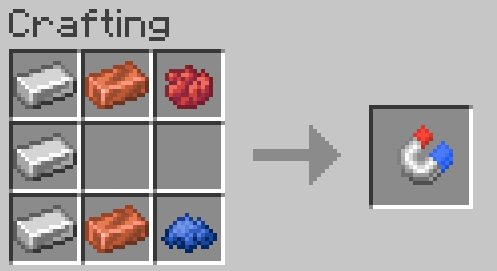
Magnetism supports an optional crafting recipe for players who want a true survival progression.
By default, the recipe uses materials that make logical sense:
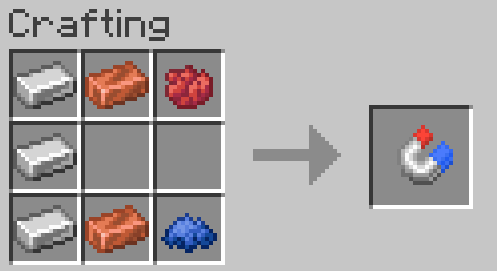
When crafted, you’ll receive a Magnet — a small, shimmering item that you can hold to toggle the magnet to activate its passive effect.
Gameplay Impact
Once you’ve used Magnetism, it’s hard to go back.
Here are some real examples of how it changes your daily Minecraft routine:
- Mining sessions: No more running in circles trying to collect loose ores — they come to you.
- Mob farming: Stand near your drops and watch XP and loot fly into your inventory automatically.
- Tree chopping: The magnet catches falling logs and saplings, saving time and cleanup.
- Exploring caves: Prevents your loot from falling into lava pits or holes.
- Building sessions: Perfect for builders who constantly pick up and drop items during construction.
- It’s not overpowered — you still have to be within range and have inventory space — but it’s incredibly convenient. Think of it as a real-life vacuum cleaner for your
Performance & Optimization
Magnetism has been carefully profiled to ensure it’s lightweight even in worlds with many entities.
The attraction check uses efficient selectors and avoids unnecessary loops. It also scales based on how many players are currently using the magnet — if nobody has it active, the system essentially goes idle.
This means you can safely use it on large servers without lag or performance degradation.
Commands & Setup
After installing the datapack:
Run /reload
Other links


Available Versions
How to Install Magnetism on Your Server
Order Server
Order a Minecraft Java server with at least 3 GB RAM (4 GB recommended).
Set datapack Loader
In the panel under "Egg", select the datapack loader and matching Minecraft version (1.21.11).
Install Mod
Open the mod browser in the dashboard and search for "Magnetism". Click "Install" – done! Alternatively, upload the .jar via SFTP to the /mods folder.
Compatibility
Mod Loaders
Minecraft Versions
1.21.11, 1.21.10, 1.21.9 (+4 more)
Server-side
✓ RequiredRecommended RAM
4 GB(min. 3 GB)Frequently Asked Questions
Magnetism server crashes on startup – what to do?
Most common cause: wrong datapack version or insufficient RAM. Check the server log (latest.log) for "OutOfMemoryError" or "Mixin" errors. With Mado Hosting: ensure at least 3 GB RAM is allocated and the loader matches the mod version (1.21.11). You can switch loaders with one click in the panel.
Is Magnetism compatible with datapack and fabric and forge and neoforge and quilt?
Magnetism officially supports datapack, fabric, forge, neoforge, quilt for Minecraft 1.21.11, 1.21.10, 1.21.9. Note: Forge and Fabric mods are NOT cross-compatible – pick one loader and stick with it. The Mado dashboard automatically detects incompatible loader combinations.
Server lagging with Magnetism – how to optimize performance?
Recommended RAM: 4 GB (per 8 players). Use /spark profiler to check if Magnetism consumes the most tick time. Common fixes: reduce server view-distance to 8-10, install "performant" or "starlight" as supplementary mods on Forge. With Mado Hosting, your server runs on NVMe SSDs with dedicated CPU cores for minimal latency.
Similar Mods




Rent Modded Server
Install Magnetism with just one click on your server.