
Mainof's HealthIndicator
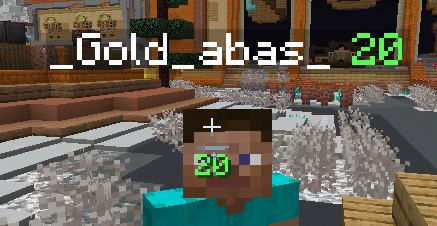
Displays the health of players near your crosshair and on their nameplate
Screenshots
About this Mod
Mainof's HealthIndicator
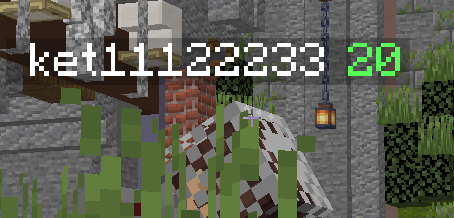
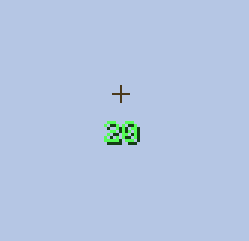
Mainof’s HealthIndicator is a mod that shows the health of the last player you hit directly at your crosshair, and displays player HP in their nametag.
Originally designed for Holyworld, but still works on any server
ENG
Features
- Shows HP of attacked player on Crosshair
- Shows HP in Nametags too
- Priority does underline HP if user HP is bigger
- Absorption hearts support
- Scale and Y-position config
Commands
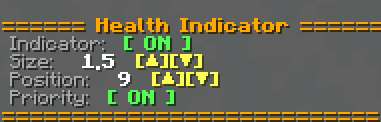
Execute /healthindicator, /hi, or /crosshairhealth to open the interactive setup menu.
Manual configuration is supported via:
/hi size <value>/hi pos <value>/hi toggle/hi priority
Settings
| Setting | Action |
|---|---|
| Indicator | Toggle HUD visibility. |
| Size | Adjust text scale. |
| Position | Move text vertically. |
| Priority | Toggle the advantage underline feature. |
RU
Функции
- Показывает HP атакуемого игрока на прицеле
- Показывает HP над ником игроков
- Приоритет подчеркивает HP, если у вас больше здоровья
- Поддержка золотых сердец (Absorption)
- Настройка масштаба и позиции
Команды
Используйте /healthindicator, /hi или /crosshairhealth для открытия меню настроек.
Доступно ручное управление через:
/hi size <значение>/hi pos <значение>/hi toggle/hi priority
Настройки
| Настройка | Действие |
|---|---|
| Индикатор | Включить/выключить HUD. |
| Размер | Настроить масштаб текста. |
| Позиция | Сместить текст по вертикали. |
| Приоритет | Включить подчеркивание при преимуществе. |
License
Mainof's HealthIndicator by Mainof is licensed under CC BY-NC 4.0


Available Versions
How to Install Mainof's HealthIndicator on Your Server
Order Server
Order a Minecraft Java server with at least 3 GB RAM (4 GB recommended).
Set forge Loader
In the panel under "Egg", select the forge loader and matching Minecraft version (1.16.5).
Install Mod
Open the mod browser in the dashboard and search for "Mainof's HealthIndicator". Click "Install" – done! Alternatively, upload the .jar via SFTP to the /mods folder.
Compatibility
Mod Loaders
Minecraft Versions
1.16.5
Server-side
✗ UnsupportedRecommended RAM
4 GB(min. 3 GB)Frequently Asked Questions
Mainof's HealthIndicator server crashes on startup – what to do?
Most common cause: wrong forge version or insufficient RAM. Check the server log (latest.log) for "OutOfMemoryError" or "Mixin" errors. With Mado Hosting: ensure at least 3 GB RAM is allocated and the loader matches the mod version (1.16.5). You can switch loaders with one click in the panel.
Is Mainof's HealthIndicator compatible with forge?
Mainof's HealthIndicator officially supports forge for Minecraft 1.16.5. The Mado dashboard automatically detects incompatible loader combinations.
Server lagging with Mainof's HealthIndicator – how to optimize performance?
Recommended RAM: 4 GB (per 8 players). Use /spark profiler to check if Mainof's HealthIndicator consumes the most tick time. Common fixes: reduce server view-distance to 8-10, install "performant" or "starlight" as supplementary mods on Forge. With Mado Hosting, your server runs on NVMe SSDs with dedicated CPU cores for minimal latency.
Similar Mods




![[ETF] Entity Texture Features](https://cdn.modrinth.com/data/BVzZfTc1/af683d206d50b05258d865b0d6e4aa2f2cee12f2_96.webp)
![[EMF] Entity Model Features](https://cdn.modrinth.com/data/4I1XuqiY/6e5bbd0d06b1741bfdab6c0cfab6de8fdaf0064c_96.webp)
Rent Modded Server
Install Mainof's HealthIndicator with just one click on your server.
Details
- License
- Creative Commons Attribution Non Commercial 4.0 International
- Server-side
- Unsupported