
Maintenance Mode
Put your server in Maintenance Mode
Screenshots

About this Mod








Maintenance Mode is a small server side utility that allows you to place your server in Maintenance mode. During this time, only players you choose will be able to access your server, and everyone else will be disconnected.
This utility is aimed at server owners to allow them to perform config changes, test new mods or configure new server features, without people randomly joining, or having to de-whitelist everyone (if you use whitelisting).

- Keeping people out of your server during maintenance/updates, except those allowed
- Scheduling when Maintenance should start and end
- Custom server icon/motd while in maintenance mode
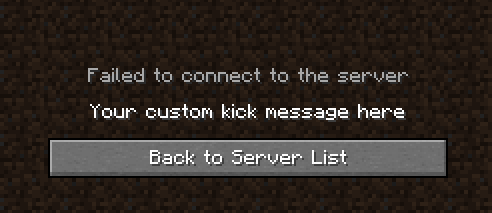
- Customizable kick message during maintenance mode
- Support for MiniMessage formatting in MOTD and Kick messages
- Support for Minecraft Formatting in MOTD and Kick messages
- Support for LuckPerms
- Full server backup (Make a full backup of your server including configs, mods, settings and more)






You are allowed to include this mod in your modpack, BUT, all downloads have to go through our offical Modrinth and Curseforge pages. You are not allowed to re-upload the mod to any other sites.
You are free to clone the code and distribute the mod as your own, but I ask that you please change the name, and you are not allowed to use any of our official docs/resources, as those are licensed under ARR.
Available Versions
How to Install Maintenance Mode on Your Server
Order Server
Order a Minecraft Java server with at least 3 GB RAM (4 GB recommended).
Set fabric Loader
In the panel under "Egg", select the fabric loader and matching Minecraft version (26.1.2).
Install Mod
Open the mod browser in the dashboard and search for "Maintenance Mode". Click "Install" – done! Alternatively, upload the .jar via SFTP to the /mods folder.
Compatibility
Mod Loaders
Minecraft Versions
26.1.2, 26.1, 1.21.11 (+26 more)
Server-side
✓ RequiredRecommended RAM
4 GB(min. 3 GB)Frequently Asked Questions
Maintenance Mode server crashes on startup – what to do?
Most common cause: wrong fabric version or insufficient RAM. Check the server log (latest.log) for "OutOfMemoryError" or "Mixin" errors. With Mado Hosting: ensure at least 3 GB RAM is allocated and the loader matches the mod version (26.1.2). You can switch loaders with one click in the panel.
Is Maintenance Mode compatible with fabric and forge and neoforge and quilt?
Maintenance Mode officially supports fabric, forge, neoforge, quilt for Minecraft 26.1.2, 26.1, 1.21.11. Note: Forge and Fabric mods are NOT cross-compatible – pick one loader and stick with it. The Mado dashboard automatically detects incompatible loader combinations.
Server lagging with Maintenance Mode – how to optimize performance?
Recommended RAM: 4 GB (per 8 players). Use /spark profiler to check if Maintenance Mode consumes the most tick time. Common fixes: reduce server view-distance to 8-10, install "performant" or "starlight" as supplementary mods on Forge. With Mado Hosting, your server runs on NVMe SSDs with dedicated CPU cores for minimal latency.
Similar Mods




![[ETF] Entity Texture Features](https://cdn.modrinth.com/data/BVzZfTc1/af683d206d50b05258d865b0d6e4aa2f2cee12f2_96.webp)
![[EMF] Entity Model Features](https://cdn.modrinth.com/data/4I1XuqiY/6e5bbd0d06b1741bfdab6c0cfab6de8fdaf0064c_96.webp)
Rent Modded Server
Install Maintenance Mode with just one click on your server.