
Makkit
An intuitive world editor for creative mode!
Screenshots

About this Mod
Makkit
An in-world editor for Minecraft.
Makkit (pronounced Make-it) is a lightweight creative mod world
editing tool, made for Fabric on Minecraft v1.16+. It's meant to make
a lot of simple operations quicker, while being easy to use!
You can read the User Guide Here!
Features
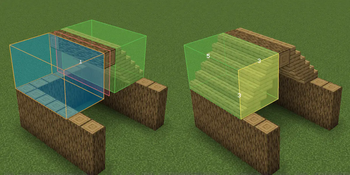
- In world editing, with realtime selection boxes
- You can view each other's selections in Multiplayer, too!
- The ability to move and resize selections with a mouse, no commands or keybinds needed!
- Simple transformations, like filling entire selections with
blocks (or just the walls!) - The ability to copy and paste selections, even along a different
axis to rotate them - The ability to mirror your selections over an axis, allowing you
to easily create roofing and other symmetric structures - A pattern tool, which lets you tile blocks or repeat them
in a certain direction - Edit history, letting you undo and redo at will!
Installation
This mod requires Fabric API and Fabric Language Kotlin. If you want to customize your experience, add in Mod Menu!
Beta
Makkit is still in Beta, so there might be some niche bugs. I try to test
everything extensively before each release, so releases should be quite
stable. Even if something does go wrong, you can always press undo!
What about Feature "X"?
While Makkit intends to make creative mode editing easier, it can't do
everything. It tries to do most common world editing features in a very
intuitive way, but it isn't a replacement for other creative mods like
WorldEdit.
Rather, you should use them both together!
In the future, I plan on adding some compatibility with WorldEdit (e.g.
letting your selection box act as a WorldEdit selection box). Stay tuned!
Fabric?
Yes, this mod is for Fabric & Fabric API. I don't intend or have
time to maintain a version for both Forge and Fabric. This mod
also does some things that would be hard to do with Forge.
However, if someone
would like to do a pull request with their own implementation
(written in Kotlin) in a separate branch, I'd be willing
to release a Forge version!
Available Versions
How to Install Makkit on Your Server
Order Server
Order a Minecraft Java server with at least 3 GB RAM (4 GB recommended).
Set fabric Loader
In the panel under "Egg", select the fabric loader and matching Minecraft version (1.16.5).
Install Mod
Open the mod browser in the dashboard and search for "Makkit". Click "Install" – done! Alternatively, upload the .jar via SFTP to the /mods folder.
Compatibility
Mod Loaders
Minecraft Versions
1.16.5
Server-side
✓ RequiredRecommended RAM
4 GB(min. 3 GB)Frequently Asked Questions
Makkit server crashes on startup – what to do?
Most common cause: wrong fabric version or insufficient RAM. Check the server log (latest.log) for "OutOfMemoryError" or "Mixin" errors. With Mado Hosting: ensure at least 3 GB RAM is allocated and the loader matches the mod version (1.16.5). You can switch loaders with one click in the panel.
Is Makkit compatible with fabric?
Makkit officially supports fabric for Minecraft 1.16.5. The Mado dashboard automatically detects incompatible loader combinations.
Server lagging with Makkit – how to optimize performance?
Recommended RAM: 4 GB (per 8 players). Use /spark profiler to check if Makkit consumes the most tick time. Common fixes: reduce server view-distance to 8-10, install "performant" or "starlight" as supplementary mods on Forge. With Mado Hosting, your server runs on NVMe SSDs with dedicated CPU cores for minimal latency.
Similar Mods




![[ETF] Entity Texture Features](https://cdn.modrinth.com/data/BVzZfTc1/af683d206d50b05258d865b0d6e4aa2f2cee12f2_96.webp)
![[EMF] Entity Model Features](https://cdn.modrinth.com/data/4I1XuqiY/6e5bbd0d06b1741bfdab6c0cfab6de8fdaf0064c_96.webp)
Rent Modded Server
Install Makkit with just one click on your server.