
Mana Display (Mana Visual)
Addon for Botania that allows you to display mana in digital values visualiser
Screenshots




About this Mod
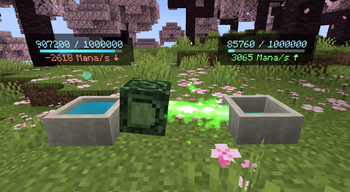
Mana Display is an addon for Botania that allows you to see mana in precise digital values.
The mod adds visual mana holograms above Botania blocks, showing:
- the current mana amount in numeric form
- a mana bar
- the rate at which mana is being added or drained
By default, holograms are enabled for Mana Pools.
You can also enable them for Mana Spreaders and Generating Flowers through the client config or with in-game commands.
Additionally, the mod enhances existing Botania tools:
- numeric mana values appear when using the Wand of the Forest on mana blocks
- mana amounts are displayed on the Tablet of Dominance
- mana values are shown for mana rings in the inventory
Commands:
/manadisplay [pool/spreader/flower] [on/off]
/manadisplay [on/off]
Useful for monitoring and debugging mana networks or optimizing mana transfer setups.
Mana Display — это аддон для Botania, который позволяет видеть ману в точных цифровых значениях.
Мод добавляет визуальные голограммы маны над блоками Botania. На них отображается:
- текущее количество маны в цифровом виде
- полоса маны
- скорость прибавления или уменьшения маны
По умолчанию голограммы отображаются только у бассейнов маны.
Вы также можете включить их для распространителей и генерирующих цветов через клиентский конфиг или с помощью игровых команд.
Кроме того, мод улучшает отображение маны в стандартных предметах Botania:
- при использовании Посоха леса показываются точные значения маны
- количество маны отображается на планшете
- значения маны показываются у колец маны в инвентаре
Команды:
/manadisplay [pool/spreader/flower] [on/off]
/manadisplay [on/off]
Мод особенно полезен для отслеживания работы сетей маны и оптимизации передачи маны.
Available Versions
How to Install Mana Display (Mana Visual) on Your Server
Order Server
Order a Minecraft Java server with at least 3 GB RAM (4 GB recommended).
Set forge Loader
In the panel under "Egg", select the forge loader and matching Minecraft version (1.20.1).
Install Mod
Open the mod browser in the dashboard and search for "Mana Display (Mana Visual)". Click "Install" – done! Alternatively, upload the .jar via SFTP to the /mods folder.
Compatibility
Mod Loaders
Minecraft Versions
1.20.1, 1.19.2, 1.16.5
Server-side
✓ RequiredRecommended RAM
4 GB(min. 3 GB)Frequently Asked Questions
Mana Display (Mana Visual) server crashes on startup – what to do?
Most common cause: wrong forge version or insufficient RAM. Check the server log (latest.log) for "OutOfMemoryError" or "Mixin" errors. With Mado Hosting: ensure at least 3 GB RAM is allocated and the loader matches the mod version (1.20.1). You can switch loaders with one click in the panel.
Is Mana Display (Mana Visual) compatible with forge?
Mana Display (Mana Visual) officially supports forge for Minecraft 1.20.1, 1.19.2, 1.16.5. The Mado dashboard automatically detects incompatible loader combinations.
Server lagging with Mana Display (Mana Visual) – how to optimize performance?
Recommended RAM: 4 GB (per 8 players). Use /spark profiler to check if Mana Display (Mana Visual) consumes the most tick time. Common fixes: reduce server view-distance to 8-10, install "performant" or "starlight" as supplementary mods on Forge. With Mado Hosting, your server runs on NVMe SSDs with dedicated CPU cores for minimal latency.
Similar Mods





Rent Modded Server
Install Mana Display (Mana Visual) with just one click on your server.