
Many Mooblooms
A unique take on the Moobloom, adding 16 new variants!
Screenshots
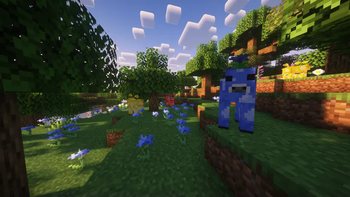
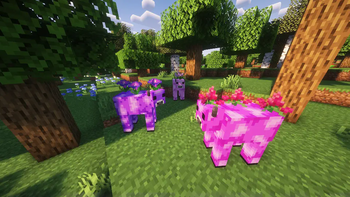
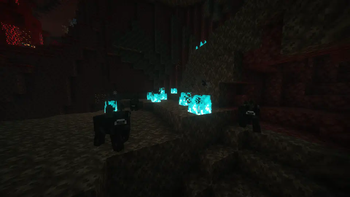
About this Mod
(Note: This mod was originally known as Trash's Mooblooms.)
This mod adds Mooblooms, the flower cow from Minecraft Earth!
In this mod, Mooblooms make their comeback with 16 variants, one for each color found in Minecraft. Furthermore, each Moobloom grows a completely new flower on its back! The list is as follows:
- White (Thunderbloom)
- Light Gray (Bellflower)
- Gray (Silver Iris)
- Black (Withercup)
- Brown (Boat Orchid)
- Red (Trillium)
- Orange (Butterfly Weed)
- Yellow (Buttercup)
- Lime (Conbush)
- Green (Gladioli)
- Cyan (Centian)
- Light Blue (Myosotis)
- Blue (Dayflower)
- Purple (Morning Glory)
- Magenta (Butterfly Candy)
- Pink (Tropical Hibiscus)
However, not every Moobloom is found naturally. You can only find Yellow, Blue, and Red Mooblooms naturally. Most other Mooblooms can only be obtained through breeding Mooblooms to mix their colors.
Like Mooshrooms, Mooblooms can be sheared to harvest the flowers on their back. Unlike Mooshrooms, Mooblooms do not convert to Cows once sheared. Rather, they regrow their flowers 20 minutes after they're sheared.
When you right click a Moobloom with a dyeable item, the item will be dyed!
Also, bees pollinate with the help of Mooblooms. Mooblooms appreciate this and hold still while they do their thing. :)
MODPACK / DATAPACK DEVS
This mod comes with a total of 17 biome tags.#trashs_mooblooms:moobloom_spawnable, along with one tag for each color with the following formatting: #trashs_mooblooms:<color>_moobloom_spawnable.
Biomes in #trashs_mooblooms:moobloom_spawnable will attempt to spawn mooblooms.
Biomes in #trashs_mooblooms:<color>_moobloom_spawnable will attempt to make a moobloom that spawns in the assigned biomes a specific color. This will be randomized if there are multiple. Also, biomes in these tags are automatically added to #trashs_mooblooms:moobloom_spawnable. If you add a biome to #trashs_mooblooms:moobloom_spawnable without it being in any of the other tags, the moobloom's color will default to yellow.
There is also a block tag, #trashs_mooblooms:moobloom_spawnable_on. These are the blocks that mooblooms can naturally spawn on. By default, this is set to #minecraft:animals_spawn_on.

Available Versions
How to Install Many Mooblooms on Your Server
Order Server
Order a Minecraft Java server with at least 3 GB RAM (4 GB recommended).
Set fabric Loader
In the panel under "Egg", select the fabric loader and matching Minecraft version (1.21.4).
Install Mod
Open the mod browser in the dashboard and search for "Many Mooblooms". Click "Install" – done! Alternatively, upload the .jar via SFTP to the /mods folder.
Compatibility
Mod Loaders
Minecraft Versions
1.21.4, 1.21.3, 1.21.2 (+2 more)
Server-side
✓ RequiredRecommended RAM
4 GB(min. 3 GB)Frequently Asked Questions
Many Mooblooms server crashes on startup – what to do?
Most common cause: wrong fabric version or insufficient RAM. Check the server log (latest.log) for "OutOfMemoryError" or "Mixin" errors. With Mado Hosting: ensure at least 3 GB RAM is allocated and the loader matches the mod version (1.21.4). You can switch loaders with one click in the panel.
Is Many Mooblooms compatible with fabric and neoforge?
Many Mooblooms officially supports fabric, neoforge for Minecraft 1.21.4, 1.21.3, 1.21.2. The Mado dashboard automatically detects incompatible loader combinations.
Server lagging with Many Mooblooms – how to optimize performance?
Recommended RAM: 4 GB (per 8 players). Use /spark profiler to check if Many Mooblooms consumes the most tick time. Common fixes: reduce server view-distance to 8-10, install "performant" or "starlight" as supplementary mods on Forge. With Mado Hosting, your server runs on NVMe SSDs with dedicated CPU cores for minimal latency.
Similar Mods

![[ETF] Entity Texture Features](https://cdn.modrinth.com/data/BVzZfTc1/af683d206d50b05258d865b0d6e4aa2f2cee12f2_96.webp)
![[EMF] Entity Model Features](https://cdn.modrinth.com/data/4I1XuqiY/6e5bbd0d06b1741bfdab6c0cfab6de8fdaf0064c_96.webp)



Rent Modded Server
Install Many Mooblooms with just one click on your server.