
Map Face
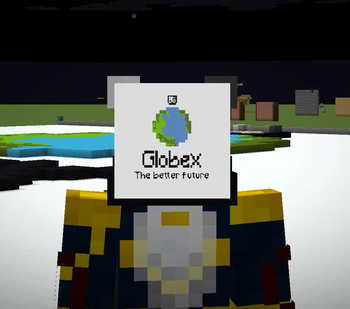
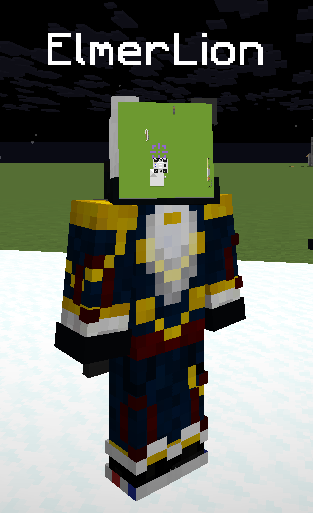
Renders a map equipped in the helmet slot in front of the players face, usable with /hat
Screenshots
About this Mod

Wear a filled map on your head and MapFace renders the actual map texture directly on the front of your face.
This is a client-side Fabric mod with an optional Paper plugin for better multiplayer syncing.
What it does
If a player equips a filled_map in the head slot, MapFace replaces the normal head-item rendering and draws the map itself as a flat face mask.
That means:
- Your own worn map renders on your face
- Other players wearing maps can also render correctly
- The map stays attached to the face and follows head rotation
How it works
Client-only mode
MapFace works by default as a client-side mod.
In this mode, you can always see your own worn maps, and you can see other players' worn maps only if your client already has that map's data.
Usually that means you must have:
- held that map before, or
- received its map data another way, such as from an item frame
If your client has never seen that map's data, there is nothing to render yet.
Optional Paper plugin
MapFace also supports an optional Paper server plugin.
When the plugin is installed on the server, clients with MapFace can sync map data automatically so worn maps render much more reliably between players.
This improves multiplayer by:
- preloading needed map data before the client notices it is missing
- keeping worn maps updated while they are being viewed
- allowing modded clients to see each other's worn maps much more consistently
Unmodded clients are ignored safely, and the client mod still works fine without the plugin.
Requirements
Client
- Fabric Loader
- Fabric API
- MapFace client mod
Optional server support
- Paper server
- MapFace Paper plugin
Usage
- Obtain a
filled_map - Equip it in the head slot
- Look in third person, or have another MapFace user look at you
Notes
- This mod is primarily visual
- It does not require the server plugin to function
- The Paper plugin only improves synchronization for players using the client mod
- Best results in multiplayer happen when both the client mod and the optional server plugin are installed
Compatibility
- Designed for the current supported Minecraft/Fabric version listed on this page
- Client-side safe by default
- Vanilla/Paper/Fabric servers are joinable with the client mod installed
Why use it?
Because putting a map on your head should show the map on your face.
Available Versions
How to Install Map Face on Your Server
Order Server
Order a Minecraft Java server with at least 3 GB RAM (4 GB recommended).
Set fabric Loader
In the panel under "Egg", select the fabric loader and matching Minecraft version (26.1.2).
Install Mod
Open the mod browser in the dashboard and search for "Map Face". Click "Install" – done! Alternatively, upload the .jar via SFTP to the /mods folder.
Compatibility
Mod Loaders
Minecraft Versions
26.1.2
Server-side
~ OptionalRecommended RAM
4 GB(min. 3 GB)Frequently Asked Questions
Map Face server crashes on startup – what to do?
Most common cause: wrong fabric version or insufficient RAM. Check the server log (latest.log) for "OutOfMemoryError" or "Mixin" errors. With Mado Hosting: ensure at least 3 GB RAM is allocated and the loader matches the mod version (26.1.2). You can switch loaders with one click in the panel.
Is Map Face compatible with fabric and paper?
Map Face officially supports fabric, paper for Minecraft 26.1.2. The Mado dashboard automatically detects incompatible loader combinations.
Server lagging with Map Face – how to optimize performance?
Recommended RAM: 4 GB (per 8 players). Use /spark profiler to check if Map Face consumes the most tick time. Common fixes: reduce server view-distance to 8-10, install "performant" or "starlight" as supplementary mods on Forge. With Mado Hosting, your server runs on NVMe SSDs with dedicated CPU cores for minimal latency.
Similar Mods

![[ETF] Entity Texture Features](https://cdn.modrinth.com/data/BVzZfTc1/af683d206d50b05258d865b0d6e4aa2f2cee12f2_96.webp)
![[EMF] Entity Model Features](https://cdn.modrinth.com/data/4I1XuqiY/6e5bbd0d06b1741bfdab6c0cfab6de8fdaf0064c_96.webp)



Rent Modded Server
Install Map Face with just one click on your server.