
Mapart Helper
Client-side mod for working with maps: editing images and converting them to mapart format, generating .nbt files, saving maps from the world as .png files, and other features
Screenshots
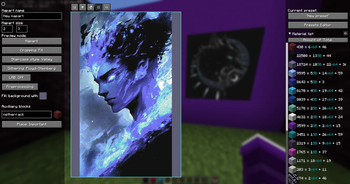
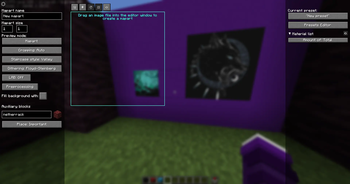
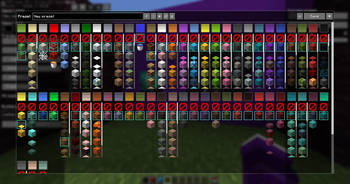
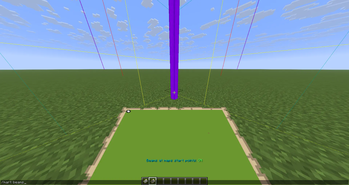
About this Mod
 Mapart Helper
If you run into any bugs or rough edges, please report them on the
Issues page — your feedback will be a huge help
Mapart Helper aims to make working with maparts as convenient and enjoyable as possible.
The mod generates palette directly from the client, giving you a complete list of blocks
available for each specific color.
It also includes other map-related features, such as saving maps from the world as PNG files or
displaying beams at the north-western positions of map areas.
Supported versions
| Version | Status |
|---|---|
| 1.21.8 | ✔️ Active |
⚠️ Last version 0.12.0 |
|
| 1.21.11 | ✔️ Active |
| 26.1 | ✔️ Active |
| 1.21.4-5 | ✔️ Backport* 0.13.1 |
*Backport versions won't be getting every new update.
They will be updated only for some major versions and critical fixes

How to:
🖼️ Create a Mapart:
- Launch the game with the mod installed
- Join a world or server
- Open the Mapart editor screen with the
Ykey (this can be changed in the settings) - Use the user-friendly GUI to create some cool maparts
🎮 Create actual maps from a mapart:
Mapart Helper provides functionality for adjusting an image and converting it to .NBT files. Currently, there are only a few ways to use it to create maps in your world/on your server:
- Use a specific client-side mod for schematics (e.g. Litematica) and use generated .NBT files. Make sure that schematic is placed correctly - northwestern edge of the mapart's schematic (excluding th top row of auxiliary blocks) must be match the northwestern edge of the in-game map (
/mart beamsmight help a little with that). When you have set the schematic you can either start building it in survival or use "placing in the world" if you are a operator; - Use a specific server-side mod/plugin to create maps from a URL.
If you are having difficulty with this step, I recommend looking for guides on creating mapparts — they should answer most of your questions. If not, I would be glad to help on my Discord.
🎨 Use palette presets:
Palette presets let you quickly switch between different sets of blocks and colors used when creating maparts.
You can manage them in the Presets Editor screen, accessible from the Mapart editor screen.
Each preset is stored as a separate .json file inside{game root folder}/config/mapart-helper/presets.
You can:
- Create and edit presets directly from the GUI.
- Add presets manually by placing
.jsonfiles into the folder — this is also how
you can share your presets with others.
All presets are also listed in the config/mapart-helper/palette_presets.json file, which maps preset filenames
to their display names.
You can use this file to quickly identify a specific preset and to safely change its filename.
If you change any of these files or add new presets while playing the game, make sure to update the data in-game — either by pressing the
“Update from files” button in the Presets Editor, or by running /mart palette update.
Commands
The following commands can be used everywhere, including servers:
/mart— Shows a list of commands in the chat/mart save frame [filename]— Saves the map's image you are looking at to thesaved_mapsfolder/mart save hand [filename]— Saves the map's image you are looking at to thesaved_mapsfolder/mart save selection [filename]— Saves the image from the selection area to thesaved_mapsfolder/mart beams— Toggles displaying the beams at the map areas' north-western points/mart palette regenerate— Regenerates blocks palette/mart palette update— Updates palette and presets from config files
There are also several miscellaneous singleplayer-only commands, almost for debugging or for some unique cases:
/mart-creative palette give-map-palette— Fills the holding filled map with the image of the complete palette/mart-creative palette place <height>— Places all blocks from the generated blocks palette into the world
from the current map area's starting coordinates and at the given y-coordinate
Rebane's MapartCraft
As someone who builds maparts in survival, I have always used this great website for that purpose.
So, of course, the main idea for this
mod was inspired by MapartCraft.
As a novice modder, I decided to create a similar tool, but integrated directly into the game.
Mapart Helper is an alternative that provides
in-game GUI for the same purposes, with some differences
and its own features.
MapartCraft and Mapart Helper use different programming languages,
algorithms, and logic. For this reason, the results may and will differ,
especially when it comes to image preprocessing.
Please keep this in mind if you want to use both tools for the same mapart.
Official links to download the mod
Contacts
- GitHub: https://github.com/Redheris/Mapart-Helper/issues
- Discord: Server
Available Versions
How to Install Mapart Helper on Your Server
Order Server
Order a Minecraft Java server with at least 3 GB RAM (4 GB recommended).
Set fabric Loader
In the panel under "Egg", select the fabric loader and matching Minecraft version (26.1.2).
Install Mod
Open the mod browser in the dashboard and search for "Mapart Helper". Click "Install" – done! Alternatively, upload the .jar via SFTP to the /mods folder.
Compatibility
Mod Loaders
Minecraft Versions
26.1.2, 26.1.1, 26.1 (+8 more)
Server-side
✗ UnsupportedRecommended RAM
4 GB(min. 3 GB)Frequently Asked Questions
Mapart Helper server crashes on startup – what to do?
Most common cause: wrong fabric version or insufficient RAM. Check the server log (latest.log) for "OutOfMemoryError" or "Mixin" errors. With Mado Hosting: ensure at least 3 GB RAM is allocated and the loader matches the mod version (26.1.2). You can switch loaders with one click in the panel.
Is Mapart Helper compatible with fabric?
Mapart Helper officially supports fabric for Minecraft 26.1.2, 26.1.1, 26.1. The Mado dashboard automatically detects incompatible loader combinations.
Server lagging with Mapart Helper – how to optimize performance?
Recommended RAM: 4 GB (per 8 players). Use /spark profiler to check if Mapart Helper consumes the most tick time. Common fixes: reduce server view-distance to 8-10, install "performant" or "starlight" as supplementary mods on Forge. With Mado Hosting, your server runs on NVMe SSDs with dedicated CPU cores for minimal latency.
Similar Mods




![[ETF] Entity Texture Features](https://cdn.modrinth.com/data/BVzZfTc1/af683d206d50b05258d865b0d6e4aa2f2cee12f2_96.webp)
![[EMF] Entity Model Features](https://cdn.modrinth.com/data/4I1XuqiY/6e5bbd0d06b1741bfdab6c0cfab6de8fdaf0064c_96.webp)
Rent Modded Server
Install Mapart Helper with just one click on your server.