
March UI
A sleek, modern UI redesign mod for Minecraft that is minimalist and intuitive while adding additional quality client-side features.
Screenshots
About this Mod
March UI
March UI is not just a simple UI mod, or anything similar to the countless resource packs that reskin the game. This mod takes Minecraft, and redesigns its interface into a modern masterpiece. Now available in Alpha with limited features.
March UI is large in size due to the high-definition assets used.


Currently Implemented Features
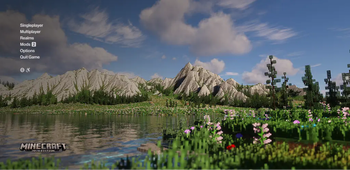
Title Screen
A beautiful, minimalist home screen welcomes you to the game. All buttons are enhanced by subtle hover effects. The classic panorama is replaced with an atmospheric background video that loops seamlessly. You can also choose to use a high-quality still, or the Vanilla panorama.
In-game HUD
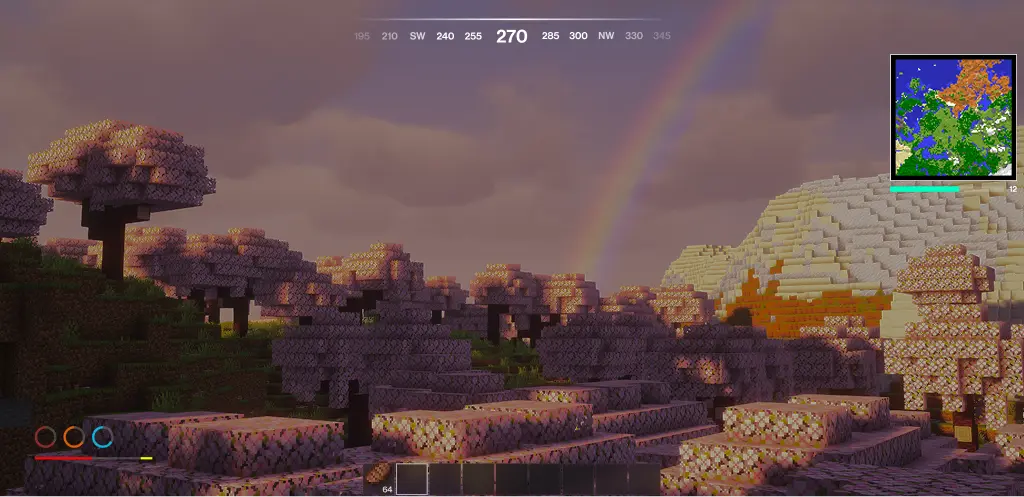
The in-game HUD has support for all vanilla HUD elements. Also included is a saturation bar. Bars blink when holding an associated armor item/food to show possible restoration. Aditionally, March UI offers a dynamic minimap, as well as a compass.
Pause Screen
The pause screen offers a moment of tranquility with a darkened overlay and backdrop blur.
Level Selection & Multiplayer Screen
These screens differ more from the vanilla experience, with each entry listed on the right, and the contextual options displayed on the left. Each world now offers a subtle hover and selection effect.
World Load Screen
The world load screen provides an eased progress bar with the same Title Screen background of your choosing.
Partially Implemented Features
- An option to keep the vanilla fonts and textured feel
- Settings Screen
- Advancements Screen
Coming Soon to March UI
- Mod Menu integration
- In-game screens (containers, etc.)
- Better font support with other languages
Incompatible Mods
- AppleSkin - Functionality Replaced
- Various Minimap Mods - Functionality Partially Replaced
Available Versions
How to Install March UI on Your Server
Order Server
Order a Minecraft Java server with at least 3 GB RAM (4 GB recommended).
Set fabric Loader
In the panel under "Egg", select the fabric loader and matching Minecraft version (26.1.1).
Install Mod
Open the mod browser in the dashboard and search for "March UI". Click "Install" – done! Alternatively, upload the .jar via SFTP to the /mods folder.
Compatibility
Mod Loaders
Minecraft Versions
26.1.1, 26.1, 1.21.1
Server-side
✗ UnsupportedRecommended RAM
4 GB(min. 3 GB)Frequently Asked Questions
March UI server crashes on startup – what to do?
Most common cause: wrong fabric version or insufficient RAM. Check the server log (latest.log) for "OutOfMemoryError" or "Mixin" errors. With Mado Hosting: ensure at least 3 GB RAM is allocated and the loader matches the mod version (26.1.1). You can switch loaders with one click in the panel.
Is March UI compatible with fabric?
March UI officially supports fabric for Minecraft 26.1.1, 26.1, 1.21.1. The Mado dashboard automatically detects incompatible loader combinations.
Server lagging with March UI – how to optimize performance?
Recommended RAM: 4 GB (per 8 players). Use /spark profiler to check if March UI consumes the most tick time. Common fixes: reduce server view-distance to 8-10, install "performant" or "starlight" as supplementary mods on Forge. With Mado Hosting, your server runs on NVMe SSDs with dedicated CPU cores for minimal latency.
Similar Mods




Rent Modded Server
Install March UI with just one click on your server.