
Masonery
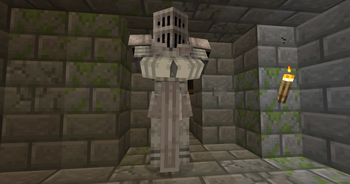
Adds a craftable satue that is able to defend you or serve as decoration.
Screenshots

About this Mod
Turn stone into a loyal ally with Masonery, a mod that introduces the Sentient Statue—a craftable guardian that brings both life and protection to your builds.
The Sentient Statue isn’t just for decoration. Once created and placed, it binds itself to its creator, becoming a dependable defender that can be customized to suit your playstyle. With a simple right-click, you can cycle through its behavior modes, giving you precise control over how it reacts to the world.
- Stance 0 – Dormant: The statue remains completely still, behaving like a normal block. It won’t respond to threats, making it perfect for aesthetic builds or safe storage areas.
- Stance 1 – Defender: The statue activates only when you’re under attack. It will target and fight back against anything that harms you, acting as your personal bodyguard.
- Stance 2 – Aggressive: The statue becomes fully active, attacking all nearby entities on sight—except for you, its master. Ideal for base defense or clearing hostile areas.
Whether you want a silent monument, a reactive protector, or an unstoppable stone warrior, Masonery lets you shape your defenses your way.
Available Versions
How to Install Masonery on Your Server
Order Server
Order a Minecraft Java server with at least 3 GB RAM (4 GB recommended).
Set forge Loader
In the panel under "Egg", select the forge loader and matching Minecraft version (1.20.1).
Install Mod
Open the mod browser in the dashboard and search for "Masonery". Click "Install" – done! Alternatively, upload the .jar via SFTP to the /mods folder.
Compatibility
Mod Loaders
Minecraft Versions
1.20.1
Server-side
✓ RequiredRecommended RAM
4 GB(min. 3 GB)Frequently Asked Questions
Masonery server crashes on startup – what to do?
Most common cause: wrong forge version or insufficient RAM. Check the server log (latest.log) for "OutOfMemoryError" or "Mixin" errors. With Mado Hosting: ensure at least 3 GB RAM is allocated and the loader matches the mod version (1.20.1). You can switch loaders with one click in the panel.
Is Masonery compatible with forge?
Masonery officially supports forge for Minecraft 1.20.1. The Mado dashboard automatically detects incompatible loader combinations.
Server lagging with Masonery – how to optimize performance?
Recommended RAM: 4 GB (per 8 players). Use /spark profiler to check if Masonery consumes the most tick time. Common fixes: reduce server view-distance to 8-10, install "performant" or "starlight" as supplementary mods on Forge. With Mado Hosting, your server runs on NVMe SSDs with dedicated CPU cores for minimal latency.
Similar Mods

![[ETF] Entity Texture Features](https://cdn.modrinth.com/data/BVzZfTc1/af683d206d50b05258d865b0d6e4aa2f2cee12f2_96.webp)
![[EMF] Entity Model Features](https://cdn.modrinth.com/data/4I1XuqiY/6e5bbd0d06b1741bfdab6c0cfab6de8fdaf0064c_96.webp)



Rent Modded Server
Install Masonery with just one click on your server.