
Screenshots
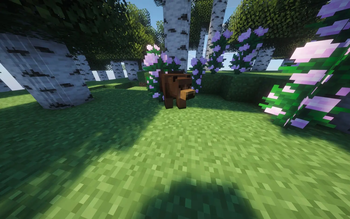
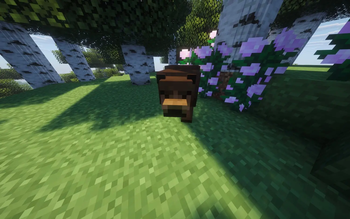
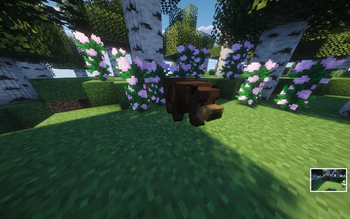
About this Mod
Mason’s Bear Mod for Forge 1.20.1 introduces a unique and immersive bear into the Minecraft world, one that blends strength with a surprisingly gentle nature. This bear is not hostile by default. When you encounter it in forests or open landscapes, it behaves calmly, wandering around, observing its surroundings, and minding its own business. It feels like a real animal rather than a typical Minecraft mob, adding a layer of realism to the game 🌲🐻.
What truly sets this mod apart is the bear’s behavior system. The bear will only attack if you attack it first. As long as you leave it alone, it remains friendly and non-aggressive, allowing players to explore nearby without fear. However, if you choose to provoke it, the mood shifts instantly. The bear becomes defensive and powerful, using strong attacks to protect itself. This reaction feels fair and natural, reinforcing the idea that the bear is not evil, just defending its territory.
Mason’s Bear Mod encourages players to think before acting and rewards peaceful gameplay. It makes the world feel more alive, where creatures respond realistically instead of mindlessly attacking. Overall, this mod adds depth, atmosphere, and a touch of warmth to Minecraft Forge 1.20.1, making every encounter with the bear feel meaningful and memorable.
Available Versions
How to Install Mason's Bear on Your Server
Order Server
Order a Minecraft Java server with at least 3 GB RAM (4 GB recommended).
Set forge Loader
In the panel under "Egg", select the forge loader and matching Minecraft version (1.20.1).
Install Mod
Open the mod browser in the dashboard and search for "Mason's Bear". Click "Install" – done! Alternatively, upload the .jar via SFTP to the /mods folder.
Compatibility
Mod Loaders
Minecraft Versions
1.20.1
Server-side
✓ RequiredRecommended RAM
4 GB(min. 3 GB)Frequently Asked Questions
Mason's Bear server crashes on startup – what to do?
Most common cause: wrong forge version or insufficient RAM. Check the server log (latest.log) for "OutOfMemoryError" or "Mixin" errors. With Mado Hosting: ensure at least 3 GB RAM is allocated and the loader matches the mod version (1.20.1). You can switch loaders with one click in the panel.
Is Mason's Bear compatible with forge?
Mason's Bear officially supports forge for Minecraft 1.20.1. The Mado dashboard automatically detects incompatible loader combinations.
Server lagging with Mason's Bear – how to optimize performance?
Recommended RAM: 4 GB (per 8 players). Use /spark profiler to check if Mason's Bear consumes the most tick time. Common fixes: reduce server view-distance to 8-10, install "performant" or "starlight" as supplementary mods on Forge. With Mado Hosting, your server runs on NVMe SSDs with dedicated CPU cores for minimal latency.
Similar Mods
![[EMF] Entity Model Features](https://cdn.modrinth.com/data/4I1XuqiY/6e5bbd0d06b1741bfdab6c0cfab6de8fdaf0064c_96.webp)


Rent Modded Server
Install Mason's Bear with just one click on your server.