MBL Utils
Utilities for Minecraft Baseball League
Screenshots
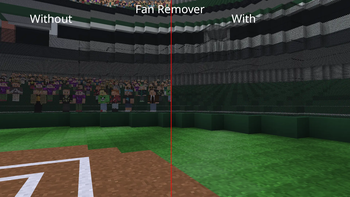
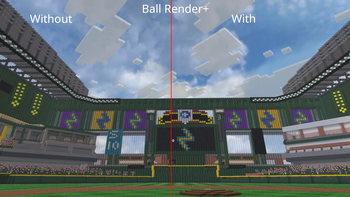
About this Mod
MBL Utils is a feature-rich client mod for the MBL Minecraft Baseball server, which greatly enhances ball rendering, fan customization, and cosmetics, while improving the overall experience of playing on the server. It integrates seamlessly with your existing mod setup without changing anything outside of the MBL experience.
⚾ Features
MBL Utils brings a range of improvements exclusively designed for the MBL server experience:
Improved Ball Rendering — Balls are rendered with greater accuracy and smoothness, making it easier to track pitches and hits in real time.
Fan Customization — Personalize your appearance in the stands with a wide range of fan options, from team colors to crowd accessories.
Better Cosmetics — Show off your style on the field and in the dugout with an expanded set of cosmetic options tied to your MBL profile.
🎮 Getting Started
Once the mod is installed, simply join the MBL server and everything will activate automatically. No complicated setup is required — MBL Utils detects the server environment and enables its features on its own.
If you want to personalize your experience, open the MBL Utils menu from your in-game settings to browse fan customization and cosmetic options. Changes are saved to your profile and will carry over between sessions.
📦 Installation
We recommend using Fabric Loader for the simplest and most tested experience. Once your mod loader is installed, drop MBL Utils into your mods folder like any other mod. If you are playing on MBL the launcher provides this mod as well as others in a pre-packaged binary. Refer to https://minecraftbaseball.com for install instructions for that method.
🐛 Reporting Bugs
Found something broken? Please open a report in our discord and include the version of MBL Utils you are running, a list of your other installed mods, and any relevant crash logs or screenshots. Reports without this information may be difficult to investigate.
Available Versions
How to Install MBL Utils on Your Server
Order Server
Order a Minecraft Java server with at least 3 GB RAM (4 GB recommended).
Set fabric Loader
In the panel under "Egg", select the fabric loader and matching Minecraft version (1.21.8).
Install Mod
Open the mod browser in the dashboard and search for "MBL Utils". Click "Install" – done! Alternatively, upload the .jar via SFTP to the /mods folder.
Compatibility
Mod Loaders
Minecraft Versions
1.21.8
Server-side
✗ UnsupportedRecommended RAM
4 GB(min. 3 GB)Frequently Asked Questions
MBL Utils server crashes on startup – what to do?
Most common cause: wrong fabric version or insufficient RAM. Check the server log (latest.log) for "OutOfMemoryError" or "Mixin" errors. With Mado Hosting: ensure at least 3 GB RAM is allocated and the loader matches the mod version (1.21.8). You can switch loaders with one click in the panel.
Is MBL Utils compatible with fabric?
MBL Utils officially supports fabric for Minecraft 1.21.8. The Mado dashboard automatically detects incompatible loader combinations.
Server lagging with MBL Utils – how to optimize performance?
Recommended RAM: 4 GB (per 8 players). Use /spark profiler to check if MBL Utils consumes the most tick time. Common fixes: reduce server view-distance to 8-10, install "performant" or "starlight" as supplementary mods on Forge. With Mado Hosting, your server runs on NVMe SSDs with dedicated CPU cores for minimal latency.
Similar Mods




Rent Modded Server
Install MBL Utils with just one click on your server.