
MCAI - Client
MCAI - Client is the client-side version of MCAI.
About this Mod
MCAI - Minecraft (Character) Artificial Intelligence
(client-side version)
Have you ever played Minecraft alone? Well, let me tell you something - it gets very lonely, very quickly when you're all alone in a vast blocky world and the only human-ish thing in the game just makes 'hrm' and 'huh' noises. This mod aims to alleviate that by providing you access to your very own AIs for you to chat with.
Setup
MCAI requires setup to work properly. This is because c.ai, like most websites, requires an authorization token before it gives you any data.
Luckily, obtaining your authorization token is simple.
First, head to c.ai. Log in or create a new account.
Then, open Inspect Element, navigate to Application, find Local Storage -> https://beta.character.ai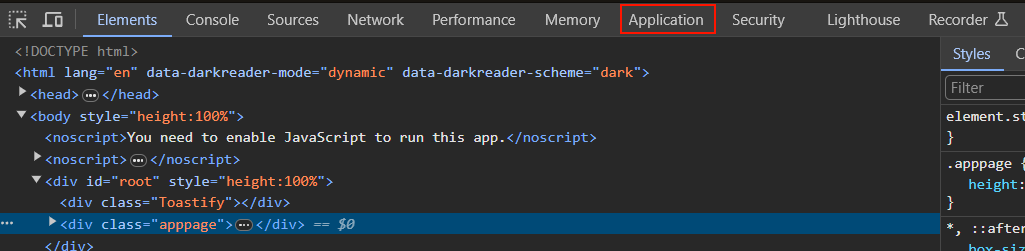

Once you're there, you will need to find a key called char_token. This should be a JSON file with two keys; value and ttl. You can ignore the ttl key; you only need the value key.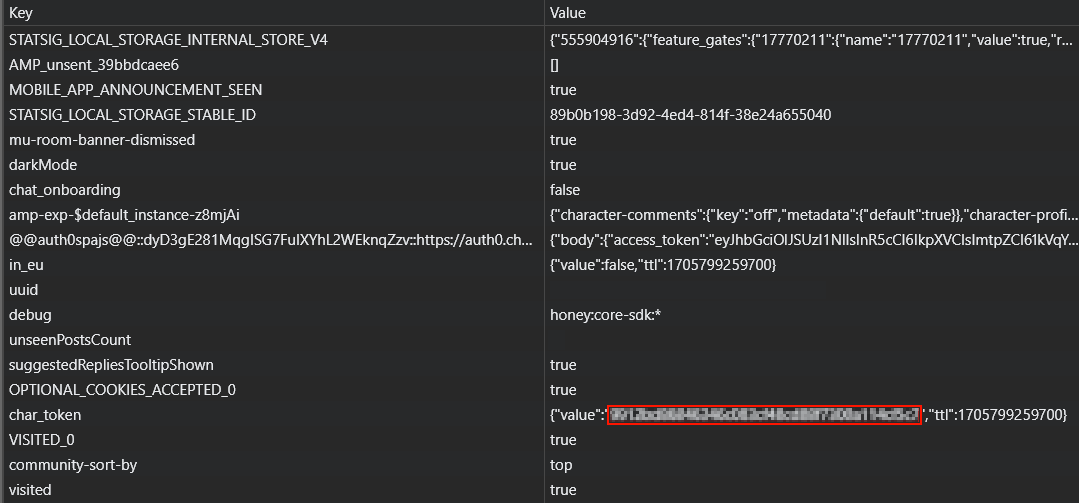
Copy the value of the value key, go to either the mod config (mcai.toml) and locate [General], where you will find the authorization field in which you can paste the value of value. Then you're good to go! Alternatively, you can use the /ai authorize <token> command in-game to automatically update the configuration file.
To register an AI to chat with, you can manually edit the configuration file, or you can use the command /ai register <character id> <aliases (optional)>. The aliases field is an optional space-separated list of alternative names to ping the AI with in chat, sort of like a nicknames system for the AI.
The character id field is used to get basic information about the character (like their name) and also as a way to know which character to send messages to. You can obtain the character ID of a character by going to c.ai, opening a chat with the character you want the ID from, and then copying the value of char= from the URL.
Chatting with registered AIs
There are two methods to chat with registered AIs - pinging them in a message via @<AI's name/alias> or via the /ai talk <name> <text> command.
[insert gif of chatting with an AI here]
Commands
/ai authorize <token> - an admin-only command that changes the access token the mod uses to interface with c.ai in-game.
/ai context <name> <broadcast (optional)> - retrieves the last few messages from the chat with the AI. Note that changing the format in the MCAI config may or may not cause it to fail when retrieving the name of the message sender. As the command defaults to only giving you context, broadcast is an available option for admins to broadcast the last few messages to everyone in chat.
/ai disable <name> - like /ai unregister, but less permanent.
/ai enable <name> - undoes /ai disable.
/ai list - lists all available AIs and relevant information (such as whether they're enabled, and their aliases).
/ai register <character id> <aliases (optional)> - character ID is the ID obtained from the c.ai website. Registers an AI so that you can chat with 'em.
/ai unregister <character id> - permanently removes an AI.
/ai reload - reloads the mod's config so that any edits made with an external tool are loaded without requiring a complete restart of Minecraft.
/ai reset <name> - wipes the memory of an AI.
/ai talk <name> <text> - alternative to pinging the AI that's arguably more clunky.
FAQ
Q: Is this mod client-side?
A: Yes! This is the client side version of MCAI.
Q: How do I talk with an AI?
A: Read this!
Q: I don't like the AIs randomly responding to my messages! How do I stop them from doing that?
A: You can disable random responses by switching the disableRandomResponses to true in the config's general section.
Q: Will you make a Forge port?
A: Nope! You're welcome to port it yourself, if you really want it on Forge, though.
Available Versions
How to Install MCAI - Client on Your Server
Order Server
Order a Minecraft Java server with at least 3 GB RAM (4 GB recommended).
Set fabric Loader
In the panel under "Egg", select the fabric loader and matching Minecraft version (1.20.6).
Install Mod
Open the mod browser in the dashboard and search for "MCAI - Client". Click "Install" – done! Alternatively, upload the .jar via SFTP to the /mods folder.
Compatibility
Mod Loaders
Minecraft Versions
1.20.6, 1.20.5, 1.20.4 (+4 more)
Server-side
✗ UnsupportedRecommended RAM
4 GB(min. 3 GB)Frequently Asked Questions
MCAI - Client server crashes on startup – what to do?
Most common cause: wrong fabric version or insufficient RAM. Check the server log (latest.log) for "OutOfMemoryError" or "Mixin" errors. With Mado Hosting: ensure at least 3 GB RAM is allocated and the loader matches the mod version (1.20.6). You can switch loaders with one click in the panel.
Is MCAI - Client compatible with fabric?
MCAI - Client officially supports fabric for Minecraft 1.20.6, 1.20.5, 1.20.4. The Mado dashboard automatically detects incompatible loader combinations.
Server lagging with MCAI - Client – how to optimize performance?
Recommended RAM: 4 GB (per 8 players). Use /spark profiler to check if MCAI - Client consumes the most tick time. Common fixes: reduce server view-distance to 8-10, install "performant" or "starlight" as supplementary mods on Forge. With Mado Hosting, your server runs on NVMe SSDs with dedicated CPU cores for minimal latency.
Similar Mods

![[ETF] Entity Texture Features](https://cdn.modrinth.com/data/BVzZfTc1/af683d206d50b05258d865b0d6e4aa2f2cee12f2_96.webp)
![[EMF] Entity Model Features](https://cdn.modrinth.com/data/4I1XuqiY/6e5bbd0d06b1741bfdab6c0cfab6de8fdaf0064c_96.webp)



Rent Modded Server
Install MCAI - Client with just one click on your server.