MCMidi
MCMidi is a Minecraft Fabric mod that allows you to play MIDI files in-game with high-quality sound and real-time visualization.
Screenshots
About this Mod
MCMidi
MCMidi is a Minecraft Fabric mod that allows you to play MIDI files in-game with high-quality sound and real-time visualization.
Features
- MIDI Playback: Play
.midior.midfiles directly within your Minecraft client. - Custom SoundFonts: Support for
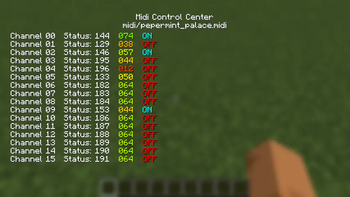
.sf2SoundFont files to customize your instrument sounds. - Real-time Visualization: A dedicated "Midi Control Center" with multiple visualization tabs:
- Detail: Real-time MIDI message log, BPM, and playback position.
- Nodes: Visual representation of active MIDI nodes. (Not implemented.)
- Piano: A virtual piano roll showing active notes.(Not implemented.)
- Waveform: Dynamic waveform visualization. (Not implemented.)
- In-Game Configuration: Integrates with Mod Menu and Cloth Config for seamless setting adjustments.
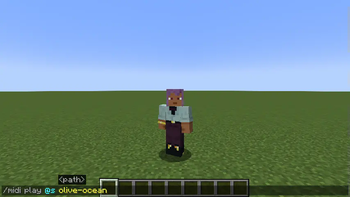
- Client-Side Commands: Quick control over playback using console commands.
Command Usage
Manage your MIDI playback using the following client-side commands:
/midi play <filename>: Plays a MIDI file from your local library./midi stop: Stops the current MIDI playback.
How to Use
- Prepare your files:
- Place your
.midior.midfiles in themidi/musics/directory within your Minecraft instance folder. - (Optional) Place your
.sf2SoundFont files in themidi/soundfonts/directory.
- Place your
- Launch Minecraft: Open the Midi Control Center by pressing
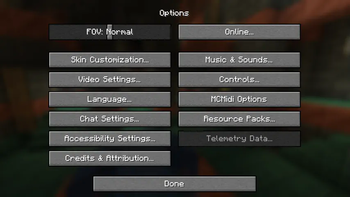
,(default keybind). - Configure Settings: Open the Mod Menu from the main menu, find MCMidi, and click the gear icon to adjust volume or select a custom SoundFont.
Implemented Architecture
MCMidi is built with a focus on modularity and maintainability:
- Dependency Injection: Uses an abstracted
IConfigManagerto handle configuration without global static state. - Abstracted Tab System: Leverages
KarasunikiLib'sITabBarandITabContentinterfaces to provide a flexible and extensible UI. - Decoupled MIDI Engine: Uses the
IMidiEngineinterface, allowing the mod to support different MIDI drivers or external devices in the future.
Dependencies
This mod requires the following libraries:
- Fabric API
- KarasunikiLib
- Cloth Config API
- Mod Menu (Optional, recommended for configuration UI)
Contribution
Contributions are welcome! If you have suggestions, bug reports, or would like to submit a pull request, please follow these steps:
- Fork this repository and create your branch from
master. - Make your changes with clear commit messages.
- Ensure your code builds and passes any existing checks.
- Submit a pull request with a description of your changes.
For major changes, please open an issue first to discuss what you would like to change.
License
This project is licensed under the MIT License. See LICENSE for details.
Available Versions
How to Install MCMidi on Your Server
Order Server
Order a Minecraft Java server with at least 3 GB RAM (4 GB recommended).
Set fabric Loader
In the panel under "Egg", select the fabric loader and matching Minecraft version (1.21.7).
Install Mod
Open the mod browser in the dashboard and search for "MCMidi". Click "Install" – done! Alternatively, upload the .jar via SFTP to the /mods folder.
Compatibility
Mod Loaders
Minecraft Versions
1.21.7, 1.21.1
Server-side
✗ UnsupportedRecommended RAM
4 GB(min. 3 GB)Frequently Asked Questions
MCMidi server crashes on startup – what to do?
Most common cause: wrong fabric version or insufficient RAM. Check the server log (latest.log) for "OutOfMemoryError" or "Mixin" errors. With Mado Hosting: ensure at least 3 GB RAM is allocated and the loader matches the mod version (1.21.7). You can switch loaders with one click in the panel.
Is MCMidi compatible with fabric?
MCMidi officially supports fabric for Minecraft 1.21.7, 1.21.1. The Mado dashboard automatically detects incompatible loader combinations.
Server lagging with MCMidi – how to optimize performance?
Recommended RAM: 4 GB (per 8 players). Use /spark profiler to check if MCMidi consumes the most tick time. Common fixes: reduce server view-distance to 8-10, install "performant" or "starlight" as supplementary mods on Forge. With Mado Hosting, your server runs on NVMe SSDs with dedicated CPU cores for minimal latency.
Similar Mods




![[ETF] Entity Texture Features](https://cdn.modrinth.com/data/BVzZfTc1/af683d206d50b05258d865b0d6e4aa2f2cee12f2_96.webp)
![[EMF] Entity Model Features](https://cdn.modrinth.com/data/4I1XuqiY/6e5bbd0d06b1741bfdab6c0cfab6de8fdaf0064c_96.webp)
Rent Modded Server
Install MCMidi with just one click on your server.