
Right Proper MCPatcher
Connected textures, random textures, and more!
Screenshots
About this Mod
A clean and improved reimplementation of MCPatcher features for Minecraft 1.7.10.
This mod provides various features for texture pack artists and modpack designers, such as:
- Random mob textures
- Mobs can have different textures applied to them, based on biome, height, or even just purely randomized.
- CTM connected textures
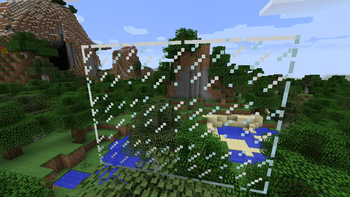
- Connected glass and other block textures, with seamless tiling
- Better Glass
- Resource packs can provide glass textures with semi-translucent effects
- Custom Item Textures
- Different item textures based on metadata, count, NBT, etc.
Planned features:
- Custom Colors for grass and water based on biomes
- Custom Skyboxes
Usage
This mod implements several features based on the OptiFineDoc documentation:
- Connected textures: https://github.com/sp614x/optifine/blob/master/OptiFineDoc/doc/ctm.properties
- Random mobs: https://github.com/sp614x/optifine/blob/master/OptiFineDoc/doc/random_entities.properties
- Custom item textures: https://github.com/sp614x/optifine/blob/master/OptiFineDoc/doc/cit_single.properties
Note: the ft_default entry in the ctm properties shipped in this mods jar is an internal implementation detail.
Please ignore it, and do not use it in your resource packs!
This is needed because the alternative for having this marker would be an expensive resource pack scan,
which would significantly slow down resource reloads.
Credits
Based on MCPatcher and MCPatcher: Forge, developed by prupe and mist475, respectively.
DarkBumus for hunting down bugs and early feature testing.
Available Versions
How to Install Right Proper MCPatcher on Your Server
Order Server
Order a Minecraft Java server with at least 3 GB RAM (4 GB recommended).
Set forge Loader
In the panel under "Egg", select the forge loader and matching Minecraft version (1.7.10).
Install Mod
Open the mod browser in the dashboard and search for "Right Proper MCPatcher". Click "Install" – done! Alternatively, upload the .jar via SFTP to the /mods folder.
Compatibility
Mod Loaders
Minecraft Versions
1.7.10
Server-side
✗ UnsupportedRecommended RAM
4 GB(min. 3 GB)Frequently Asked Questions
Right Proper MCPatcher server crashes on startup – what to do?
Most common cause: wrong forge version or insufficient RAM. Check the server log (latest.log) for "OutOfMemoryError" or "Mixin" errors. With Mado Hosting: ensure at least 3 GB RAM is allocated and the loader matches the mod version (1.7.10). You can switch loaders with one click in the panel.
Is Right Proper MCPatcher compatible with forge?
Right Proper MCPatcher officially supports forge for Minecraft 1.7.10. The Mado dashboard automatically detects incompatible loader combinations.
Server lagging with Right Proper MCPatcher – how to optimize performance?
Recommended RAM: 4 GB (per 8 players). Use /spark profiler to check if Right Proper MCPatcher consumes the most tick time. Common fixes: reduce server view-distance to 8-10, install "performant" or "starlight" as supplementary mods on Forge. With Mado Hosting, your server runs on NVMe SSDs with dedicated CPU cores for minimal latency.
Similar Mods

![[ETF] Entity Texture Features](https://cdn.modrinth.com/data/BVzZfTc1/af683d206d50b05258d865b0d6e4aa2f2cee12f2_96.webp)
![[EMF] Entity Model Features](https://cdn.modrinth.com/data/4I1XuqiY/6e5bbd0d06b1741bfdab6c0cfab6de8fdaf0064c_96.webp)



Rent Modded Server
Install Right Proper MCPatcher with just one click on your server.