
MCRGB
Search for blocks based on the dominant colours in their textures.
Screenshots
About this Mod
MCRGB Mod for Minecraft Fabric 1.20.1+
Trailer:
Requirements:
- Minecraft 1.20.1+
- Fabric
- Fabric API
Reccomended:
- Cloth Config
Features:
A Colour Picker for Minecraft Blocks!
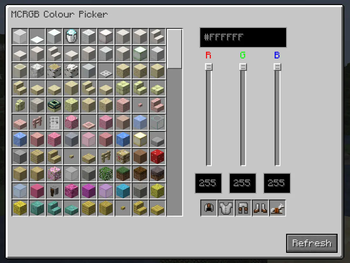
MCRGB is a client-side Minecraft Mod designed to assist building. It allows you to search for blocks based on the dominant colours in their textures.
Press the colour picker key (I by default) to open the colour picker GUI.
HSV, HSL, RGB and Hex Support!
Input your colours using your favourite colour space, and the mod will suggest blocks that closely match that colour.
If you are in Creative Mode and have Operator Level Permissions, you can click blocks to give them to yourself.
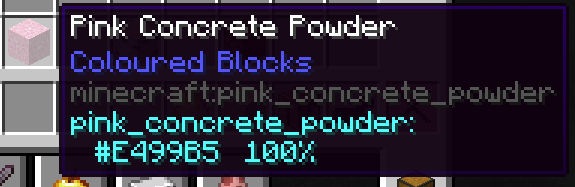
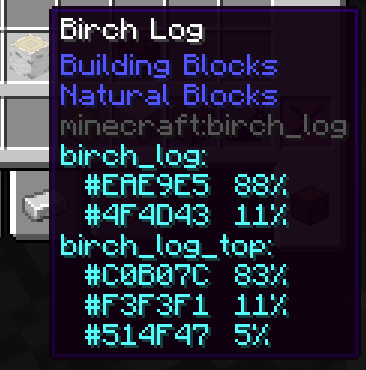
You can also see the breakdown of a block's colour info by hovering over it. This tells you the percentage each colour takes up in each texture, and which blockstates it corresponds to.
Optional: You can also view this info in regular inventories by changing the config.
Build using Colour Theory
Easily /give Yourself Dyed Leather Armour
How it works:
On first launch, MCRGB will generate a file, located in .minecraft/mcrgb_colours/file.json
MCRGB attempts to scan every block texture in the game and calculates the dominant colours by grouping together similar pixels based on their euclidean distance in sRGB space, and calculating the mean average of each group. The results are saved in this file. If you ever need to regenerate the file (if you've changed resource packs or added new mods which add more blocks), click the "Refresh" button in the colour picker UI.
When you input a colour to the colour picker, the list of blocks is sorted by the euclidean distance to each of the dominant colours in each texture. Each texture is weighted according to how much of that colour takes up in the texture.
Credits:
Mod created by bacco
Logo created by Whirdle
Available Versions
How to Install MCRGB on Your Server
Order Server
Order a Minecraft Java server with at least 3 GB RAM (4 GB recommended).
Set fabric Loader
In the panel under "Egg", select the fabric loader and matching Minecraft version (1.21.11).
Install Mod
Open the mod browser in the dashboard and search for "MCRGB". Click "Install" – done! Alternatively, upload the .jar via SFTP to the /mods folder.
Compatibility
Mod Loaders
Minecraft Versions
1.21.11, 1.21.10, 1.21.9 (+15 more)
Server-side
✗ UnsupportedRecommended RAM
4 GB(min. 3 GB)Frequently Asked Questions
MCRGB server crashes on startup – what to do?
Most common cause: wrong fabric version or insufficient RAM. Check the server log (latest.log) for "OutOfMemoryError" or "Mixin" errors. With Mado Hosting: ensure at least 3 GB RAM is allocated and the loader matches the mod version (1.21.11). You can switch loaders with one click in the panel.
Is MCRGB compatible with fabric?
MCRGB officially supports fabric for Minecraft 1.21.11, 1.21.10, 1.21.9. The Mado dashboard automatically detects incompatible loader combinations.
Server lagging with MCRGB – how to optimize performance?
Recommended RAM: 4 GB (per 8 players). Use /spark profiler to check if MCRGB consumes the most tick time. Common fixes: reduce server view-distance to 8-10, install "performant" or "starlight" as supplementary mods on Forge. With Mado Hosting, your server runs on NVMe SSDs with dedicated CPU cores for minimal latency.
Similar Mods

![[ETF] Entity Texture Features](https://cdn.modrinth.com/data/BVzZfTc1/af683d206d50b05258d865b0d6e4aa2f2cee12f2_96.webp)
![[EMF] Entity Model Features](https://cdn.modrinth.com/data/4I1XuqiY/6e5bbd0d06b1741bfdab6c0cfab6de8fdaf0064c_96.webp)



Rent Modded Server
Install MCRGB with just one click on your server.