
Screenshots

About this Mod
Sudo
This module adds some commonly used Linux commands to the game, including sudo, echo, cat, and export.
Some Linux mechanisms have also been added, such as the home folder and the .bashrc file.
Instructions
Parameters
Some commands support parameters, you can use _ plus parameters.
Variables
Some commands also support the use of variables. You can use variables in the form of ${variable name}. For how to set variables, please see export.
Dynamic variables
Dynamic variables are recalculated on every execution, here are all dynamic variables:
home: the current user’s home folderuuid: uuid of the current userplayer: the username of the current userexp: the current user’s experience valuelevel: the level of the current userhealth: current user’s healthmax_health: the current user’s maximum healthworld: current world namelocation: current location (format is x.y.z)server: current server namemotd: motd of the current servertime: current time (Unix timestamp)
Order
echo
usage:
/echo <content> # Output content
cat
usage:
/cat <file path> # Output file content
write
usage:
/write <file path> <content> #Write file content, which will overwrite the original content.
export
usage:
/export <variable name> <variable value> #Set variables
/export public_<variable name> <variable value> # Set public variables, sudo permissions are required
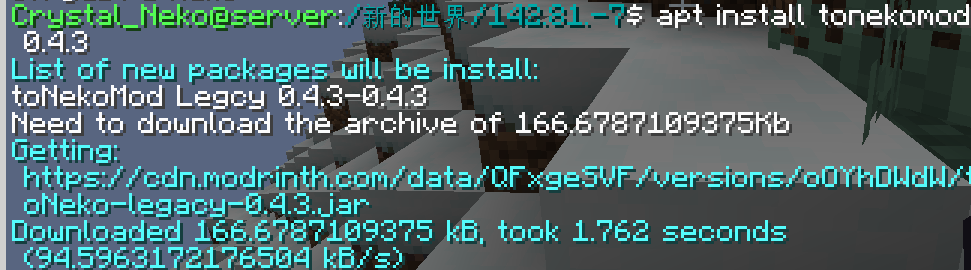
apt
Install mods from Modrinth.
usage:
/apt install <slug> <version> # Install module
/apt search <slug> # Search module
image of apt command:
bash
Call the system to execute bash commands (only supports Linux).
usage:
/bash <command>
WARNNING:THIS COMMAND IS DANGEROUS. IT MAYBE DAMAGE YOUR SYSTEM.
neofetch
You know the command.
Special files
.bashrc
This file executes the commands inside when the player logs in. The commands are separated by ; and there is no / before the command.
The file is located in home/<player name>/.bashrc. Players can modify this file without sudo permissions.
Available Versions
How to Install mcsudo on Your Server
Order Server
Order a Minecraft Java server with at least 3 GB RAM (4 GB recommended).
Set fabric Loader
In the panel under "Egg", select the fabric loader and matching Minecraft version (1.21.3).
Install Mod
Open the mod browser in the dashboard and search for "mcsudo". Click "Install" – done! Alternatively, upload the .jar via SFTP to the /mods folder.
Compatibility
Mod Loaders
Minecraft Versions
1.21.3, 1.21.2, 1.21.1 (+8 more)
Server-side
✓ RequiredRecommended RAM
4 GB(min. 3 GB)Frequently Asked Questions
mcsudo server crashes on startup – what to do?
Most common cause: wrong fabric version or insufficient RAM. Check the server log (latest.log) for "OutOfMemoryError" or "Mixin" errors. With Mado Hosting: ensure at least 3 GB RAM is allocated and the loader matches the mod version (1.21.3). You can switch loaders with one click in the panel.
Is mcsudo compatible with fabric and quilt?
mcsudo officially supports fabric, quilt for Minecraft 1.21.3, 1.21.2, 1.21.1. The Mado dashboard automatically detects incompatible loader combinations.
Server lagging with mcsudo – how to optimize performance?
Recommended RAM: 4 GB (per 8 players). Use /spark profiler to check if mcsudo consumes the most tick time. Common fixes: reduce server view-distance to 8-10, install "performant" or "starlight" as supplementary mods on Forge. With Mado Hosting, your server runs on NVMe SSDs with dedicated CPU cores for minimal latency.
Similar Mods




![[ETF] Entity Texture Features](https://cdn.modrinth.com/data/BVzZfTc1/af683d206d50b05258d865b0d6e4aa2f2cee12f2_96.webp)
![[EMF] Entity Model Features](https://cdn.modrinth.com/data/4I1XuqiY/6e5bbd0d06b1741bfdab6c0cfab6de8fdaf0064c_96.webp)
Rent Modded Server
Install mcsudo with just one click on your server.