
ME-Beam-Former
Add an ME Beam Former to AE2 to enable visually and wireless visually stunning ME network connections.
Screenshots
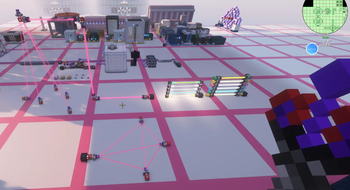
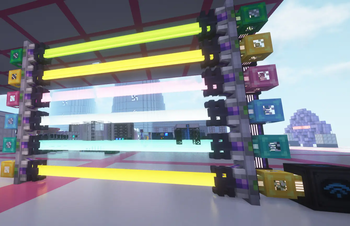
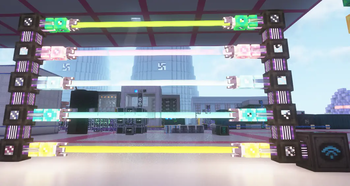
About this Mod
ME-Beam-Former
A lightweight Applied Energistics 2 addon that links two cable-bus parts with a visible, colored beam. It provides a clean, visual way to bridge ME network nodes across a short gap without extra cables.
Features
- Connect two Beam Former parts facing each other (up to 32 blocks).
- Real-time visibility of the link as a colored beam (inherits the cable color).
- Quick toggle: shift-right-click to hide or show the beam per pair.
- Respects occlusion and part collisions; beam auto-disconnects if blocked.
- Works with AE2’s grid and uses proper ticking/connection logic.
- Performance-friendly dynamic rendering with emissive visuals.
Requirements
- Minecraft: 1.20.1
- Forge: 47.x
- Applied Energistics 2: 15.4.x
Notes
- Designed to match AE2’s look-and-feel and part rendering pipeline.
- Client-only visuals; server logic stays minimal and safe.
- Compatible with common rendering optimizers. If you encounter visual glitches with shader/optimization mods, try disabling the specific beam-related setting.
Getting Started
- Craft two Beam Formers.
- Place them facing each other on cable buses.
- Power your ME network and enjoy the link. Use Shift+Right Click on either end to toggle beam visibility.
Enjoy a cleaner ME setup with clear, elegant links between nodes!
Available Versions
How to Install ME-Beam-Former on Your Server
Order Server
Order a Minecraft Java server with at least 3 GB RAM (4 GB recommended).
Set forge Loader
In the panel under "Egg", select the forge loader and matching Minecraft version (1.21.1).
Install Mod
Open the mod browser in the dashboard and search for "ME-Beam-Former". Click "Install" – done! Alternatively, upload the .jar via SFTP to the /mods folder.
Compatibility
Mod Loaders
Minecraft Versions
1.21.1, 1.20.1
Server-side
✓ RequiredRecommended RAM
4 GB(min. 3 GB)Frequently Asked Questions
ME-Beam-Former server crashes on startup – what to do?
Most common cause: wrong forge version or insufficient RAM. Check the server log (latest.log) for "OutOfMemoryError" or "Mixin" errors. With Mado Hosting: ensure at least 3 GB RAM is allocated and the loader matches the mod version (1.21.1). You can switch loaders with one click in the panel.
Is ME-Beam-Former compatible with forge and neoforge?
ME-Beam-Former officially supports forge, neoforge for Minecraft 1.21.1, 1.20.1. The Mado dashboard automatically detects incompatible loader combinations.
Server lagging with ME-Beam-Former – how to optimize performance?
Recommended RAM: 4 GB (per 8 players). Use /spark profiler to check if ME-Beam-Former consumes the most tick time. Common fixes: reduce server view-distance to 8-10, install "performant" or "starlight" as supplementary mods on Forge. With Mado Hosting, your server runs on NVMe SSDs with dedicated CPU cores for minimal latency.
Similar Mods

![[ETF] Entity Texture Features](https://cdn.modrinth.com/data/BVzZfTc1/af683d206d50b05258d865b0d6e4aa2f2cee12f2_96.webp)
![[EMF] Entity Model Features](https://cdn.modrinth.com/data/4I1XuqiY/6e5bbd0d06b1741bfdab6c0cfab6de8fdaf0064c_96.webp)



Rent Modded Server
Install ME-Beam-Former with just one click on your server.