
Mechanical Machinery
A create addon mod implementing a bunch of different machines
Screenshots
About this Mod
Mechanical Machinery
Mechanical machinery is a mod I have made to add all the things that i wish could be done with Create. Currently it only adds a sifter (I know a mod already exists I just preferred my own version as it wasn't just a millstone overlayed :joy: and has more features), but I plan to add many things to the mod too.NOTE: This mod is in the very early stages. Expect bugs, and please report them on the github!
Sifter
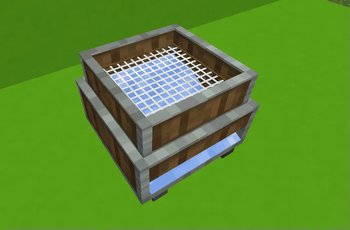
The sifter is a block when powered from the bottom with Create's Stress Units will "Sift" your ingredients into its results. It also has the ability to use any fluid in the recipes too. The mod comes with no default recipes. But you can add your own very easily with KubeJS, see the wiki for how - https://github.com/Bennyboy1695/MechanicalMachinery/wiki/KubeJS
You can also add your own mesh's to be used in your recipes too also with KubeJS, see the wiki for how - Custom Meshes
Planned Features
Note: While these are planned I do not have that much knowledge on how to do all the things so it may take a long time, or might not happen without help
- Some kinda Storage system (would have to be as lag free as possible, I know how badly mods like SSN can affect tps at size)
- Connectable sifters so that you can pump into one and it shares the load
- Maybe tiered sifters
Available Versions
How to Install Mechanical Machinery on Your Server
Order Server
Order a Minecraft Java server with at least 3 GB RAM (4 GB recommended).
Set forge Loader
In the panel under "Egg", select the forge loader and matching Minecraft version (1.19.2).
Install Mod
Open the mod browser in the dashboard and search for "Mechanical Machinery". Click "Install" – done! Alternatively, upload the .jar via SFTP to the /mods folder.
Compatibility
Mod Loaders
Minecraft Versions
1.19.2
Server-side
✓ RequiredRecommended RAM
4 GB(min. 3 GB)Frequently Asked Questions
Mechanical Machinery server crashes on startup – what to do?
Most common cause: wrong forge version or insufficient RAM. Check the server log (latest.log) for "OutOfMemoryError" or "Mixin" errors. With Mado Hosting: ensure at least 3 GB RAM is allocated and the loader matches the mod version (1.19.2). You can switch loaders with one click in the panel.
Is Mechanical Machinery compatible with forge?
Mechanical Machinery officially supports forge for Minecraft 1.19.2. The Mado dashboard automatically detects incompatible loader combinations.
Server lagging with Mechanical Machinery – how to optimize performance?
Recommended RAM: 4 GB (per 8 players). Use /spark profiler to check if Mechanical Machinery consumes the most tick time. Common fixes: reduce server view-distance to 8-10, install "performant" or "starlight" as supplementary mods on Forge. With Mado Hosting, your server runs on NVMe SSDs with dedicated CPU cores for minimal latency.
Similar Mods




Rent Modded Server
Install Mechanical Machinery with just one click on your server.