
Mellstroy Mod
Play with Mellstroy and test your luck in the slot machine!
Screenshots


About this Mod
Who is Mellstroy
Mellstroy is a famous Russian streamer known for his casino streams
Mellstroy
- Health 20 HP
- Attack Damage 2 HP per hit
- Speed 0.3
- Behavior Neutral until attacked then aggressive
How to spawn Mellstroy
- Place a gold block
- Stand within 10 blocks of it
- Type in chat three times "What kind of business is this, bitch" in English
or "Что за бизнес, сука" in Russian - Mellstroy appears on the gold block
- The gold block disappears
Drop
- 1 MellGem after death
ITEMS
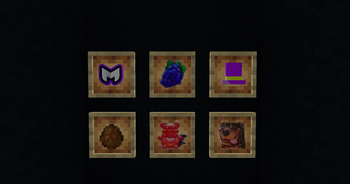
MellGem A rare item dropped by Mellstroy
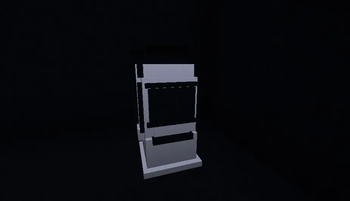
Used to craft the Slot Machine
Stacks up to 64
Hat Grants the Politeness effect when used on the ground near Mellstroy Can also be eaten to apply the effect to yourself
Stacks up to 16
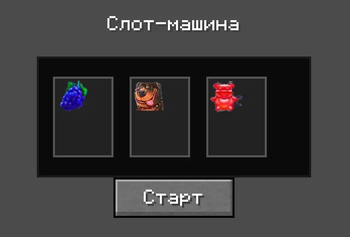
- Slot Machine Symbols
- Fruit
- Gummy Bear
- Dog
- The slot machine can only be used if Mellstroy is near it
EFFECTS
Politeness Changes all Mellstroy voice lines to polite versions
Gambling Addiction (Ludomania)
How to get: Mellstroy picks up a diamond near you within 8 blocks
Duration 5 minutes
Effect 90 percent win chance in the slot machine
SLOT MACHINE
Crafting Recipe
- 8 iron blocks around a MellGem MellGem in the center equals 1 Slot Machine
How to use
- Place the slot machine
- Mellstroy must be within 30 blocks
- Right click to open the interface
- Press the "Start" button
- Wait 3 seconds for the reels to spin
- 2 second delay before result
- Win or lose
Winning conditions
- All 3 symbols match
- Reward 3 identical items plus 16 diamonds
- Win chance about 11 percent
- With Gambling Addiction 90 percent
Features
- 30 second cooldown between spins
- Spinning animation
- Independent reel stopping
- No empty slots
ACHIEVEMENTS
- "What kind of business is this, bitch" Summon Mellstroy
- "Mellstroy.game" Obtain MellGem
- "Dodep" Craft the Slot Machine
- "40 MILLION" Win in the Slot Machine hard achievement
Available Versions
How to Install Mellstroy Mod on Your Server
Order Server
Order a Minecraft Java server with at least 3 GB RAM (4 GB recommended).
Set forge Loader
In the panel under "Egg", select the forge loader and matching Minecraft version (1.20.1).
Install Mod
Open the mod browser in the dashboard and search for "Mellstroy Mod". Click "Install" – done! Alternatively, upload the .jar via SFTP to the /mods folder.
Compatibility
Mod Loaders
Minecraft Versions
1.20.1
Server-side
✓ RequiredRecommended RAM
4 GB(min. 3 GB)Frequently Asked Questions
Mellstroy Mod server crashes on startup – what to do?
Most common cause: wrong forge version or insufficient RAM. Check the server log (latest.log) for "OutOfMemoryError" or "Mixin" errors. With Mado Hosting: ensure at least 3 GB RAM is allocated and the loader matches the mod version (1.20.1). You can switch loaders with one click in the panel.
Is Mellstroy Mod compatible with forge?
Mellstroy Mod officially supports forge for Minecraft 1.20.1. The Mado dashboard automatically detects incompatible loader combinations.
Server lagging with Mellstroy Mod – how to optimize performance?
Recommended RAM: 4 GB (per 8 players). Use /spark profiler to check if Mellstroy Mod consumes the most tick time. Common fixes: reduce server view-distance to 8-10, install "performant" or "starlight" as supplementary mods on Forge. With Mado Hosting, your server runs on NVMe SSDs with dedicated CPU cores for minimal latency.
Similar Mods




Rent Modded Server
Install Mellstroy Mod with just one click on your server.