
Melon Loader
A Forge 1.8.9 mod lets you change backgrounds of minecraft.
Screenshots
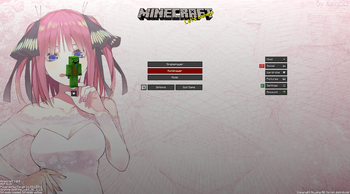
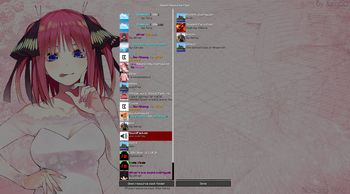
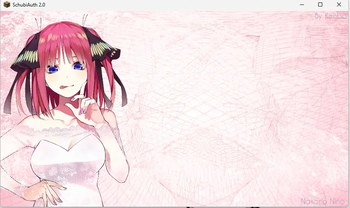
About this Mod
🍉 Melon Loader
The ultimate, seamlessly integrated custom background mod for Minecraft 1.8.9.
Melon Loader completely overhauls the vanilla Minecraft menus, allowing you to easily set your own gorgeous 16:9 wallpapers for the Loading Screen, Main Menu, Multiplayer/Singleplayer, and Settings menus.
Built with heavy modpacks in mind, Melon Loader is designed to be 100% compatible with Essential, Patcher, and PolishedGUI, seamlessly replacing their backgrounds without crashing or causing black screen glitches.
✨ Key Features
- Four Custom Background Slots: Set distinct images for your Forge Loading Screen, Home Page, Play Menus, and Settings Menus.
- Perfect 16:9 Smart Cropping: No more stretched or distorted images! Melon Loader uses dynamic UV math to act like a desktop wallpaper—smoothly zooming and cropping your image to perfectly fill the screen, no matter how you resize your window.
- In-Game Transparency: When you are actively playing in a world or on a server, Melon Loader gets out of your way. Opening your settings or resource packs in-game will beautifully blur your active gameplay in the background instead of covering it up.
- Smart Text Overlay: Menus with lots of text (like Multiplayer or Controls) automatically receive a sleek, 45% dark gradient overlay, ensuring white text remains perfectly readable without ruining the brightness of your Home Page.
- Native File Explorer: Powered by OneConfig, simply open the mod menu and click "Browse" to open a standard Windows/Mac file explorer. Select any
.pngor.jpgright from your computer—no need to type out complicated file paths!
🚀 Bulletproof Compatibility
Tired of UI mods breaking your background? Melon Loader uses advanced OpenGL rendering to bypass the hardcoded black boxes from UI mods and PvP Resource Packs (like Bombies).
- Compatible with Essential
- Compatible with Patcher
- Compatible with PolishedGUI
- Compatible with all PvP Resource Packs
⚙️ Getting Started
- Drop
MelonLoader-1.0.jarinto yourmodsfolder. - Launch Minecraft 1.8.9.
- Open your OneConfig menu (usually
RSHIFT). - Find Melon Loader and click the Browse... buttons to select your favorite 16:9 wallpapers.
- Click Save, and your game will instantly update!
Note on Forge Loading Screens: For the custom splash screen to work, Forge's default loading UI must be disabled. Melon Loader includes a handy "Fix Loading Screen" button right inside the config menu that will automatically configure your splash.properties file for you with one click!
📥 Requirements
- Minecraft Forge 1.8.9
- OneConfig (Required for the settings menu)
Available Versions
How to Install Melon Loader on Your Server
Order Server
Order a Minecraft Java server with at least 3 GB RAM (4 GB recommended).
Set forge Loader
In the panel under "Egg", select the forge loader and matching Minecraft version (1.8.9).
Install Mod
Open the mod browser in the dashboard and search for "Melon Loader". Click "Install" – done! Alternatively, upload the .jar via SFTP to the /mods folder.
Compatibility
Mod Loaders
Minecraft Versions
1.8.9
Server-side
✗ UnsupportedRecommended RAM
4 GB(min. 3 GB)Frequently Asked Questions
Melon Loader server crashes on startup – what to do?
Most common cause: wrong forge version or insufficient RAM. Check the server log (latest.log) for "OutOfMemoryError" or "Mixin" errors. With Mado Hosting: ensure at least 3 GB RAM is allocated and the loader matches the mod version (1.8.9). You can switch loaders with one click in the panel.
Is Melon Loader compatible with forge?
Melon Loader officially supports forge for Minecraft 1.8.9. The Mado dashboard automatically detects incompatible loader combinations.
Server lagging with Melon Loader – how to optimize performance?
Recommended RAM: 4 GB (per 8 players). Use /spark profiler to check if Melon Loader consumes the most tick time. Common fixes: reduce server view-distance to 8-10, install "performant" or "starlight" as supplementary mods on Forge. With Mado Hosting, your server runs on NVMe SSDs with dedicated CPU cores for minimal latency.
Similar Mods




![[ETF] Entity Texture Features](https://cdn.modrinth.com/data/BVzZfTc1/af683d206d50b05258d865b0d6e4aa2f2cee12f2_96.webp)
![[EMF] Entity Model Features](https://cdn.modrinth.com/data/4I1XuqiY/6e5bbd0d06b1741bfdab6c0cfab6de8fdaf0064c_96.webp)
Rent Modded Server
Install Melon Loader with just one click on your server.