
Melur Auto Fish
Adds an auto-fishing feature and supports the DeepWater plugin
Screenshots
About this Mod
MelurAutoFish
Smart auto-fishing mod for the DeepWater plugin in Minecraft Fabric




MelurAutoFish is an advanced client-side Fabric mod designed specifically to automate the fishing process on servers utilizing the popular DeepWater plugin. Forget about tedious mini-game tracking! The mod handles all the mechanics for you, ensuring maximum efficiency.
✨ Key Features
- 🤖 DeepWater Mini-game Automation: The mod reads the mini-game state directly from the Action Bar in real-time. It automatically rotates the player's camera (Yaw) to track the fish and triggers the catch interaction at the perfect moment when the fish is within the green success zone.
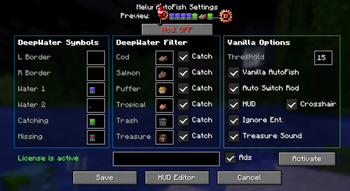
- 📊 Interactive HUD: A stylish in-game overlay displaying the current status of the mod, session duration, remaining durability of the active fishing rod, and detailed catch statistics (caught fish, trash, and treasures).
- 🔄 Smart Fishing Rod Protection (Auto-Switch): No more broken rods with valuable enchantments like Mending or Lure! The mod monitors the durability of the fishing rod in your hand. As soon as it drops below a configurable threshold, the mod automatically searches your inventory or hotbar for a spare rod and swaps it. If you run out of fishing rods, the mod safely deactivates.
- 🛡️ Catch Filtering: Choose exactly what you want to catch in the settings. The mod supports independent toggles for:
- 🐟 Cod
- 🍣 Salmon
- 🐡 Pufferfish
- 🐠 Tropical Fish
- 🗑️ Trash
- ⭐ Treasures (Loot)
- 🔊 Sound Alerts: A celebratory level-up sound plays when catching treasures so you never miss a lucky catch!
The configuration file is saved at .minecraft/config/melurautofish.json. You can edit it manually or configure it in-game using ModMenu:
Config:
{
  "symbolBorderLeft": "∴",
  "symbolBorderRight": "∷",
  "symbolBarCatching": "↥",
  "symbolBarMissing": "≔",
  "symbolWater1": "∹",
  "symbolWater2": ".",
  "symbolCod": "⋝",
  "symbolSalmon": "⨥",
  "symbolPufferfish": "⨨",
  "symbolTropicalFish": "⨟",
  "symbolTrash": "🗑",
  "symbolTreasure": "⭐",
  "catchCod": true,
  "catchSalmon": true,
  "catchPufferfish": true,
  "catchTropicalFish": true,
  "catchTrash": true,
  "catchTreasure": true,
  "ignoreEntities": true,
  "autoSwitchRod": true,
  "rodDurabilityThreshold": 15,
  "showHud": true,
  "showCrosshairIndicator": true,
  "playTreasureSound": true,
  "showActionbarMessages": true,
  "showAd": true,
  "licenseKey": "",
  "hudX": 10,
  "hudY": 10,
  "hudScale": 1.0
}
📥 Installation & Requirements
To use this mod, the following components are required:
- Minecraft (version 1.21+ and above)
- Fabric Loader
- Fabric API
- ModMenu (recommended for easy access to the configuration GUI)
Installation Steps:
- Download the latest version of the
.jarmod file from Modrinth. - Place the file inside your
.minecraft/modsdirectory. - Launch Minecraft using your Fabric profile.
- Open the settings via the mod menu (ModMenu, or edit the config file directly if ModMenu is not installed), enter your license key in the corresponding field, and click Activate.
- Press the
Okey in-game while holding a fishing rod to start auto-fishing!
💡 Important Note
To unlock the full functionality of the mod, a license key is required, which you can obtain completely free on our partner servers:
- 👑 Vlast (IP:
vlast.aurorix.pro) - ⚙️ Melur (IP:
play.melur.pro)
🔒 Privacy & Transparency (Security)
We value your privacy and strictly follow Modrinth's safety guidelines. Here is exactly how our licensing system works:
- One-Way SHA-256 HWID: To prevent key sharing and abuse, the mod reads basic, non-sensitive system properties (such as OS name and computer name) to generate a secure, one-way SHA-256 hash (HWID).
- No Personal Data Stored: We never collect, send, or store your personal information, Minecraft credentials, or IP addresses. Only the hashed hardware ID is stored securely in our database to validate your license.
- 100% Secure: The mod contains no spyware, tracking, backdoors, or telemetry. It only makes direct, secure connections to database strictly for key verification.
*This mod is purely client-side (Client-Side). It does not need to be installed on the server. Please use this mod responsibly and strictly in accordance with the rules of the servers you play on.*
Available Versions
How to Install Melur Auto Fish on Your Server
Order Server
Order a Minecraft Java server with at least 3 GB RAM (4 GB recommended).
Set fabric Loader
In the panel under "Egg", select the fabric loader and matching Minecraft version (1.21.11).
Install Mod
Open the mod browser in the dashboard and search for "Melur Auto Fish". Click "Install" – done! Alternatively, upload the .jar via SFTP to the /mods folder.
Compatibility
Mod Loaders
Minecraft Versions
1.21.11
Server-side
✗ UnsupportedRecommended RAM
4 GB(min. 3 GB)Frequently Asked Questions
Melur Auto Fish server crashes on startup – what to do?
Most common cause: wrong fabric version or insufficient RAM. Check the server log (latest.log) for "OutOfMemoryError" or "Mixin" errors. With Mado Hosting: ensure at least 3 GB RAM is allocated and the loader matches the mod version (1.21.11). You can switch loaders with one click in the panel.
Is Melur Auto Fish compatible with fabric?
Melur Auto Fish officially supports fabric for Minecraft 1.21.11. The Mado dashboard automatically detects incompatible loader combinations.
Server lagging with Melur Auto Fish – how to optimize performance?
Recommended RAM: 4 GB (per 8 players). Use /spark profiler to check if Melur Auto Fish consumes the most tick time. Common fixes: reduce server view-distance to 8-10, install "performant" or "starlight" as supplementary mods on Forge. With Mado Hosting, your server runs on NVMe SSDs with dedicated CPU cores for minimal latency.
Similar Mods




Rent Modded Server
Install Melur Auto Fish with just one click on your server.