
mercuryium
该模组使得MC渲染可以使用更多的线程,提高游戏最低帧,减少卡顿 This mod allows MC rendering to use more threads, improving low FPS in the game and reducing lag 本mod由AI编写,mod by AI
About this Mod
中文(zh-cn)
该模组使得MC渲染可以使用更多的线程,提高LOW帧
在i7 8550U 16G内存 1模组量 显示器最高刷新率(60hz) 渲染和模拟距离12区块上:
未添加此模组时摇晃视角时帧数52~60
添加此模组后摇晃视角时帧数稳定60左右,不低于55
帧数对比:
左边原版,帧数有时候波动大;右边安装了本模组,帧数波动小
- 环境:azul zulu java25
- 分辨率:1080x721
加入机械动力,1000个小水车和50+个大水车测试:
第一个没有安装本模组,第二个安装了本模组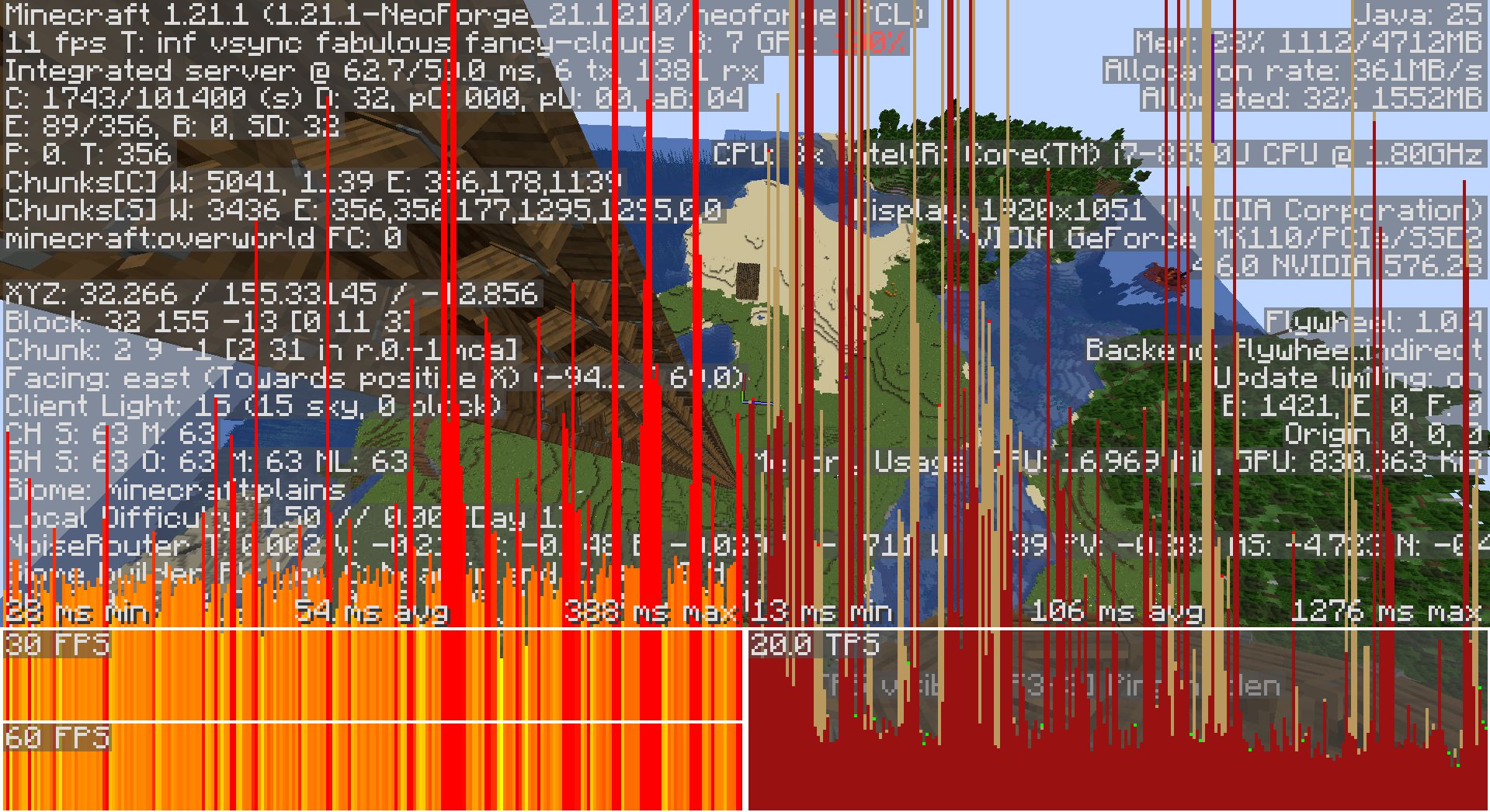

- 环境:azul zulu java25
- 分辨率:1920x1051
- 生物群系过渡距离15x15
- 图像品质:极佳
- 模拟距离和渲染距离:32区块
- 实体渲染距离:500%
本模组和sodium是独立的
如果喜欢本模组,或者这个模组帮到了您,请给我买瓶饮料!
如果安装模组后帧数没有太大变化,请更改配置文件,把两个值都改为64,并重启游戏
en-us(英文)
This mod allows Minecraft rendering to use more threads, improving low frame rates
On an i7 8550U with 16GB of RAM (1 module), maximum monitor refresh rate (60Hz), rendering and simulation distance set to 12 chunks:
When shaking the view without this mod added Frame rate 52~60
After adding this mod, when shaking the camera view The frame rate is stable around 60, not less than 55
Frame rate comparison:
The left side is the original version, with occasional big frame rate fluctuations; the right side has this mod installed, with smaller frame rate fluctuations
- Environment: Azul Zulu Java 25
- Resolution: 1080x721
Add Create, test 1,000 small water wheels and 50 large water wheels:
The first one did not install this mod, and the second one installed this mod
- Environment: Azul Zulu Java 25
- Resolution: 1920x1051
- Biome transition distance 15x15
- Image Quality: Excellent
- Simulation distance and render distance: 32 chunks
- Entity render distance: 500%
This mod and Sodium mod are independent of each other
If you like this mod, or if this mod has helped you, please buy me a coffee!
If the frame rate doesn't change much after installing the mod, please modify the configuration file, change both values to 64, and restart the game
哔哩哔哩作者主页Bilibili Creator's Homepage
Available Versions
How to Install mercuryium on Your Server
Order Server
Order a Minecraft Java server with at least 3 GB RAM (4 GB recommended).
Set neoforge Loader
In the panel under "Egg", select the neoforge loader and matching Minecraft version (1.21.1).
Install Mod
Open the mod browser in the dashboard and search for "mercuryium". Click "Install" – done! Alternatively, upload the .jar via SFTP to the /mods folder.
Compatibility
Mod Loaders
Minecraft Versions
1.21.1
Server-side
✗ UnsupportedRecommended RAM
4 GB(min. 3 GB)Frequently Asked Questions
mercuryium server crashes on startup – what to do?
Most common cause: wrong neoforge version or insufficient RAM. Check the server log (latest.log) for "OutOfMemoryError" or "Mixin" errors. With Mado Hosting: ensure at least 3 GB RAM is allocated and the loader matches the mod version (1.21.1). You can switch loaders with one click in the panel.
Is mercuryium compatible with neoforge?
mercuryium officially supports neoforge for Minecraft 1.21.1. The Mado dashboard automatically detects incompatible loader combinations.
Server lagging with mercuryium – how to optimize performance?
Recommended RAM: 4 GB (per 8 players). Use /spark profiler to check if mercuryium consumes the most tick time. Common fixes: reduce server view-distance to 8-10, install "performant" or "starlight" as supplementary mods on Forge. With Mado Hosting, your server runs on NVMe SSDs with dedicated CPU cores for minimal latency.
Similar Mods


Rent Modded Server
Install mercuryium with just one click on your server.