
Metalmancy
⚙️ Metalmancy – Forge or Channel the Power Metalmancy is a Minecraft expansion mod that challenges players to choose their path: Will you harness the raw arcane energy of ancient relics… or smelt them down to fuel industrial progress? Deep beneath the ov
Screenshots
About this Mod
Become a Blacksmith in Minecraft.
Implemented Features
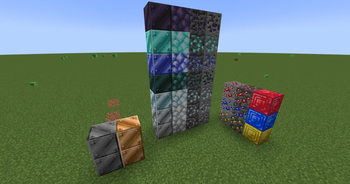
Adds Copper, Tin, Bronze, Platinum, Titanium, Cobalt, Mithril and Orichalcum;
Adds Flint and Bone Tools;
Added Hammer, for now is just an expensive Pickaxe;
Planning Features (Not Implemented Yet):
Adds Clay and Porcelain buckets;
Put clay into a chest-like pattern in crafting table to create a Hammer Cast;
Put the cast into the furnace and craft it with a metal block to create a Hammer;
Use a Hammer to create Ore Dusts. Hammers can't crush metals that are harder than itself;
Use clay to create pots to store liquids and casts to forge tools.
Add Mithrill Shrines in Overworld, Aurimite Forges in the Nether and Orichalcum Veins in the End.
Add Blacksmith Forge to smelt Metals;
Add Blacksmith Anvil to change Tools;
Add Sockets to your weapon and transfer magic gems between them;
Special Alloys combining different metals;
Available Versions
How to Install Metalmancy on Your Server
Order Server
Order a Minecraft Java server with at least 4 GB RAM (6 GB recommended).
Set fabric Loader
In the panel under "Egg", select the fabric loader and matching Minecraft version (1.21.11).
Install Mod
Open the mod browser in the dashboard and search for "Metalmancy". Click "Install" – done! Alternatively, upload the .jar via SFTP to the /mods folder.
Compatibility
Mod Loaders
Minecraft Versions
1.21.11, 1.21.10, 1.21.9 (+9 more)
Server-side
✓ RequiredRecommended RAM
6 GB(min. 4 GB)Frequently Asked Questions
Metalmancy server crashes on startup – what to do?
Most common cause: wrong fabric version or insufficient RAM. Check the server log (latest.log) for "OutOfMemoryError" or "Mixin" errors. With Mado Hosting: ensure at least 4 GB RAM is allocated and the loader matches the mod version (1.21.11). You can switch loaders with one click in the panel.
Is Metalmancy compatible with fabric?
Metalmancy officially supports fabric for Minecraft 1.21.11, 1.21.10, 1.21.9. The Mado dashboard automatically detects incompatible loader combinations.
Server lagging with Metalmancy – how to optimize performance?
Recommended RAM: 6 GB (per 5 players). Use /spark profiler to check if Metalmancy consumes the most tick time. Common fixes: reduce server view-distance to 8-10, install "performant" or "starlight" as supplementary mods on Forge. With Mado Hosting, your server runs on NVMe SSDs with dedicated CPU cores for minimal latency.
Similar Mods

![[ETF] Entity Texture Features](https://cdn.modrinth.com/data/BVzZfTc1/af683d206d50b05258d865b0d6e4aa2f2cee12f2_96.webp)
![[EMF] Entity Model Features](https://cdn.modrinth.com/data/4I1XuqiY/6e5bbd0d06b1741bfdab6c0cfab6de8fdaf0064c_96.webp)



Rent Modded Server
Install Metalmancy with just one click on your server.
Details
- License
- Creative Commons Attribution Non Commercial Share Alike 4.0 International
- Server-side
- Required