
MetalRender
Optimisation mod for Apple Silicon hardware.
Screenshots
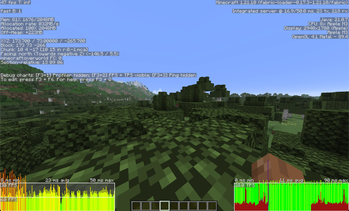
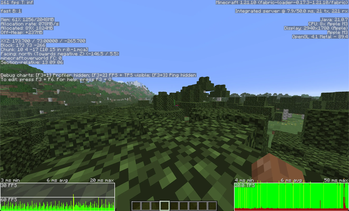
About this Mod
MetalRender is a Minecraft mod that uses Apple’s Metal graphics system to render the game on macOS. Also, please report any bugs/issues on the GitHub repo's Issues tab! It also has a Suggestions tag so all feedback is welcome!
MetalRender adds a new and improved rendering backend that can make Minecraft run faster and smoother on Macs by using modern graphics features. MetalRender is made for those on Apple devices who want faster frames and better performance on Minecraft. MetalRender is inspired by Nvidium (a great optimisation mod for Nvidia GPUs) by Cortex
DISCLAIMER:
MetalRender is not affiliated with, endorsed by, or associated with Apple Inc. "Metal" refers to the Apple Metal graphics API, used under standard developer terms. The MetalRender logo is an original design inspired by Metal and is not intended to resemble or imply association with any Apple Inc. branding.
Dependencies
Make sure that you have these before running MetalRender (or it will definitely crash)!
- Sodium (for the current version of MC that you are running)
- Fabric API (same as the above)
- Fabric
- Java 21 (or above for building it, does not need to simply run)
- ModMenu (for versions v0.1.6 and above
Install Instructions:
Currently, MetalRender is only avaliable with Fabric loader. To install MetalRender, first install Fabric loader via their offical site Fabric download/install. Once that has been completed, drop Sodium into the Mods folder, along with MetalRender to run.
Need more performance? MetalRender alone with Sodium might not be enough to meet your needs. I recommend installing other mods like MoreCulling for better performance, along with the CaffineMC suite. They provide powerful and efficent performance mods to suit your needs.
Hardware compatiblilty
MetalRender is made for Apple Silicon chips only. This basically means that it would only work on Mac devices made after 2019. Below is a list of supported chips:
- Apple Silicon chips M1 or newer (M1, M2, M3, M4, M5)
- Apple Silicon chips A10 or newer
Not sure what chip you have? To find the chip of your device, follow the instructions below:
Mac devices: Locate the Apple icon on the top-left of your screen. Click on it and select About this Mac. It should open a window displaying device information. Chip information will be under Chip. If it does not say Chip, but instead Processor, your Mac is not supported (Chip means M-series or Apple Silicon, Processor means Intel stuff).
iPad devices: Open the Settings app and locate General --> About. It should be listed under Model Name (e.g iPad Pro 13-inch (3rd generation)). Then, open a search browser and type your iPad Model Name in the search bar to find what chip you have.
Only Apple Silicon is supported with MetalRender. If your device meets the above requirements and still does not work, please raise this problem with me on the GitHub page, under Source.
If your device is not supported, a error message will display and MetalRender will automatically disable.
Issues or bugs
If you have a issue, bug or suggestion, please don't hesitate to let me know via the GitHub Issues tab and I will resolve it in timely manner! Before reporting bugs, make sure that you have Java 21 (or above), Fabric API and Sodium installed!
Known bugs:
- Long uptime slowdowns. If your computer has a long uptime (2 days+), it obviously will slow down, this is not a bug with the mod its a issue with Apple.
For devs
All the source code is included in the .JAR file in version v0.1. It has not and will not be updated.
If you have version v0.1.2 or later, the source code is only avaliable on the GitHub, under Sources. Build instructions are there also.
MetalRender command line
A full version of this guide is available on the GitHub repo. Only versions v0.1.6+ have command line features. Versions before that do NOT have commands features.
Common Commands
/metalrender status— Show current MetalRender status.
/metalrender help — List all commands.
/metalrender cache clear — Clear cache and restart renderer.
/metalrender reload — Reload world renderer.
/metalrender restart — Restart MetalRender.
LOD (Level of Detail)
/metalrender lod reset — Reset LOD settings.
/metalrender lod enable — Enable LOD system.
/metalrender lod disable — Disable LOD system.
/metalrender lod threshold
Configuration
/metalrender config save — Save current config.
/metalrender config reload — Reload config from disk.
/metalrender config reset — Reset all settings to default.
Performance
/metalrender performance reset — Reset performance settings.
Available Versions
How to Install MetalRender on Your Server
Order Server
Order a Minecraft Java server with at least 3 GB RAM (4 GB recommended).
Set fabric Loader
In the panel under "Egg", select the fabric loader and matching Minecraft version (1.21.10).
Install Mod
Open the mod browser in the dashboard and search for "MetalRender". Click "Install" – done! Alternatively, upload the .jar via SFTP to the /mods folder.
Compatibility
Mod Loaders
Minecraft Versions
1.21.10, 1.21.9, 1.21.8
Server-side
✗ UnsupportedRecommended RAM
4 GB(min. 3 GB)Frequently Asked Questions
MetalRender server crashes on startup – what to do?
Most common cause: wrong fabric version or insufficient RAM. Check the server log (latest.log) for "OutOfMemoryError" or "Mixin" errors. With Mado Hosting: ensure at least 3 GB RAM is allocated and the loader matches the mod version (1.21.10). You can switch loaders with one click in the panel.
Is MetalRender compatible with fabric?
MetalRender officially supports fabric for Minecraft 1.21.10, 1.21.9, 1.21.8. The Mado dashboard automatically detects incompatible loader combinations.
Server lagging with MetalRender – how to optimize performance?
Recommended RAM: 4 GB (per 8 players). Use /spark profiler to check if MetalRender consumes the most tick time. Common fixes: reduce server view-distance to 8-10, install "performant" or "starlight" as supplementary mods on Forge. With Mado Hosting, your server runs on NVMe SSDs with dedicated CPU cores for minimal latency.
Similar Mods


Rent Modded Server
Install MetalRender with just one click on your server.