
Metaworlds Unofficial
An Unofficial Continuation of the Metaworlds Mod
Screenshots

About this Mod
About
This is an unofficial port and continuation of the old Metaworlds Mod to Minecraft Forge 1.7.10.
Installation
Install Minecraft 1.7.10 with the latest Forge version
Download and move the latest jar file from this mod's files into the mods folder
You might (but not always) have to install extra dependencies as specified in https://github.com/jblas-project/jblas/wiki/Missing-Libraries
Features
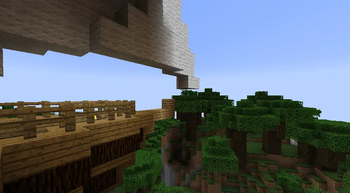
Create fully functioning worlds within worlds!
These worlds are fully functioning and editable at all time just like the normal world, all normal block mechanics should work in metaworlds too!
There's no size limit as metaworlds use world logics and loads as chunks!
You can move on them while they are in motion!
Metaworlds are also rotatable and scalable!
Quickly align and flip metaworlds with special blocks!
Reintegrate metaworlds with the normal world using the metaworlds reintegrator block!
All crafting recipes are customizable within autogenerated config files!
Improvements (from original version)
Ported to 1.7.10
There is no longer an installer and two mods you need to download separately
Fixed damage taken on subworlds not being shown
Fixed not being able to die while on a subworld (even in survival)
Old Mod Review
https://www.youtube.com/watch?v=_g6wvB76J3k
F.A.Q
Q: When port to version x.x.x?
A: Probably never, unless you want to do it yourself, of course.
Q: Modpacks?
A: Of course! No need to ask.
Q: There is a crash! / This mod doesn't work with X! / I found a bug!
A: You can always report it on the issue tracker and I'll try and take a look.
Available Versions
How to Install Metaworlds Unofficial on Your Server
Order Server
Order a Minecraft Java server with at least 3 GB RAM (4 GB recommended).
Set forge Loader
In the panel under "Egg", select the forge loader and matching Minecraft version (1.7.10).
Install Mod
Open the mod browser in the dashboard and search for "Metaworlds Unofficial". Click "Install" – done! Alternatively, upload the .jar via SFTP to the /mods folder.
Compatibility
Mod Loaders
Minecraft Versions
1.7.10
Server-side
✓ RequiredRecommended RAM
4 GB(min. 3 GB)Frequently Asked Questions
Metaworlds Unofficial server crashes on startup – what to do?
Most common cause: wrong forge version or insufficient RAM. Check the server log (latest.log) for "OutOfMemoryError" or "Mixin" errors. With Mado Hosting: ensure at least 3 GB RAM is allocated and the loader matches the mod version (1.7.10). You can switch loaders with one click in the panel.
Is Metaworlds Unofficial compatible with forge?
Metaworlds Unofficial officially supports forge for Minecraft 1.7.10. The Mado dashboard automatically detects incompatible loader combinations.
Server lagging with Metaworlds Unofficial – how to optimize performance?
Recommended RAM: 4 GB (per 8 players). Use /spark profiler to check if Metaworlds Unofficial consumes the most tick time. Common fixes: reduce server view-distance to 8-10, install "performant" or "starlight" as supplementary mods on Forge. With Mado Hosting, your server runs on NVMe SSDs with dedicated CPU cores for minimal latency.
Similar Mods




![[ETF] Entity Texture Features](https://cdn.modrinth.com/data/BVzZfTc1/af683d206d50b05258d865b0d6e4aa2f2cee12f2_96.webp)
![[EMF] Entity Model Features](https://cdn.modrinth.com/data/4I1XuqiY/6e5bbd0d06b1741bfdab6c0cfab6de8fdaf0064c_96.webp)
Rent Modded Server
Install Metaworlds Unofficial with just one click on your server.