
Middle-Earth Additions: Npc
A mod that transforms the citizens of Middle-earth into interactive merchants and traders.
Screenshots

About this Mod
Middle-Earth NPC



Overview
Middle-Earth NPC transforms the citizens of Middle-earth into interactive merchants and traders. Assign roles to NPCs, establish faction-based commerce, and create a living economy across all nine major factions of Middle-earth.
Features
NPC Role System
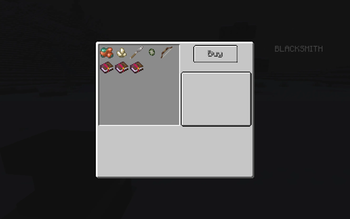
- Blacksmith Role: NPCs sell weapons, armor, raw materials, and enchanted books
- Farmer Role: NPCs offer food, crops, and agricultural supplies
- Automatic workstation detection (anvils for blacksmiths, composters for farmers)
- Smart AI pathfinding to claim and maintain workstations
Faction-Based Trading
- Unique shop inventories for all 9 Middle-earth factions:
- Gondor, Rohan, Shire, Isengard
- Lothlorien, Longbeards, Mordor, Misties, Dale
- Faction-specific items and pricing using Middle-earth currency (copper, silver, gold coins)
- Configurable shop data via JSON files
Role Management
- Use
/npcrole <role>to assign roles manually - Right-click interaction system for pending role assignments
- Only Civilian and Militia rank NPCs can be assigned roles
- Persistent data storage across world saves
Datapack Customization
- Override default shops using datapacks
- Create
data/me-npc/farmer/<faction>.jsonordata/me-npc/blacksmith/<faction>.json - Customize items and prices for any faction's merchants
- Example:
data/me-npc/farmer/gondor.jsonto modify Gondor farmer inventory
How to Use
- Find a Civilian or Militia NPC from any faction
- Use
/npcrole blacksmithor/npcrole farmernear the NPC - Right-click the NPC to confirm role assignment
- The NPC will seek nearby workstations and begin trading
- Use
/npcrole clearto remove roles if needed
Requirements
- Minecraft: 1.21.1
- Fabric Loader + Fabric API
- Middle-earth Mod (1.5.3-1.21.1-alpha or compatible)
Installation
- Install Fabric Loader and Fabric API
- Install the Middle-earth mod
- Install Cardinal Components API
- Drop this mod jar into your
modsfolder - Launch and start building your Middle-earth economy
Technical Details
- Fabric-ready with client and server support
- Mixin-based entity extensions for seamless integration
- Data-driven shop configurations for easy customization
- Persistent NPC role data using Cardinal Components
License & Credits
- License: see LICENSE
- Built for the Middle-earth mod community
- Thanks to the Fabric and Cardinal Components teams
Transform your Middle-earth settlements into thriving centers of commerce and trade
Available Versions
How to Install Middle-Earth Additions: Npc on Your Server
Order Server
Order a Minecraft Java server with at least 3 GB RAM (4 GB recommended).
Set fabric Loader
In the panel under "Egg", select the fabric loader and matching Minecraft version (1.21.1).
Install Mod
Open the mod browser in the dashboard and search for "Middle-Earth Additions: Npc". Click "Install" – done! Alternatively, upload the .jar via SFTP to the /mods folder.
Compatibility
Mod Loaders
Minecraft Versions
1.21.1
Server-side
✓ RequiredRecommended RAM
4 GB(min. 3 GB)Frequently Asked Questions
Middle-Earth Additions: Npc server crashes on startup – what to do?
Most common cause: wrong fabric version or insufficient RAM. Check the server log (latest.log) for "OutOfMemoryError" or "Mixin" errors. With Mado Hosting: ensure at least 3 GB RAM is allocated and the loader matches the mod version (1.21.1). You can switch loaders with one click in the panel.
Is Middle-Earth Additions: Npc compatible with fabric?
Middle-Earth Additions: Npc officially supports fabric for Minecraft 1.21.1. The Mado dashboard automatically detects incompatible loader combinations.
Server lagging with Middle-Earth Additions: Npc – how to optimize performance?
Recommended RAM: 4 GB (per 8 players). Use /spark profiler to check if Middle-Earth Additions: Npc consumes the most tick time. Common fixes: reduce server view-distance to 8-10, install "performant" or "starlight" as supplementary mods on Forge. With Mado Hosting, your server runs on NVMe SSDs with dedicated CPU cores for minimal latency.
Similar Mods
![[EMF] Entity Model Features](https://cdn.modrinth.com/data/4I1XuqiY/6e5bbd0d06b1741bfdab6c0cfab6de8fdaf0064c_96.webp)


Rent Modded Server
Install Middle-Earth Additions: Npc with just one click on your server.