
Miketavious's Auto Miner
An client side auto miner for Minecraft
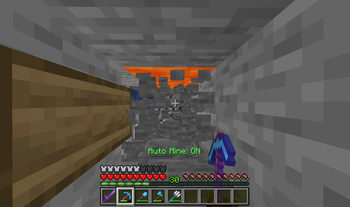
Screenshots
About this Mod
Miketavious Auto Miner

Effortless mining at your fingertips! Simply look at blocks and watch them break automatically.
Features
Intelligent Tool System
- Pickaxe Mode: Only mines when holding pickaxes
- Axe Mode: Only mines when holding axes
- Shovel Mode: Only mines when holding shovels
- Tools Mode: Works with any mining tool (pickaxe, axe, shovel)
- All Mode: Mines with anything in your hand - even empty hands!
Durability Protection
- Automatically stops mining when your tool gets low on durability
- Configurable threshold (1-100% remaining durability)
- Never accidentally break your precious tools again
Clean Configuration
- Intuitive config screen via ModMenu
- Toggle messages on/off
- Choose between action bar or chat notifications
Installation
- Download and install the Modrinth App
- Create a new Minecraft 1.21.5+ instance with Fabric
- Install dependencies:
- Add this mod to your instance
- Launch and enjoy!
Usage
- Hold any mining tool (or any item, depending on your settings)
- Press K to toggle auto mining
- Look at blocks to mine them automatically
- Configure settings through ModMenu → Auto Mine Configuration
Compatibility
- Client-side only - works on any server
- Minecraft 1.21.5+ with Fabric Loader
- Compatible with most other mods
- No server installation required
Perfect for long mining sessions, resource gathering, and reducing hand strain from repetitive clicking.
I use a three-part versioning format where the first number denotes major releases, the second indicates feature updates, and the third represents bug fixes and minor Minecraft version updates and improvements/changes.
Why I made this mod
Note: In all honesty I made this mod becuase Toro's Auto Miner hasnt been updated in like 6 months becusae he was waiting for a library to be updated, I decided I just need to make my own solution since their mod is taking way to long to update.
Available Versions
How to Install Miketavious's Auto Miner on Your Server
Order Server
Order a Minecraft Java server with at least 3 GB RAM (4 GB recommended).
Set fabric Loader
In the panel under "Egg", select the fabric loader and matching Minecraft version (1.21.7).
Install Mod
Open the mod browser in the dashboard and search for "Miketavious's Auto Miner". Click "Install" – done! Alternatively, upload the .jar via SFTP to the /mods folder.
Compatibility
Mod Loaders
Minecraft Versions
1.21.7, 1.21.6, 1.21.5
Server-side
✗ UnsupportedRecommended RAM
4 GB(min. 3 GB)Frequently Asked Questions
Miketavious's Auto Miner server crashes on startup – what to do?
Most common cause: wrong fabric version or insufficient RAM. Check the server log (latest.log) for "OutOfMemoryError" or "Mixin" errors. With Mado Hosting: ensure at least 3 GB RAM is allocated and the loader matches the mod version (1.21.7). You can switch loaders with one click in the panel.
Is Miketavious's Auto Miner compatible with fabric?
Miketavious's Auto Miner officially supports fabric for Minecraft 1.21.7, 1.21.6, 1.21.5. The Mado dashboard automatically detects incompatible loader combinations.
Server lagging with Miketavious's Auto Miner – how to optimize performance?
Recommended RAM: 4 GB (per 8 players). Use /spark profiler to check if Miketavious's Auto Miner consumes the most tick time. Common fixes: reduce server view-distance to 8-10, install "performant" or "starlight" as supplementary mods on Forge. With Mado Hosting, your server runs on NVMe SSDs with dedicated CPU cores for minimal latency.
Similar Mods




Rent Modded Server
Install Miketavious's Auto Miner with just one click on your server.