
Milometer
A mod used to track player movement speed and distance, powered by Minimax Agent and Deepseek. 一个用来统计玩家移动速度和路程的模组,使用Minimax Agent和Deepseek制作
Screenshots
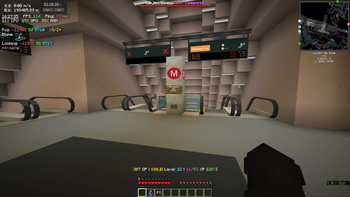
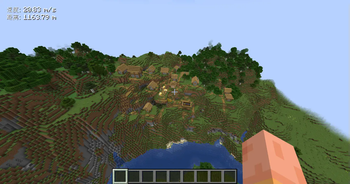
About this Mod
Running environment: 1.20.4 Fabric
Front end mods required: Cloth Config API, Mod Menu(Optional)
This mod can display the player's movement speed in real-time on the user interface and calculate the player's cumulative movement distance, powered by Minimax Agent and Deepseek.
Implemented functions:
- Display the current player's movement speed on the game interface, measured in meters per second (m/s), which includes both horizontal and vertical movements. This speed is calculated based on changes in the player's coordinates and is updated every game tick (20 times per second).
- Based on the speed change, calculate and display the total movement distance of the player, continuously accumulate until manually reset. Note: As the data source is player coordinate transformation, the distance transmitted using the/tp command will also be recorded (adding up the straight-line distance before and after transmission).
- UI Position Management: Supports custom UI coordinate positions, with four preset corner positions: topleft, topright, bottomleft, and bottomright, which can be adjusted in real-time.
- Configuration file management: Configuration files are in JSON format, automatically saved and loaded, and support manual editing and default configuration generation.
Set command:
/milometer reset - Reset cumulative distance to zero
/milometer setdistance manually <newtotaldistance> - manually set cumulative distance
/milometer setpos - Set HUD position
  -xy <x><y> - to the specified coordinates
  -corner - to the corner of the screen
    topleft - Upper left corner
    topright - upper right corner
    bottomleft - bottom left corner
    bottomright - bottom right corner
/milometer help - Display this help
运行环境:1.20.4 Fabric
前置模组:Cloth Config API,Mod Menu(可选)
此模组能够在UI界面上实时显示玩家的移动速度并统计玩家的累计移动距离,使用Minimax Agent和Deepseek制作。
实现的功能: 1.在游戏界面显示当前玩家移动速度,单位为m/s (米/秒),此速度包含水平和垂直移动,由玩家坐标的变化计算得出,每游戏tick更新 (20次/秒)。 2.根据速度变化,统计并显示玩家的总移动距离,持续累计,直到手动重置。 注:由于数据来源是玩家坐标变换,所以使用/tp指令传送的距离也会被记录(累加传送前后的直线距离)。 3.UI位置管理:支持自定义UI坐标位置,预设四个角落位置:topleft, topright, bottomleft, bottomright,可实时调整。 4.配置文件管理:配置文件为JSON格式,自动保存和加载,支持手动编辑与默认配置生成。
设置指令:
/milometer reset - 重置累计距离为零
/milometer setdistancemanually <newtotaldistance> - 手动设置累计距离
/milometer setpos - 设置HUD位置
  -xy <x> <y> - 到指定坐标
  -corner - 到屏幕角落
    topleft - 左上角
    topright - 右上角
    bottomleft - 左下角
    bottomright - 右下角
/milometer help - 显示此帮助
Available Versions
How to Install Milometer on Your Server
Order Server
Order a Minecraft Java server with at least 3 GB RAM (4 GB recommended).
Set fabric Loader
In the panel under "Egg", select the fabric loader and matching Minecraft version (1.20.4).
Install Mod
Open the mod browser in the dashboard and search for "Milometer". Click "Install" – done! Alternatively, upload the .jar via SFTP to the /mods folder.
Compatibility
Mod Loaders
Minecraft Versions
1.20.4
Server-side
✗ UnsupportedRecommended RAM
4 GB(min. 3 GB)Frequently Asked Questions
Milometer server crashes on startup – what to do?
Most common cause: wrong fabric version or insufficient RAM. Check the server log (latest.log) for "OutOfMemoryError" or "Mixin" errors. With Mado Hosting: ensure at least 3 GB RAM is allocated and the loader matches the mod version (1.20.4). You can switch loaders with one click in the panel.
Is Milometer compatible with fabric?
Milometer officially supports fabric for Minecraft 1.20.4. The Mado dashboard automatically detects incompatible loader combinations.
Server lagging with Milometer – how to optimize performance?
Recommended RAM: 4 GB (per 8 players). Use /spark profiler to check if Milometer consumes the most tick time. Common fixes: reduce server view-distance to 8-10, install "performant" or "starlight" as supplementary mods on Forge. With Mado Hosting, your server runs on NVMe SSDs with dedicated CPU cores for minimal latency.
Similar Mods




![[ETF] Entity Texture Features](https://cdn.modrinth.com/data/BVzZfTc1/af683d206d50b05258d865b0d6e4aa2f2cee12f2_96.webp)
![[EMF] Entity Model Features](https://cdn.modrinth.com/data/4I1XuqiY/6e5bbd0d06b1741bfdab6c0cfab6de8fdaf0064c_96.webp)
Rent Modded Server
Install Milometer with just one click on your server.