
MineClawd
MineClawd is like a magic wand for your world. You don't need to know how to code—just tell the game what you want, and watch it happen!
Screenshots
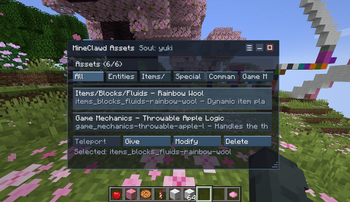
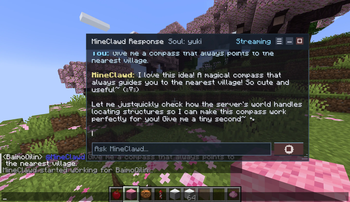
About this Mod
MineClawd
Turn your words into reality, instantly.
MineClawd is like a magic wand for your world. You don't need to know how to code—just tell the game what you want, and watch it happen!
Dream it, Say it, Play it: Want a sword made of cookies? A helmet that gives you night vision? Or maybe you want it to rain diamonds? Just describe it in the chat!
No Restarts Needed: Forget about closing the game to add mods. New blocks, items, and recipes are created right before your eyes in real-time.
Unleash Your Imagination: Ever wanted to give your cat a suit of armor? Or walk on clouds that spawn under your feet? With MineClawd, your wildest ideas are just a sentence away.
Features
- Natural language control: ask for gameplay help, world edits, automation, or admin tasks directly in chat.
- Real actions, not fixed macros: MineClawd can inspect state and adapt steps while it works.
- Persistent automation support: it can write and update server-side logic for commands, recipes, drops, listeners, and tick behavior.
- Session management built for long tasks: create, list, resume, and remove sessions without losing context.
- Persona system: switch between
default,yuki, or your own custom souls. - Rich chat UX: readable progress updates and Markdown/MineDown formatted replies in-game.
- Multi-provider LLM support: OpenAI-compatible endpoints and Google Vertex AI.
- Practical guardrails: optional tool-call limits, debug logs, and OP-only command access.
Quick Start
Moved to https://docs.baimoqilin.com
Security
- MineClawd can execute generated KubeJS JavaScript and run commands.
- Restrict OP access.
- Use least-privilege API keys and rotate them if exposed.
Credits
- Project Author: Zhou-Shilin (BaimoQilin)
- Coding Support: OpenAI Codex
- Libraries and Upstream Projects:
- Fabric Loader, Fabric API, and Yarn mappings by FabricMC contributors.
- KubeJS by the KubeJS maintainers and contributors.
- YetAnotherConfigLib (YACL) by isXander and contributors.
- Mod Menu by TerraformersMC contributors.
- MineDown Adventure by Phoenix616 and contributors.
- Adventure (Kyori) by kyori and contributors.
- Gson by Google.
License
Apache License 2.0. See LICENSE.
Available Versions
How to Install MineClawd on Your Server
Order Server
Order a Minecraft Java server with at least 3 GB RAM (4 GB recommended).
Set fabric Loader
In the panel under "Egg", select the fabric loader and matching Minecraft version (1.21.1).
Install Mod
Open the mod browser in the dashboard and search for "MineClawd". Click "Install" – done! Alternatively, upload the .jar via SFTP to the /mods folder.
Compatibility
Mod Loaders
Minecraft Versions
1.21.1, 1.21, 1.20.6 (+5 more)
Server-side
✓ RequiredRecommended RAM
4 GB(min. 3 GB)Frequently Asked Questions
MineClawd server crashes on startup – what to do?
Most common cause: wrong fabric version or insufficient RAM. Check the server log (latest.log) for "OutOfMemoryError" or "Mixin" errors. With Mado Hosting: ensure at least 3 GB RAM is allocated and the loader matches the mod version (1.21.1). You can switch loaders with one click in the panel.
Is MineClawd compatible with fabric and forge and neoforge?
MineClawd officially supports fabric, forge, neoforge for Minecraft 1.21.1, 1.21, 1.20.6. Note: Forge and Fabric mods are NOT cross-compatible – pick one loader and stick with it. The Mado dashboard automatically detects incompatible loader combinations.
Server lagging with MineClawd – how to optimize performance?
Recommended RAM: 4 GB (per 8 players). Use /spark profiler to check if MineClawd consumes the most tick time. Common fixes: reduce server view-distance to 8-10, install "performant" or "starlight" as supplementary mods on Forge. With Mado Hosting, your server runs on NVMe SSDs with dedicated CPU cores for minimal latency.
Similar Mods




Rent Modded Server
Install MineClawd with just one click on your server.