
Minecraft Countryball Mod
A minecraft mod that adds countryballs!
Screenshots
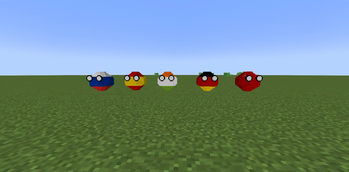
About this Mod
MINECRAFT COUNTRYBALL MOD
What is the Countryball Minecraft Mod?
This mod is a very simple mod that adds countryballs to minecraft. If you don't know what a countryball is, a short summary is that it's an art style where country flags are drawn on cirlces and you can animate or draw them in comics or little animations making fun of their country with political jokes.
There's a whole community built around this and it's been an art form that's been around for years.
What exactly does it add?
It adds new mobs, countryballs, that walk and look around. They're very basic mobs, so they don't do anything special and they don't spawn naturally, you need to spawn them in with commands or spawn eggs.
Does it change gameplay?
Not really, yet. Since you can only access them in creative, survival gameplay should be the same. However eventually they may begin spawning naturally in the world with their own strucutres and individual behaviors!
What countries are in the mod?
So far, only a few: China, Germany, Russia, India and Spain, plus a lemkoball named after me, the maker of this mod, and a base countryball that doesn't have any flag, it's just a blank canvas.
More countries will be added in the future. There are so little because different flags are harder to map onto the ball itself than others.
What version of minecraft does it support, and does it need any dependencies?
This mod is available for Minecraft 1.21.1, and will continue to be updated as more versions come out. Currently it is not available for the snapshots.
The mod requires Geckolib version 4.6.3 or higher, and the Fabric API 0.105 or higher (The dependency lists and their versions will always be updated as soon as possible).
Available Versions
How to Install Minecraft Countryball Mod on Your Server
Order Server
Order a Minecraft Java server with at least 3 GB RAM (4 GB recommended).
Set fabric Loader
In the panel under "Egg", select the fabric loader and matching Minecraft version (1.21.1).
Install Mod
Open the mod browser in the dashboard and search for "Minecraft Countryball Mod". Click "Install" – done! Alternatively, upload the .jar via SFTP to the /mods folder.
Compatibility
Mod Loaders
Minecraft Versions
1.21.1
Server-side
✗ UnsupportedRecommended RAM
4 GB(min. 3 GB)Frequently Asked Questions
Minecraft Countryball Mod server crashes on startup – what to do?
Most common cause: wrong fabric version or insufficient RAM. Check the server log (latest.log) for "OutOfMemoryError" or "Mixin" errors. With Mado Hosting: ensure at least 3 GB RAM is allocated and the loader matches the mod version (1.21.1). You can switch loaders with one click in the panel.
Is Minecraft Countryball Mod compatible with fabric?
Minecraft Countryball Mod officially supports fabric for Minecraft 1.21.1. The Mado dashboard automatically detects incompatible loader combinations.
Server lagging with Minecraft Countryball Mod – how to optimize performance?
Recommended RAM: 4 GB (per 8 players). Use /spark profiler to check if Minecraft Countryball Mod consumes the most tick time. Common fixes: reduce server view-distance to 8-10, install "performant" or "starlight" as supplementary mods on Forge. With Mado Hosting, your server runs on NVMe SSDs with dedicated CPU cores for minimal latency.
Similar Mods
![[EMF] Entity Model Features](https://cdn.modrinth.com/data/4I1XuqiY/6e5bbd0d06b1741bfdab6c0cfab6de8fdaf0064c_96.webp)


Rent Modded Server
Install Minecraft Countryball Mod with just one click on your server.