Minecraft Heads Browser
Browse minecraft-heads heads within your game!
Screenshots

About this Mod
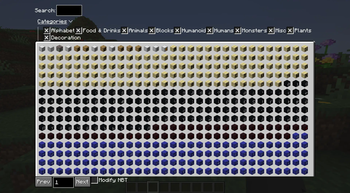
This mod adds an in-game GUI (default bound to H) that allows you to browse heads from the "Best Heads" collection from minecraft-heads.com. This mod is targeted towards those who like to build in singleplayer, and want easier access to decorative skulls.
By default, clicking a head will run a /give command to obtain the head. If you do not have permissions to use this command on a server, there is a Modify NBT option provided.
REQUIRED MODS
How does Modify NBT Work?
This feature works by modifying the currently held item's NBT to apply the custom skin. It only works in creative mode, and may not work on all or be allowed on all servers. You must be holding a player_head item in your main hand for this to work.
Configuration
This mod provides a few simple configuration options- accessible via Mod Menu, mostly relating to what filtering options to save when re-opening the GUI.
Why is the mod 7MB?
The mod is 7MB as the mod includes a backup file of the heads database. This is so that if my server goes down, the mod still functions properly. Each release contains an additional file, ending in _min, which does not include this functionality and is only 57kb as of v1.0.0. These can be found by clicking the appropriate version in the Versions tab. Note that file size should not significantly impact startup times at all.
Privacy
On startup, this mod makes a request to my website mcheads.sophiethefox.cc. This is done to obtain the latest heads data from minecraft-heads.com, acting as a proxy for cache purposes. None of your information including IP nor username is logged.
Planned Features
- UI Improvements
- Better search

Available Versions
How to Install Minecraft Heads Browser on Your Server
Order Server
Order a Minecraft Java server with at least 3 GB RAM (4 GB recommended).
Set fabric Loader
In the panel under "Egg", select the fabric loader and matching Minecraft version (1.21.5).
Install Mod
Open the mod browser in the dashboard and search for "Minecraft Heads Browser". Click "Install" – done! Alternatively, upload the .jar via SFTP to the /mods folder.
Compatibility
Mod Loaders
Minecraft Versions
1.21.5, 1.21.4, 1.21.3 (+3 more)
Server-side
✗ UnsupportedRecommended RAM
4 GB(min. 3 GB)Frequently Asked Questions
Minecraft Heads Browser server crashes on startup – what to do?
Most common cause: wrong fabric version or insufficient RAM. Check the server log (latest.log) for "OutOfMemoryError" or "Mixin" errors. With Mado Hosting: ensure at least 3 GB RAM is allocated and the loader matches the mod version (1.21.5). You can switch loaders with one click in the panel.
Is Minecraft Heads Browser compatible with fabric?
Minecraft Heads Browser officially supports fabric for Minecraft 1.21.5, 1.21.4, 1.21.3. The Mado dashboard automatically detects incompatible loader combinations.
Server lagging with Minecraft Heads Browser – how to optimize performance?
Recommended RAM: 4 GB (per 8 players). Use /spark profiler to check if Minecraft Heads Browser consumes the most tick time. Common fixes: reduce server view-distance to 8-10, install "performant" or "starlight" as supplementary mods on Forge. With Mado Hosting, your server runs on NVMe SSDs with dedicated CPU cores for minimal latency.
Similar Mods

![[ETF] Entity Texture Features](https://cdn.modrinth.com/data/BVzZfTc1/af683d206d50b05258d865b0d6e4aa2f2cee12f2_96.webp)
![[EMF] Entity Model Features](https://cdn.modrinth.com/data/4I1XuqiY/6e5bbd0d06b1741bfdab6c0cfab6de8fdaf0064c_96.webp)



Rent Modded Server
Install Minecraft Heads Browser with just one click on your server.