
Minecraft Sigma MCS
Improving b1.7.3 while preserving its charm! Monolith generation, updated existing blocks, survival balance, client side upgrades and more...
Screenshots


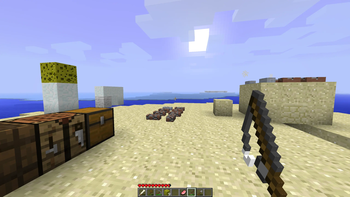


About this Mod
Mod Info
Minecraft Sigma (MCS) is a total conversion mod for beta 1.7.3. Challenging survival that breeds creative solutions, encourages exploration, while preserving the sandbox nature and feel of old Minecraft.

Major Additions include:
- Cauldron brewing for potions.
- Arcane magic and spell creation.
- Nether Expansion!
- Double world height using same world format!
- Alpha monoliths form past 3000 blocks!
- Animal taming.
- Armor stands.
- Slime blocks for bouncing items and entities.
- Dynamite with rocket jumping.
- Enhanced Mob AI.
- Ancient beacons.
Join Discord for help or discussion:
INSTALLATION
If you used Prism Launcher before, here is the easiest way to instsall MCS in one click - just download the instance zip linked below and import as new instance.
MCS Prism Instance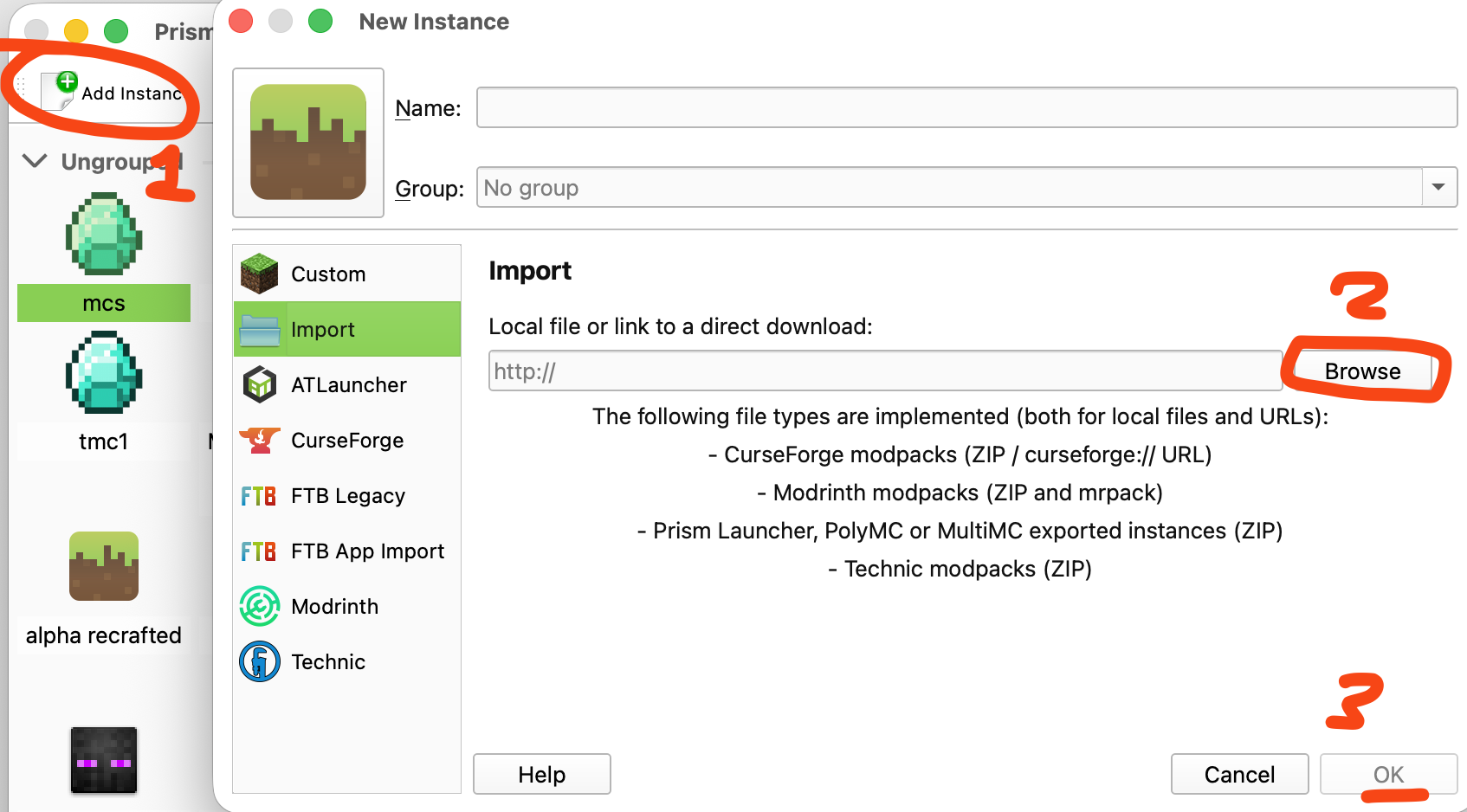
else use manual install option shown below;
Manual installation way
- Download and install Java 8.
- Download and install MultiMC or PrismLauncher.
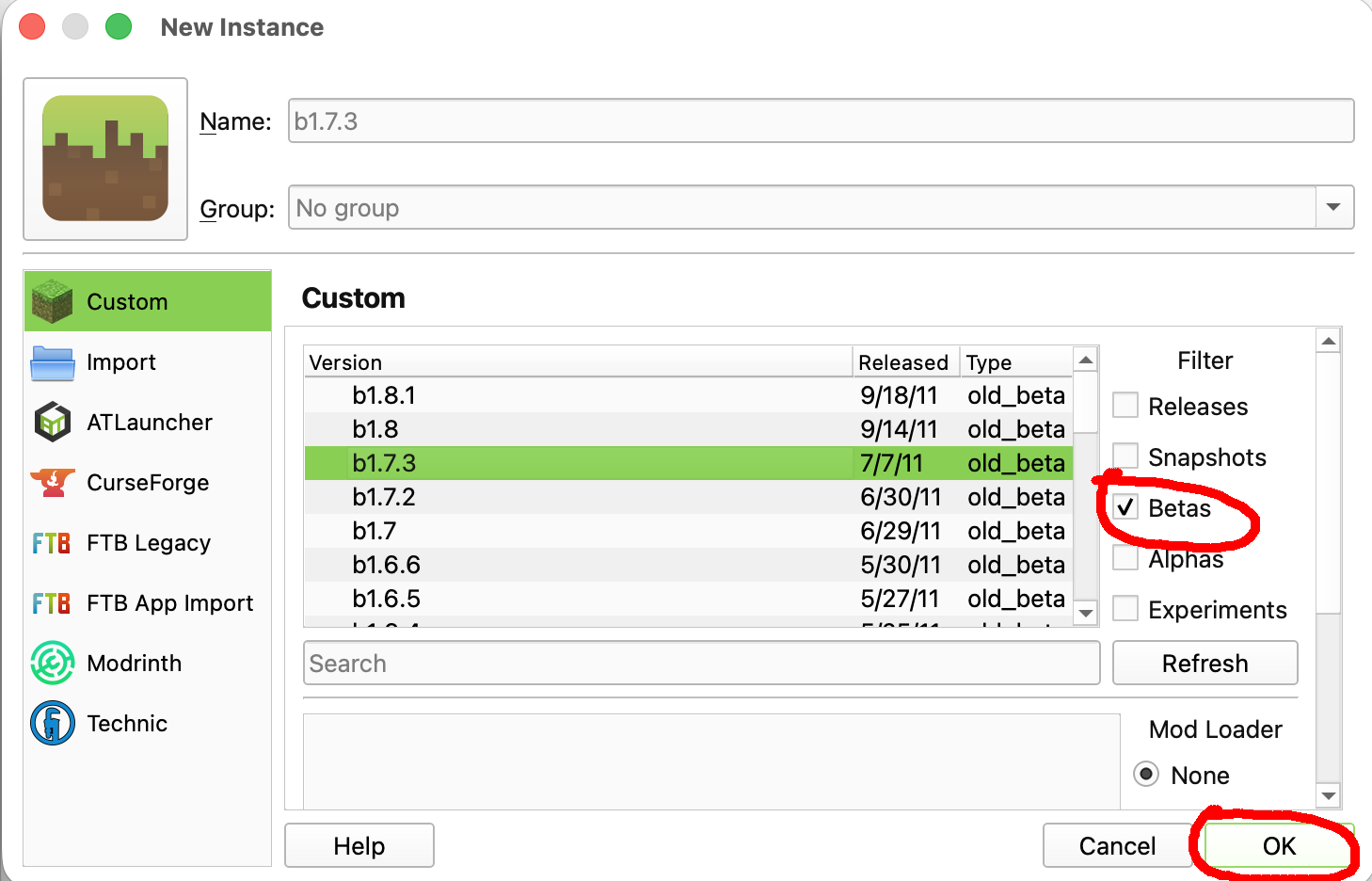
- Create a new b1.7.3 instance.
- Download the latest MCS mod zip file from releases.
- In Launcher, Select your new beta 1.7.3 instance, click Edit -> Version -> Add to Minecraft jar > choose mcs-[version].zip
- OPTIONAL: Install LaunchWrapper for client side fixes like player skins https://github.com/MCPHackers/LaunchWrapper/blob/main/doc/MultiMC.md
- Play!
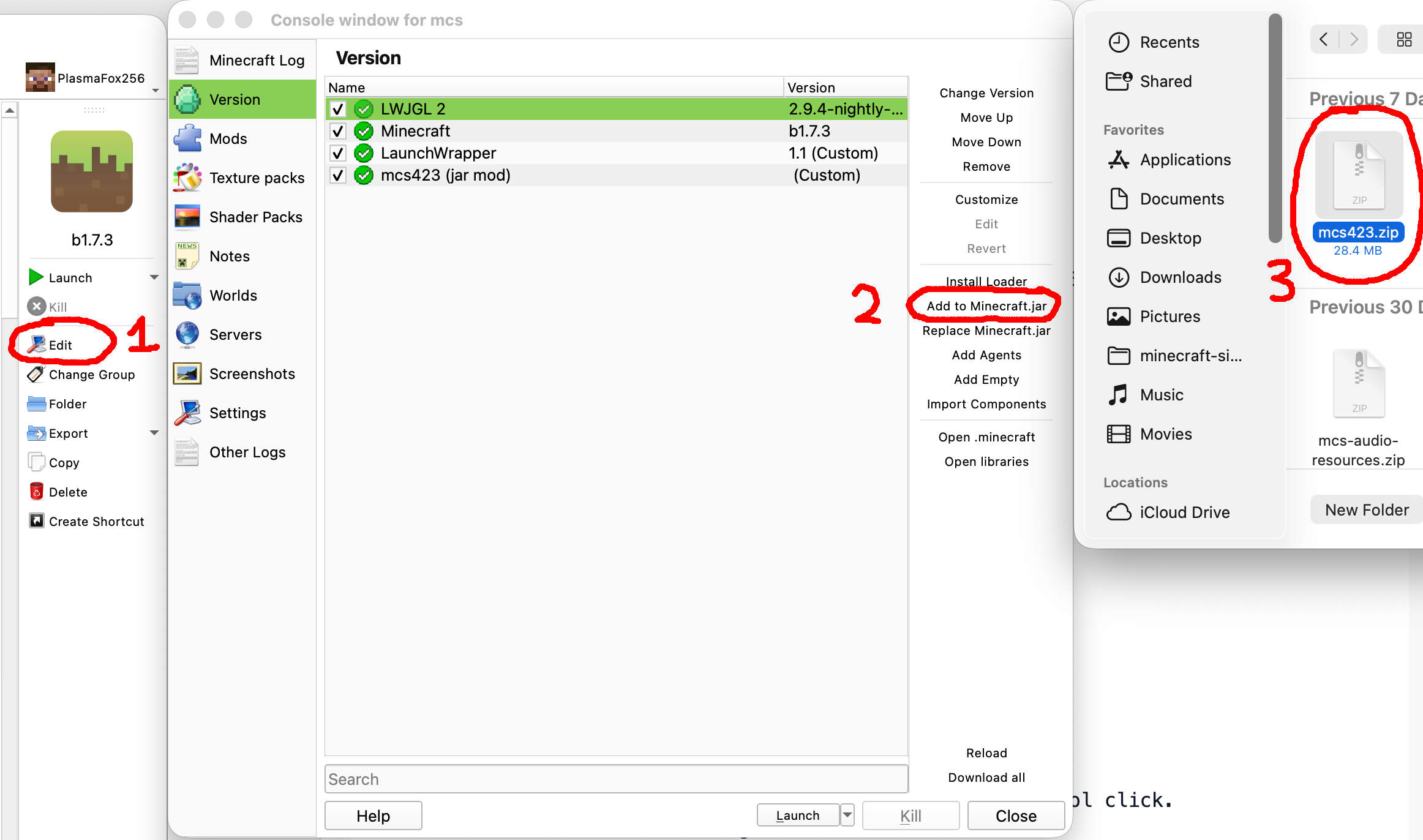
To update the mod, simply download the new mcs.zip, select your launcher instance that you created earlier, click Edit -> Version -> Add to Minecraft jar > choose new mcs.zip After you added the new mod zip, select the old one and click Remove.
DO NOT install other mods alongside MCS as they are not compatible!
Survival Tips
- Check achievements, they can give you hints!
- Craft first tools with flint.
- String is required for beds.
- Dig clay and place it in the sun to dry.
- Build furnace from bricks.
- Tame animals with different foods.
- Mix and match armor for defence bonuses.
- Store armor on stands.
- Control and right click to place down tools.
- Use inventory shortcuts like number keys, dragging, control click.
- Build roads for faster walking
- Construct beacons for powerful effects.
- Mine Nether ores to discover potion brewing and sorcery
- your items linger for 20 minutes in loaded chunks so you have time to prepare for the trip back; late game you can use black sand to point in the direction of your corpse.

Notable Recipes
Spoiler
Recipe: Bed x1
Ingredients:
- String
- Cloth
- Planks
Recipe: Cauldron and Arcane Table
Ingredients:
- Dormant rock
Potions: mix items and find out
Recipe: Saddle x1
Ingredients:
- Leather
Recipe: Bucket Empty x1
Ingredients:
- Ingot Gold
Recipe: Web x1
Ingredients:
- String
Recipe: Dynamite x4
Ingredients:
- Redstone x1
- Gunpowder x1
- Gunpowder x1
- String x1
Recipe: Tnt x1
Ingredients:
- Dynamite
- Paper
Recipe: Apple Gold x1
Ingredients:
- Ingot Gold
- Apple Red
Recipe: Compass x1
Ingredients:
- Ingot Iron
- Redstone
Recipe: Lapis Bricks x2
Ingredients:
- Lapis
- Clay
Recipe: Seared Bricks x4
Ingredients:
- Seared Stone
Recipe: Grout x2
Ingredients:
- Soul Sand
- Gravel
- Clay
Recipe: Brick Block x2
Ingredients:
- Brick
- Clay
Recipe: White Stone x1
Ingredients:
- Cobblestone
- Bonemeal
Recipe: Beacon x1
Ingredients:
- Glass
- Glow Stone
- Obsidian
Recipe: Stone Bricks x4
Ingredients:
- Stone
Recipe: Iron Grate x6
Ingredients:
- Ingot Iron
Recipe: Slime Block x1
Ingredients:
- Slime Ball
Recipe: Slime Ball x4
Ingredients:
- Slime Block
Recipe: Barrel x1
Ingredients:
- Wood Logs
Recipe: Armor Stand x1
Ingredients:
- Fence
- Stone Slab
Useful Java args
-XX:+UseConcMarkSweepGC -XX:-UseAdaptiveSizePolicy -Xss1024K
You should allocate 1 gigabyte of RAM, old minecraft does not need much.
WARNING
Not compatible with other mods! No multiplayer yet. This is a hobby project of mine, althought I try to add content and bugfixes regularly, there is no guaranteed plan.
Credits
Mojang - the game itself and assets;
RetroMCP - the tool I used to decompile, reobfuscate and build this mod;
Birevan - Light Color modification;
FloweChild - Piston packing code, game design ideas such as material walk speed, gloom, textures for barrel and creeper oysters;
Bestsoft100 - help with dynamic block mining delay;
alexchompski - lots of custom textures;
Krzysztof Pikes - new music from Askew
This project modifies obfuscated class files from Minecraft Beta 1.7.3, which is © Mojang AB and not open source.
The author claims no ownership over the original Minecraft code.
This mod is provided for educational and archival purposes only.
No part of this project may be used commercially. Redistribution of Minecraft code remains subject to Mojang’s end-user license agreement (EULA).
Available Versions
How to Install Minecraft Sigma MCS on Your Server
Order Server
Order a Minecraft Java server with at least 4 GB RAM (6 GB recommended).
Set modloader Loader
In the panel under "Egg", select the modloader loader and matching Minecraft version (b1.7.3).
Install Mod
Open the mod browser in the dashboard and search for "Minecraft Sigma MCS". Click "Install" – done! Alternatively, upload the .jar via SFTP to the /mods folder.
Compatibility
Mod Loaders
Minecraft Versions
b1.7.3
Server-side
✓ RequiredRecommended RAM
6 GB(min. 4 GB)Frequently Asked Questions
Minecraft Sigma MCS server crashes on startup – what to do?
Most common cause: wrong modloader version or insufficient RAM. Check the server log (latest.log) for "OutOfMemoryError" or "Mixin" errors. With Mado Hosting: ensure at least 4 GB RAM is allocated and the loader matches the mod version (b1.7.3). You can switch loaders with one click in the panel.
Is Minecraft Sigma MCS compatible with modloader?
Minecraft Sigma MCS officially supports modloader for Minecraft b1.7.3. The Mado dashboard automatically detects incompatible loader combinations.
Server lagging with Minecraft Sigma MCS – how to optimize performance?
Recommended RAM: 6 GB (per 5 players). Use /spark profiler to check if Minecraft Sigma MCS consumes the most tick time. Common fixes: reduce server view-distance to 8-10, install "performant" or "starlight" as supplementary mods on Forge. With Mado Hosting, your server runs on NVMe SSDs with dedicated CPU cores for minimal latency.
Similar Mods




Rent Modded Server
Install Minecraft Sigma MCS with just one click on your server.