
Minecraft-Sync
The Minecraft Sync 2.0 Discord Bot is designed to seamlessly synchronize chat between Minecraft servers and Discord. It allows real-time communication across both platforms, making it easy to connect and interact. For support or inquiries, users can join t
Screenshots
About this Mod
Description
This solution was specifically developed for the Minecraft Sync 2.0 Discord Bot.
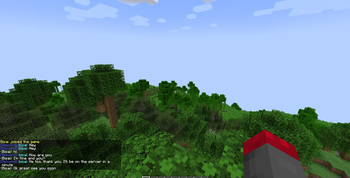
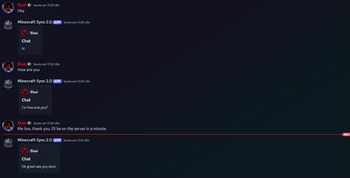
Together, the bot and this integration allow you to seamlessly synchronize the Minecraft chat with a Discord chat.
This enables you to connect chats between both platforms in real time effortlessly!
Invite the bot via the following link: bot invite link
Support: support discord server
Website: https://mc-sync.eu
Email: [email protected]
Setup
After the first startup, the token is generated automatically.
If needed, it can be adjusted in the following file: config.yml.
Configuration
Obtain the Token
Invite the Discord bot to your server and execute /chat-sync add.
Copy the generated token!Install the Plugin/Mod
Upload the plugin or mod to your server and restart it.
Once the server is running, paste the token into theconfig.ymlfile and restart it again.
I hope this guide helps you set everything up smoothly.
If you have any questions, feel free to reach out anytime! 😊
Available Versions
How to Install Minecraft-Sync on Your Server
Order Server
Order a Minecraft Java server with at least 3 GB RAM (4 GB recommended).
Set fabric Loader
In the panel under "Egg", select the fabric loader and matching Minecraft version (1.21.10).
Install Mod
Open the mod browser in the dashboard and search for "Minecraft-Sync". Click "Install" – done! Alternatively, upload the .jar via SFTP to the /mods folder.
Compatibility
Mod Loaders
Minecraft Versions
1.21.10, 1.21.9, 1.21.8 (+8 more)
Server-side
✗ UnsupportedRecommended RAM
4 GB(min. 3 GB)Frequently Asked Questions
Minecraft-Sync server crashes on startup – what to do?
Most common cause: wrong fabric version or insufficient RAM. Check the server log (latest.log) for "OutOfMemoryError" or "Mixin" errors. With Mado Hosting: ensure at least 3 GB RAM is allocated and the loader matches the mod version (1.21.10). You can switch loaders with one click in the panel.
Is Minecraft-Sync compatible with fabric and neoforge and paper?
Minecraft-Sync officially supports fabric, neoforge, paper for Minecraft 1.21.10, 1.21.9, 1.21.8. The Mado dashboard automatically detects incompatible loader combinations.
Server lagging with Minecraft-Sync – how to optimize performance?
Recommended RAM: 4 GB (per 8 players). Use /spark profiler to check if Minecraft-Sync consumes the most tick time. Common fixes: reduce server view-distance to 8-10, install "performant" or "starlight" as supplementary mods on Forge. With Mado Hosting, your server runs on NVMe SSDs with dedicated CPU cores for minimal latency.
Similar Mods




Rent Modded Server
Install Minecraft-Sync with just one click on your server.