
Minepiece Essentials
Boss timers and quest parchment reader for the MinePiece server — client-side Fabric mod.
Screenshots
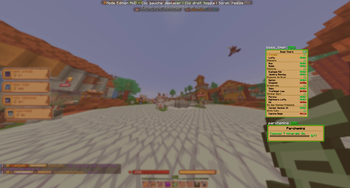
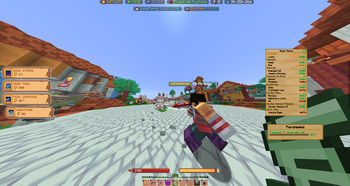
About this Mod
Minepiece Essentials
A lightweight, client-side Fabric mod for the MinePiece Minecraft server. Two passive quality-of-life
features:
Features
🕒 Boss Timers
- Auto-tracks boss respawns per island
- Plays a configurable sound alert when a boss is close to respawning
- Auto-syncs boss coordinates as Xaero's Minimap waypoints (if installed)
- Manual refresh button + per-island refresh queue
📜 Parchment Reader
- Scans quest parchments in your inventory
- Displays each parchment's objectives in a clean HUD
🎛 Draggable HUDs
- Press
Kto enter edit mode - Drag any HUD with the mouse
- Click outside or press
Escto save the layout
📍 Manual waypoints
- Press
Bto drop a waypoint at your current position (requires Xaero's Minimap)
Requirements
- Minecraft 1.21.11
- Fabric Loader ≥ 0.19.2
- Fabric API
- Java 21
- (optional) Xaero's Minimap
Install
Drop the .jar into your .minecraft/mods/ folder.
Configuration
All settings are stored locally at .minecraft/config/minepiece-essentials/:
config.json— refresh intervals, alert thresholdslayouts.json— HUD positionsbosses/— saved boss timers per islandwaypoints/— manual waypoints
Privacy
- 100% client-side.
- No account required.
- No telemetry. No data collection. Nothing leaves your machine.
- The mod's only network interaction with the MinePiece server is sending the silent
/infocommand (already available to
every player) to refresh boss timers.
Source
Source code: https://github.com/Aure64/minepiece-essentials
Available Versions
How to Install Minepiece Essentials on Your Server
Order Server
Order a Minecraft Java server with at least 3 GB RAM (4 GB recommended).
Set fabric Loader
In the panel under "Egg", select the fabric loader and matching Minecraft version (1.21.11).
Install Mod
Open the mod browser in the dashboard and search for "Minepiece Essentials". Click "Install" – done! Alternatively, upload the .jar via SFTP to the /mods folder.
Compatibility
Mod Loaders
Minecraft Versions
1.21.11, 1.21.8
Server-side
✗ UnsupportedRecommended RAM
4 GB(min. 3 GB)Frequently Asked Questions
Minepiece Essentials server crashes on startup – what to do?
Most common cause: wrong fabric version or insufficient RAM. Check the server log (latest.log) for "OutOfMemoryError" or "Mixin" errors. With Mado Hosting: ensure at least 3 GB RAM is allocated and the loader matches the mod version (1.21.11). You can switch loaders with one click in the panel.
Is Minepiece Essentials compatible with fabric?
Minepiece Essentials officially supports fabric for Minecraft 1.21.11, 1.21.8. The Mado dashboard automatically detects incompatible loader combinations.
Server lagging with Minepiece Essentials – how to optimize performance?
Recommended RAM: 4 GB (per 8 players). Use /spark profiler to check if Minepiece Essentials consumes the most tick time. Common fixes: reduce server view-distance to 8-10, install "performant" or "starlight" as supplementary mods on Forge. With Mado Hosting, your server runs on NVMe SSDs with dedicated CPU cores for minimal latency.
Similar Mods




Rent Modded Server
Install Minepiece Essentials with just one click on your server.