
Minetown
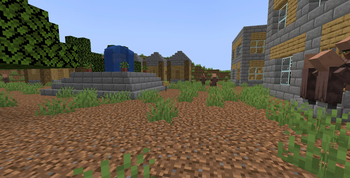
This mod adds towns - villages, but better. These towns contain a fountain in the middle, houses, apartment buildings...
Screenshots
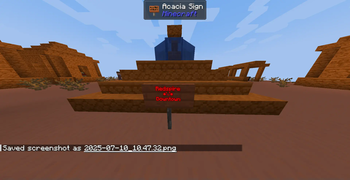
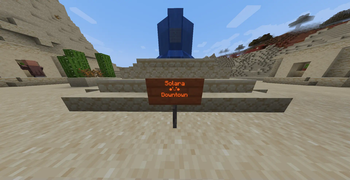
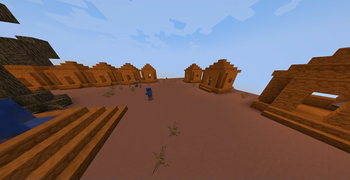
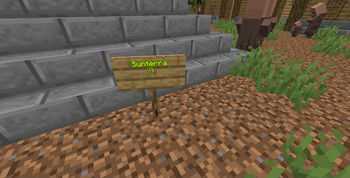
About this Mod
Minetown
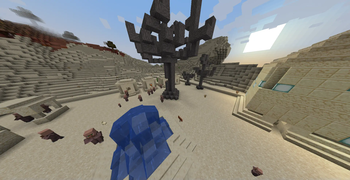
If you're tired from normal villages, this mod is for you. It adds towns - villages, but better. They contain things like fountains, houses, apartment building,...
Sunterra (Plains, Forests): oak trees, stone brick fountain, houses contain stone bricks, oak planks, oak saplings in flower pots, brown beds
Solara (Desert): sandstone houses, sandstone fountain, big building for job blocks, cactuses in flower pots, dead acacia trees
Redspire (Badlands): red sandstone houses, red sandstone fountain, cactuses and dead bushes in flower pots, dead oak trees
Important Information
We have a universal Discord server that has an issue tracker.
Cohost Studio 2025, All Rights reserved. You are NOT allowed to distribute this mod without the consent from the CEO of Conhost Studio; You are NOT allowed to publish addons commercially without the consent from Conhost;
Available Versions
How to Install Minetown on Your Server
Order Server
Order a Minecraft Java server with at least 4 GB RAM (6 GB recommended).
Set datapack Loader
In the panel under "Egg", select the datapack loader and matching Minecraft version (1.21.7).
Install Mod
Open the mod browser in the dashboard and search for "Minetown". Click "Install" – done! Alternatively, upload the .jar via SFTP to the /mods folder.
Compatibility
Mod Loaders
Minecraft Versions
1.21.7, 1.21.6, 1.21.5 (+5 more)
Server-side
✓ RequiredRecommended RAM
6 GB(min. 4 GB)Frequently Asked Questions
Minetown server crashes on startup – what to do?
Most common cause: wrong datapack version or insufficient RAM. Check the server log (latest.log) for "OutOfMemoryError" or "Mixin" errors. With Mado Hosting: ensure at least 4 GB RAM is allocated and the loader matches the mod version (1.21.7). You can switch loaders with one click in the panel.
Is Minetown compatible with datapack and forge and neoforge?
Minetown officially supports datapack, forge, neoforge for Minecraft 1.21.7, 1.21.6, 1.21.5. The Mado dashboard automatically detects incompatible loader combinations.
Server lagging with Minetown – how to optimize performance?
Recommended RAM: 6 GB (per 5 players). Use /spark profiler to check if Minetown consumes the most tick time. Common fixes: reduce server view-distance to 8-10, install "performant" or "starlight" as supplementary mods on Forge. With Mado Hosting, your server runs on NVMe SSDs with dedicated CPU cores for minimal latency.
Similar Mods



Rent Modded Server
Install Minetown with just one click on your server.