
MineZ Help Menu
The Minecraft mod created to make playing and understanding MineZ's mechanics easier
Screenshots
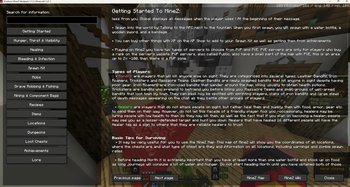
About this Mod
MineZ Help Mod for Shotbow MineZ Server
What does MineZ Help Menu offer?
- Each of the key mechanics of MineZ thoroughly explained
- MineZ's mobs' and bosses' behavior described
- Loot Tables for each of the chest rarity, tier of fishing and grave digging
- Table with information about all kinds of food (Hunger, Saturation, Thirst, Item stack)
- Adds information about the level of hydration provided by food to the item's description
- built-in resourcepack made to show the correct path to take in some dungeons
- custom textures for various items such as for ex. fresh water or bags
- fully compatible and built-in the Shotbow MineZ Modpack
Soon more:
- BankViewer
- Navigator (shows you the best way to travel between set locations)
- Automatic Distant Horizons switcher for spawn and dungeons
Information about Mod
This mod has been approved by the Shotbow.net's Staff team and fully complies with its the server's rules, however it has not been created nor maintained by them.
Available Versions
How to Install MineZ Help Menu on Your Server
Order Server
Order a Minecraft Java server with at least 3 GB RAM (4 GB recommended).
Set fabric Loader
In the panel under "Egg", select the fabric loader and matching Minecraft version (1.21.10).
Install Mod
Open the mod browser in the dashboard and search for "MineZ Help Menu". Click "Install" – done! Alternatively, upload the .jar via SFTP to the /mods folder.
Compatibility
Mod Loaders
Minecraft Versions
1.21.10, 1.21.9, 1.21.8 (+7 more)
Server-side
✗ UnsupportedRecommended RAM
4 GB(min. 3 GB)Frequently Asked Questions
MineZ Help Menu server crashes on startup – what to do?
Most common cause: wrong fabric version or insufficient RAM. Check the server log (latest.log) for "OutOfMemoryError" or "Mixin" errors. With Mado Hosting: ensure at least 3 GB RAM is allocated and the loader matches the mod version (1.21.10). You can switch loaders with one click in the panel.
Is MineZ Help Menu compatible with fabric?
MineZ Help Menu officially supports fabric for Minecraft 1.21.10, 1.21.9, 1.21.8. The Mado dashboard automatically detects incompatible loader combinations.
Server lagging with MineZ Help Menu – how to optimize performance?
Recommended RAM: 4 GB (per 8 players). Use /spark profiler to check if MineZ Help Menu consumes the most tick time. Common fixes: reduce server view-distance to 8-10, install "performant" or "starlight" as supplementary mods on Forge. With Mado Hosting, your server runs on NVMe SSDs with dedicated CPU cores for minimal latency.
Similar Mods




Rent Modded Server
Install MineZ Help Menu with just one click on your server.