
Minimap CE
A faithful, lightweight minimap addon for Better Than Wolves CE 3.0.0+
Screenshots
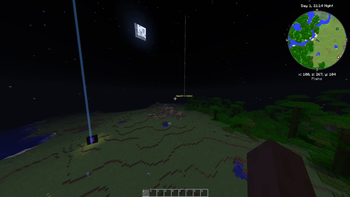
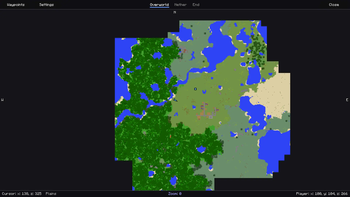
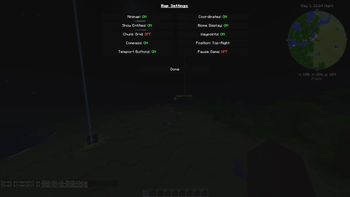
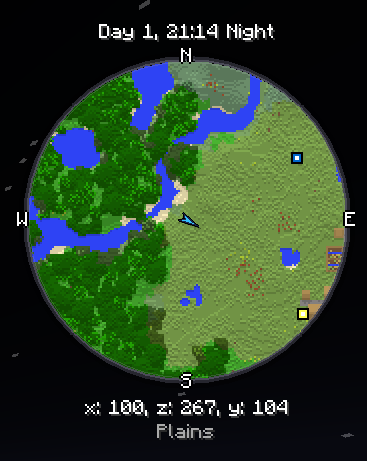
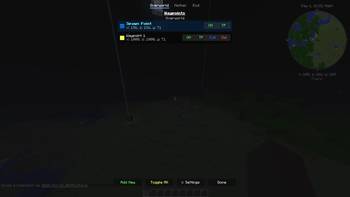
About this Mod
Minimap CE
A faithful, lightweight minimap mod for Better Than Wolves CE 3.0.0 and above (Minecraft 1.6.4).
Minimap CE provides all the classic minimap functionality you need, themed to feel right at home with old-school Minecraft and BTW. It runs client-side only.
Features
Classic Minimap
- Texture-sampled block colors — reads Minecraft's terrain atlas for accurate per-block colors.
- Topographic shading — height-based lighting for terrain depth.
- Circular map with a premium beveled frame and compass labels (N/E/S/W).
- Zoom — scroll to zoom in/out, entities and waypoints track at all zoom levels.
- Dynamic HUD Proportions — Minimap text automatically scales based on the size/zoom of your minimap for a perfectly clean look.
- Chunk grid overlay (toggleable).
- Biome tinting for grass, leaves, and foliage.
Full-Screen Topography
- Full-Screen Map — A scalable, draggable full-screen map interface.
- Persistent Terrain — Explored areas save to disk and display on the full-screen map even when far away, with intelligent silent patching if a chunk is loaded with missing data.
- Cross-Dimension Viewing — Seamlessly browse map data from the Nether, End, or Overworld via UI tabs, without needing to travel there.
- Unpaused Journeys — The settings menu allows you to leave the game unpaused while viewing the fullscreen map, perfect for long journeys or AFKing.
Waypoint Management
- Minimalist Map Markers — Half-size clean square markers designed to reduce visual clutter against any terrain.
- Hoverable Labels — To avoid map clutter, waypoint titles on the fullscreen map are hidden by default and appear seamlessly when hovered over!
- Add/Edit/Delete classic waypoint markers.
- Cross-Dimension Waypoint List — Access, manage, and toggle waypoints for any dimension natively from the waypoint GUI.
- Rei's "Add New" button layout inside the waypoint manager.
- Death Waypoints — Automatically saves your coordinates upon death and natively numbers subsequent deaths (e.g., Death, Death 2).
- In-world beacons — Translucent beams with waypoint icons visible from any distance.
- Teleport directly to any waypoint (lands you safely above ground).
- Per-world saving — separates waypoint lists automatically based on the singleplayer world or multiplayer server.
Entity Radar
- Mob arrows visible on the minimap — categorized by color: Red (hostile), Green (passive), Yellow (neutral).
- Player chevron in a distinctive gold colour.
Info HUD
- Tracks Time — Day count, HH:MM, Day/Night indicator.
- Tracks Coordinates — (x, z, y).
- Displays current Biome name.
Controls
| Key | Action |
|---|---|
J |
Open full-screen map |
O |
Open minimap settings |
B |
Open waypoint manager |
F |
Toggle entity radar |
] |
Increase minimap size |
[ |
Decrease minimap size |
Scroll |
Zoom in/out |
Installation
- Install Better Than Wolves CE 3.0.x and the Fabric Loader (0.14.19 or later recommended).
- Download the
minimap-ce-3.0.2.jarfrom the versions tab. - Drop the
.jarinto your Minecraft.minecraft/mods/folder. - Launch the game!
Available Versions
How to Install Minimap CE on Your Server
Order Server
Order a Minecraft Java server with at least 3 GB RAM (4 GB recommended).
Set legacy-fabric Loader
In the panel under "Egg", select the legacy-fabric loader and matching Minecraft version (1.6.4).
Install Mod
Open the mod browser in the dashboard and search for "Minimap CE". Click "Install" – done! Alternatively, upload the .jar via SFTP to the /mods folder.
Compatibility
Mod Loaders
Minecraft Versions
1.6.4
Server-side
✗ UnsupportedRecommended RAM
4 GB(min. 3 GB)Frequently Asked Questions
Minimap CE server crashes on startup – what to do?
Most common cause: wrong legacy-fabric version or insufficient RAM. Check the server log (latest.log) for "OutOfMemoryError" or "Mixin" errors. With Mado Hosting: ensure at least 3 GB RAM is allocated and the loader matches the mod version (1.6.4). You can switch loaders with one click in the panel.
Is Minimap CE compatible with legacy-fabric?
Minimap CE officially supports legacy-fabric for Minecraft 1.6.4. The Mado dashboard automatically detects incompatible loader combinations.
Server lagging with Minimap CE – how to optimize performance?
Recommended RAM: 4 GB (per 8 players). Use /spark profiler to check if Minimap CE consumes the most tick time. Common fixes: reduce server view-distance to 8-10, install "performant" or "starlight" as supplementary mods on Forge. With Mado Hosting, your server runs on NVMe SSDs with dedicated CPU cores for minimal latency.
Similar Mods




![[ETF] Entity Texture Features](https://cdn.modrinth.com/data/BVzZfTc1/af683d206d50b05258d865b0d6e4aa2f2cee12f2_96.webp)
![[EMF] Entity Model Features](https://cdn.modrinth.com/data/4I1XuqiY/6e5bbd0d06b1741bfdab6c0cfab6de8fdaf0064c_96.webp)
Rent Modded Server
Install Minimap CE with just one click on your server.