
Mining Quarries
Build quarries that mine cobblestone and ores!
Screenshots
About this Mod
Mining Quarries Mod
Overview
- Adds a new block called the Quarry.
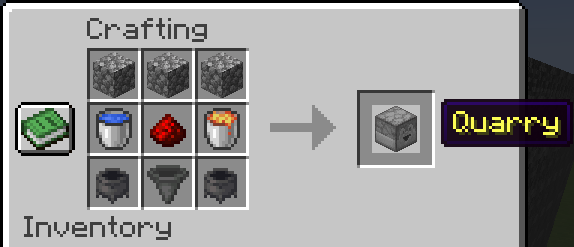
- Crafting Recipe:
- 3 × Cobblestone
- 1 × Water Bucket
- 1 x Redstone
- 1 × Lava Bucket
- 2 × Cauldrons
- 1 × Hopper
Quarry Block Mechanics
- Directional block with a 9×9 inventory.
- Supports multiple container outputs by facing multiple Quarries into the same container.
- Loot generation occurs only when:
- The chunk is loaded.
- The Quarry is facing into a valid container (e.g., Chest, Barrel).
- The pickaxe has more than 1 durability left.
Usage Steps
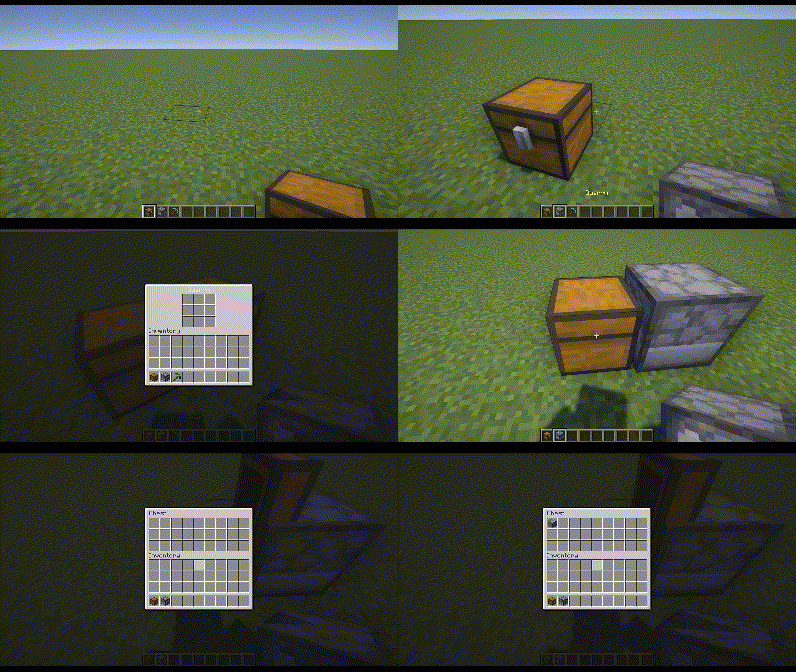
- Place the Quarry in the desired orientation, making sure it faces a container.
- Insert a pickaxe in the center slot of the Quarry’s 9×9 inventory.
- (Optional) Place desired items in any other slot(s) to whitelist them.
- Or place a Redstone Torch below the pickaxe to blacklist those items instead.
- Monitor pickaxe durability; replace or repair it before it drops to 1 to keep the Quarry running.
Pickaxe Behavior & Drops
- Pickaxes never fully break; it stops the Quarry when the pickaxe reaches 1 durability.
- Base drops; Cobblestone, Granite, Andesite, Diorite
- Different pickaxes affect:
- Cooldown (delay between loot generation).
- Additional loot types (beyond the base drops).
- Cooldown and Drops Table:
| Pickaxe | Cooldown (s) | Additional Drops |
|---|---|---|
| Gold | 1.0 | (None beyond base drops) |
| Wood | 7.0 | + Coal |
| Stone | 6.0 | + Lapis |
| Copper | 5.0 | + Copper |
| Iron | 4.0 | + Iron, + Redstone |
| Diamond | 3.0 | + Diamond, + Emerald |
| Netherite | 2.0 | + Rare chance of Ancient Debris |
Pickaxe Enchantments
- Efficiency: Each level reduces the Quarry’s cooldown by 0.1s.
- Unbreaking: Functions like vanilla Unbreaking, slowing durability loss.
- Fortune: Each level adds 1 extra loot roll per Quarry cycle.
- Silk Touch: Drops become their silk-touch variants (e.g., Stone instead of Cobblestone).
- Mending: No durability loss (effectively infinite uses).
Filtering System
- In the 9×9 Quarry inventory, all slots except the center are filtering slots.
- Whitelist Mode (default): Only items matching what’s in those filter slots will drop.
- Blacklist Mode: Placing a Redstone Torch in the slot below the center pickaxe slot switches all filtering slots into a blacklist.
- Important: If you are using Silk Touch, use silk-touched variants in the filter slots to match those exact drops.
For versions prior to 2.0.0
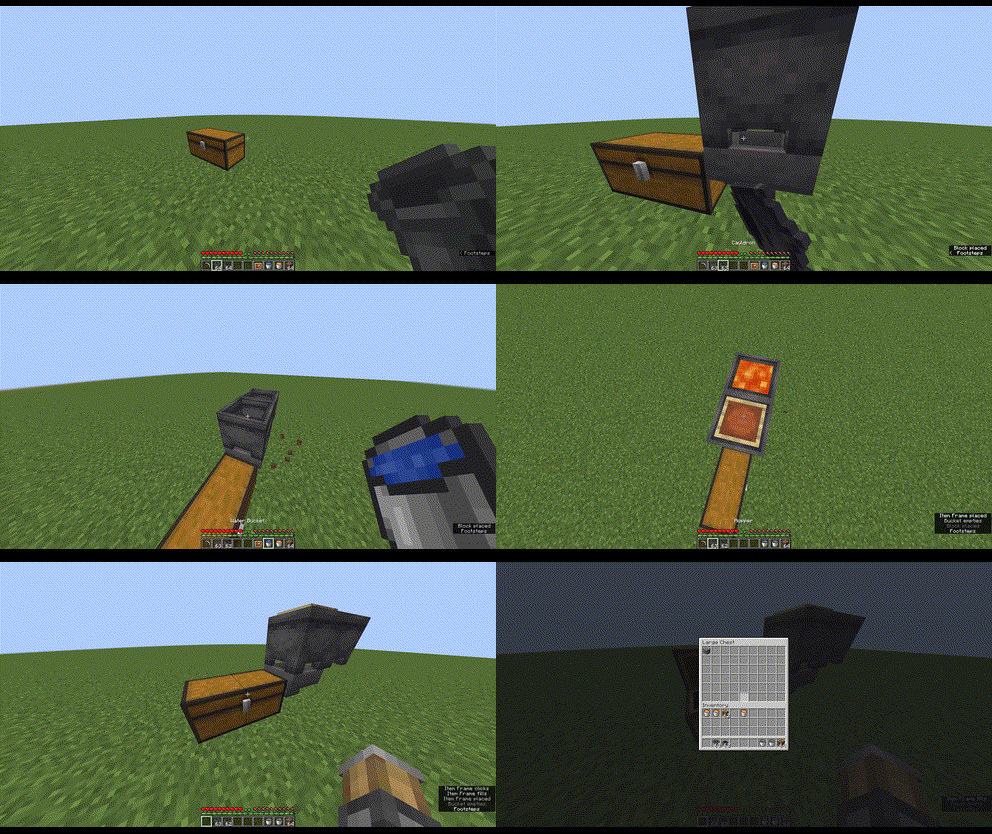
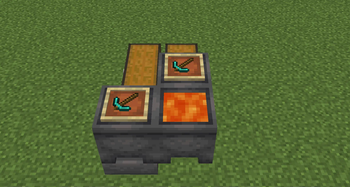
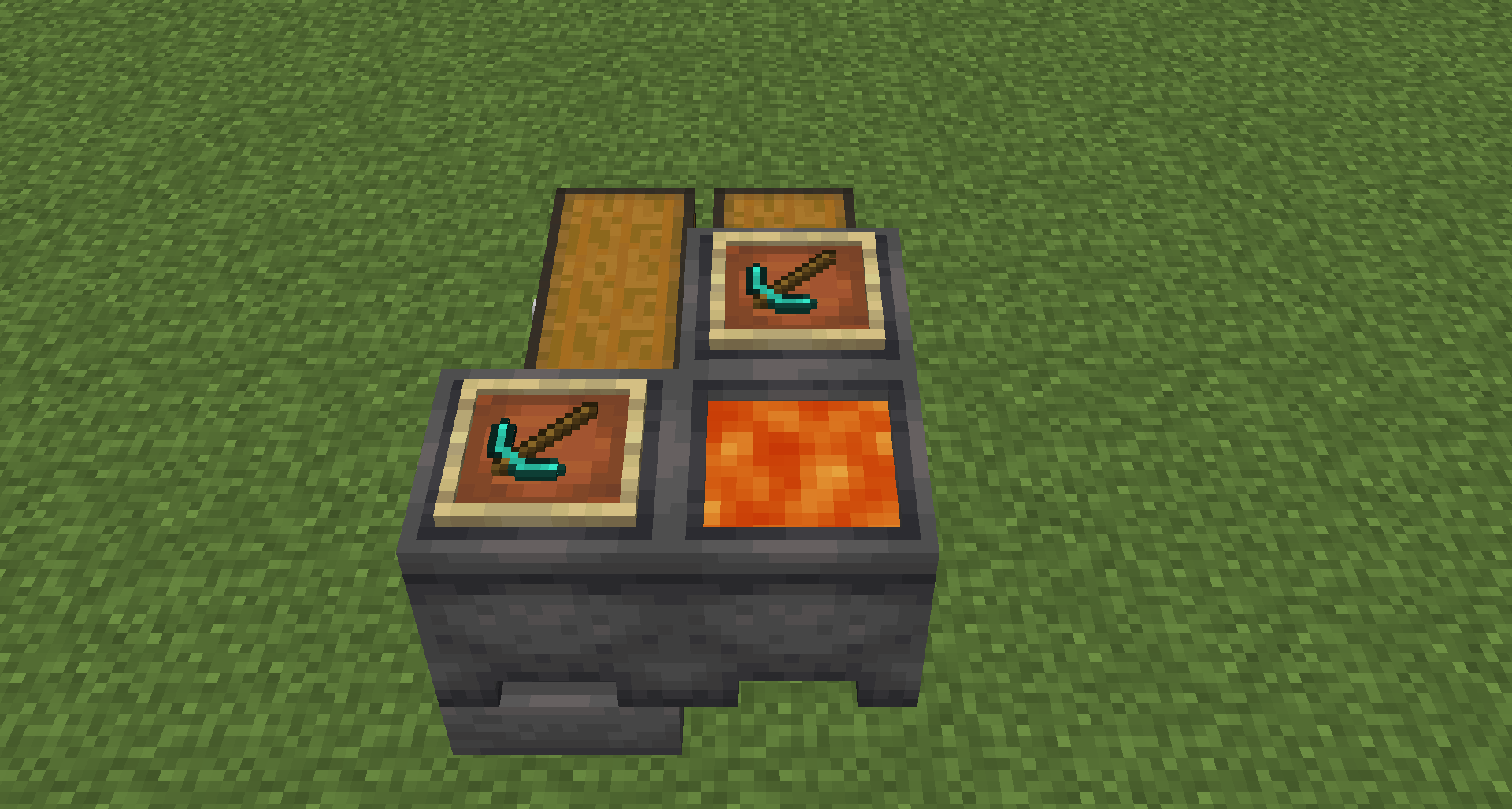
Build quarries that mine for you. All you need is a pickaxe, cauldrons of water and lava, an item frame, and a hopper.The ores you get and the speed at which the quarry operates is completely variable to the pickaxe you give it. Ores of increased tiers are rarer to be obtained through the quarry. Ancient debris for example is 1 in 1125 chance.
These quarries aren't overpowered. It's mostly cobblestone.
- Golden Pickaxe: 1s delay; cobblestone only.
- Wooden Pickaxe: 6s delay; Golden tier + coal
- Stone Pickaxe: 5s delay; Wooden tier + copper, and lapis
- Iron Pickaxe: 4s delay; Stone tier + iron, and redstone
- Diamond Pickaxe: 3s delay; Iron tier + gold, diamonds, and emeralds
- Netherite Pickaxe: 2s delay; Diamond tier + ancient debris
As the quarry operates, the pickaxe will lose durability. Once the pickaxe is all used up, it gets sent in with the ores with one durability left. This way your pickaxes aren't destroyed. If you want to extend the lifetime of the pickaxe, you can enchant it with unbreaking, which operates exactly as if you were to mine something. It checks for unbreaking only up to 10 levels.
Other applicable enchants include fortune, mending, and silk touch. Mending pickaxes don't lose durability! And silk touch pickaxes mine the silk touch variant of ores and stones. Fortune works by producing an extra tick of resources per level. Up to 3.
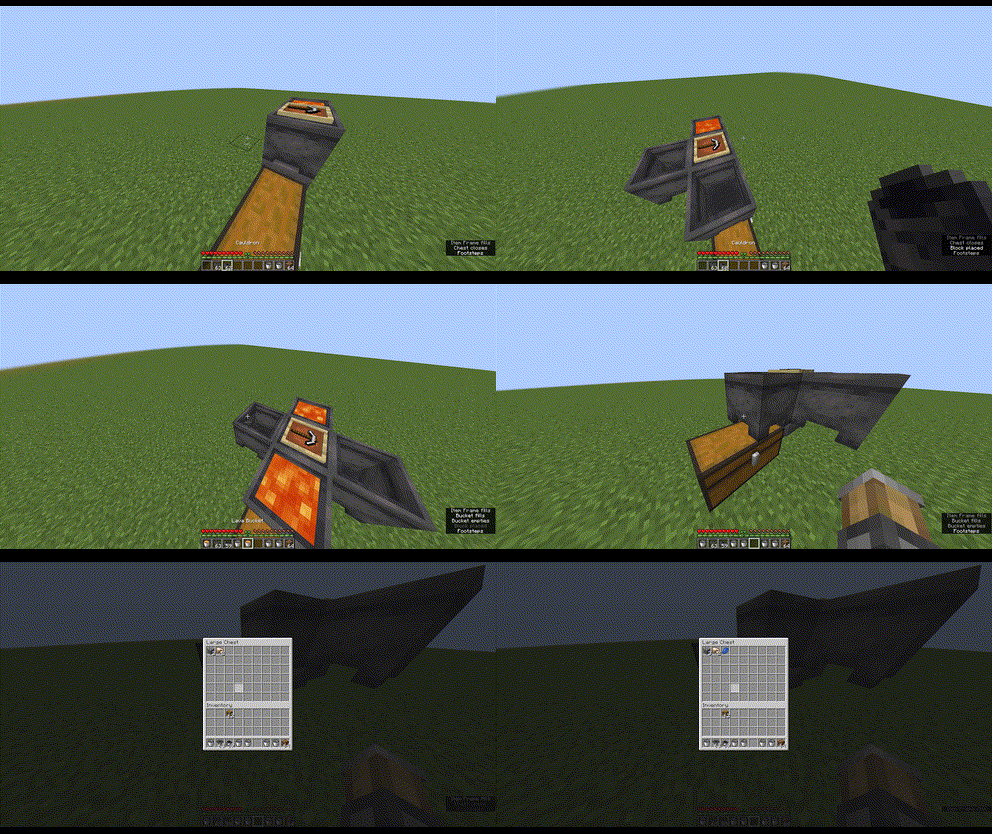
How do you build one? Check out this GIF.
You can increase production by adding more lava cauldrons. Up to 3 extras.
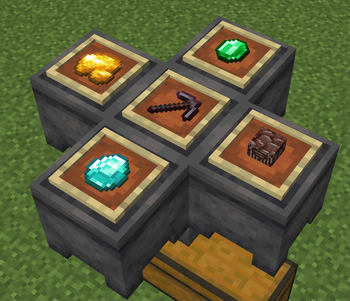
Don't want all the cobblestone? Want to only mine for diamonds for example? As of version 1.1.0, you can now filter up to 4 items to mine for. The quarry will still take damage and generate loot, but the loot you don't want will be destroyed, leaving only the resources you've selected.
How do you set up filtering? Place an item frame on the lava cauldrons. Four cauldrons, four items to filter. See this: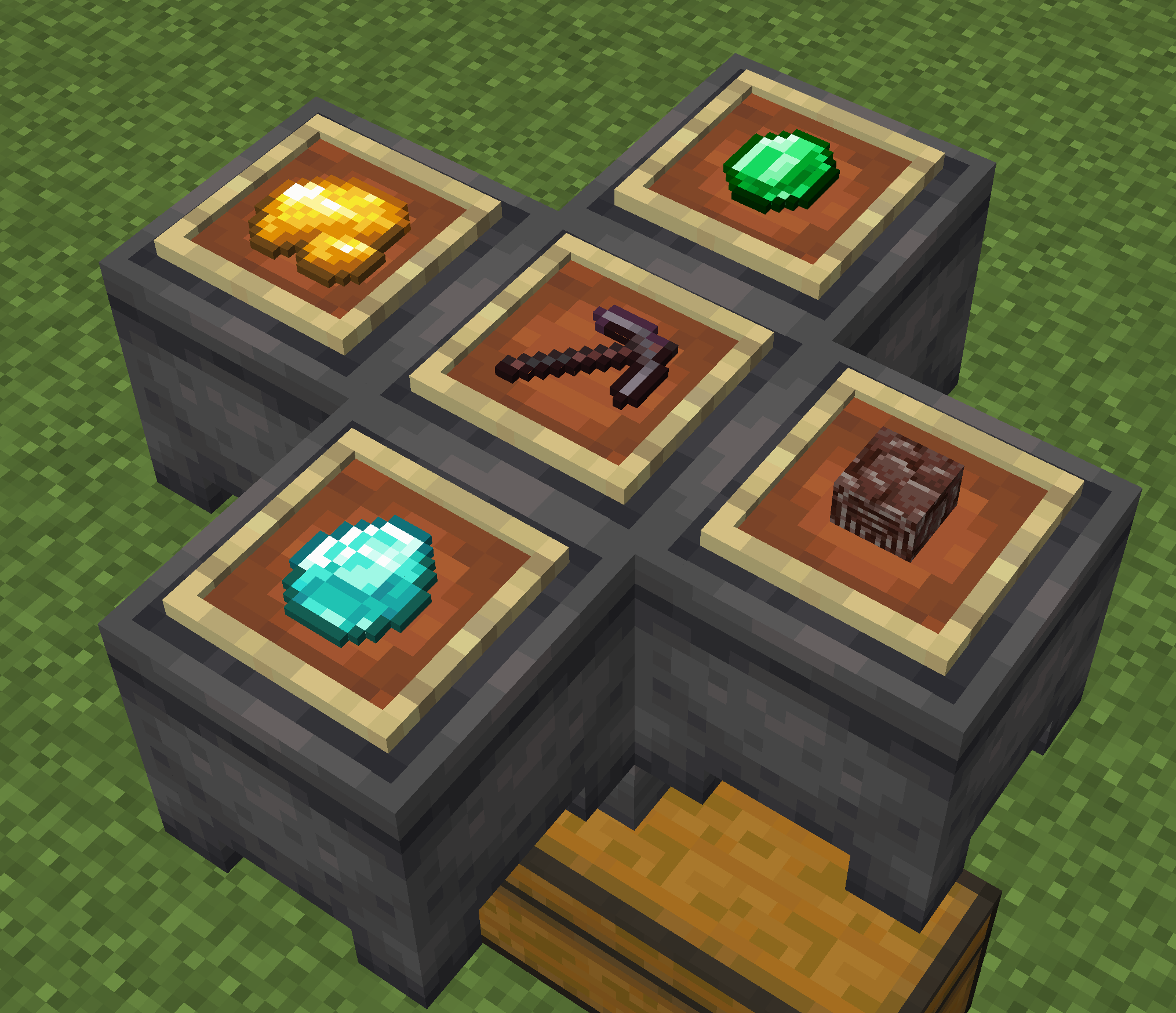
Quarries may share the same lava cauldron, like sugar cane can share water. And by extension, filtering rules.
Looking to automate tree farming? Check out Potted Farms
And my other mods
Logo gifted by Mechanary
Available Versions
How to Install Mining Quarries on Your Server
Order Server
Order a Minecraft Java server with at least 3 GB RAM (4 GB recommended).
Set datapack Loader
In the panel under "Egg", select the datapack loader and matching Minecraft version (26.1.2).
Install Mod
Open the mod browser in the dashboard and search for "Mining Quarries". Click "Install" – done! Alternatively, upload the .jar via SFTP to the /mods folder.
Compatibility
Mod Loaders
Minecraft Versions
26.1.2, 26.1.1, 26.1 (+12 more)
Server-side
✓ RequiredRecommended RAM
4 GB(min. 3 GB)Frequently Asked Questions
Mining Quarries server crashes on startup – what to do?
Most common cause: wrong datapack version or insufficient RAM. Check the server log (latest.log) for "OutOfMemoryError" or "Mixin" errors. With Mado Hosting: ensure at least 3 GB RAM is allocated and the loader matches the mod version (26.1.2). You can switch loaders with one click in the panel.
Is Mining Quarries compatible with datapack and fabric and forge and neoforge and quilt?
Mining Quarries officially supports datapack, fabric, forge, neoforge, quilt for Minecraft 26.1.2, 26.1.1, 26.1. Note: Forge and Fabric mods are NOT cross-compatible – pick one loader and stick with it. The Mado dashboard automatically detects incompatible loader combinations.
Server lagging with Mining Quarries – how to optimize performance?
Recommended RAM: 4 GB (per 8 players). Use /spark profiler to check if Mining Quarries consumes the most tick time. Common fixes: reduce server view-distance to 8-10, install "performant" or "starlight" as supplementary mods on Forge. With Mado Hosting, your server runs on NVMe SSDs with dedicated CPU cores for minimal latency.
Similar Mods




Rent Modded Server
Install Mining Quarries with just one click on your server.