
MiningQol
MiningQOL for hypixel skyblock. 1.21.10 fabric, yes it is Ai/vibe coded, shut up
Screenshots

About this Mod
MiningQOL
discord: ratity
A modern Minecraft Fabric mod for 1.21.8 that provides quality-of-life improvements for mining in Hypixel Skyblock.
Built with the Vexel GUI library for a sleek, modern interface with smooth animations and an intuitive card-based design.
Features
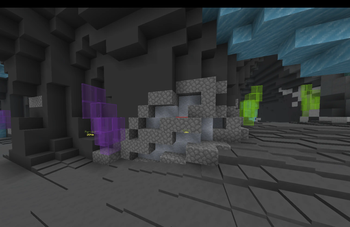
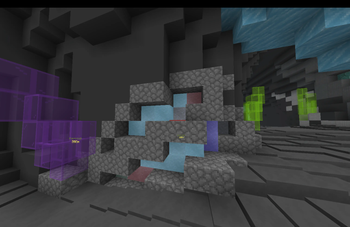
Corpse ESP
Highlight and track different types of corpses in the Crystal Hollows:
- Lapis Armor Corpses (Blue)
- Tungsten Corpses (Gray)
- Umber Corpses (Brown)
- Vanguard Corpses (Red)
- Fully customizable with individual toggles for each type
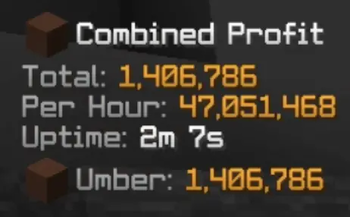
Mining Profit Tracker
Real-time profit tracking for your mining sessions:
- Tracks gemstone drops (Rough, Flawed, Fine, Flawless, Perfect)
- Automatic Hypixel Bazaar price fetching
- Option to use NPC prices instead
- Configurable pristine chance
- Draggable HUD position
- Display options for different gem tiers
- Session-based tracking with reset functionality
Efficient Miner Overlay
Visual overlay showing efficiency when mining blocks:
- Color-coded efficiency indicators
- Two visualization modes: modern gradient or classic heatmap
- Helps optimize mining patterns
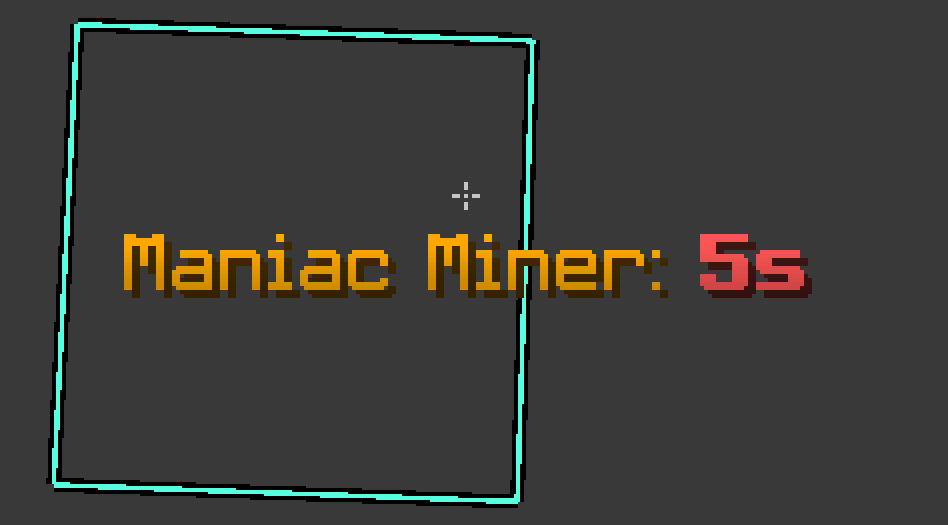
Pickaxe Cooldown Display
- HUD showing current pickaxe ability cooldown
- Displays when Maniac Miner or similar abilities are active
- Configurable position and title display
- Customizable cooldown threshold for title visibility
Name Hider
Privacy feature to hide your username:
- Replace your name with custom text
- Solid color or gradient color options
- RGB color picker for both colors
Glass Pane Sync
Fixes gemstone (stained glass) pane connections when mining:
- Makes panes behave like they did in 1.8.9
- Properly updates visual connections when breaking adjacent panes
- Purely cosmetic client-side fix
Click Lock
Click lock functionality for mining (use responsibly):
- Configurable mining slot and cooldown
- Rod swap support
- Second drill support
- Tab list cooldown integration
- Visual HUD indicator
Command Keybinds
- Bind any chat command to any keyboard key
- Easy-to-use keybind editor in GUI
Miscellaneous
- Auto-skip /sho load: Automatically runs
/sho skipto 1after/sho load
Installation
- Make sure you have Fabric Loader installed for Minecraft 1.21.8
- Download Fabric API for 1.21.8
- Download the latest release of MiningQOL from the Releases page
- Place the downloaded
.jarfile in your.minecraft/modsfolder - Launch Minecraft with the Fabric profile
Usage
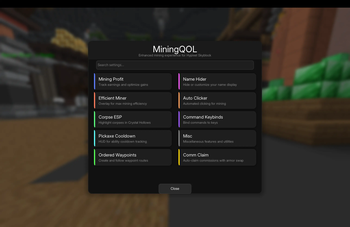
Open the config GUI in-game with /miningconfig command.
Modern GUI Interface
The mod features a sleek, modern interface built with the Vexel GUI library:
- Card-based design - Clean, organized categories with smooth hover effects
- Powerful search - Search bar that finds settings across all categories
- Search by feature name (e.g., "profit", "cooldown")
- Search by specific settings (e.g., "bazaar", "heatmap", "gradient")
- Search by keywords (e.g., "lapis", "rod swap", "pristine")
- Instant navigation - Fast screen transitions with no loading delays
- Responsive controls - Modern sliders, toggles, and color pickers
Categories
- Mining Profit - Track earnings and optimize gains with bazaar integration
- Efficient Miner - Overlay showing players with max mining efficiency
- Corpse ESP - Highlight different corpse types in Crystal Hollows
- Pickaxe Cooldown - HUD for ability cooldown tracking
- Name Hider - Customize or hide your name display with gradients
- Click Lock - Click lock functionality for mining (use responsibly)
- Command Keybinds - Bind any command to any key for quick access
- Misc - Glass pane sync, auto-skip /sho load, and more
Configuration
All settings are saved automatically to config/miningqol.json and persist between game sessions.
Dependencies
- Minecraft Version: 1.21.8
- Loader: Fabric Loader 0.16.14+
- Fabric API: 0.130.0+1.21.8
- Fabric Language Kotlin: 1.13.0+kotlin.2.1.0
- Vexel GUI Library: 121 (included)
- Java Version: Java 21
Disclaimer
This mod is designed for Hypixel Skyblock and includes features like click lock. Use at your own risk. Always check Hypixel's rules regarding allowed modifications. The developers are not responsible for any consequences from using this mod.
Most features are purely visual/informational and should be safe, but features like click lock may be against server rules.
Building from Source
git clone https://github.com/Rinity9801/MiningQOL.git
cd MiningQOL
./gradlew build
The built jar will be in build/libs/
Available Versions
How to Install MiningQol on Your Server
Order Server
Order a Minecraft Java server with at least 3 GB RAM (4 GB recommended).
Set fabric Loader
In the panel under "Egg", select the fabric loader and matching Minecraft version (1.21.11).
Install Mod
Open the mod browser in the dashboard and search for "MiningQol". Click "Install" – done! Alternatively, upload the .jar via SFTP to the /mods folder.
Compatibility
Mod Loaders
Minecraft Versions
1.21.11, 1.21.10
Server-side
✗ UnsupportedRecommended RAM
4 GB(min. 3 GB)Frequently Asked Questions
MiningQol server crashes on startup – what to do?
Most common cause: wrong fabric version or insufficient RAM. Check the server log (latest.log) for "OutOfMemoryError" or "Mixin" errors. With Mado Hosting: ensure at least 3 GB RAM is allocated and the loader matches the mod version (1.21.11). You can switch loaders with one click in the panel.
Is MiningQol compatible with fabric?
MiningQol officially supports fabric for Minecraft 1.21.11, 1.21.10. The Mado dashboard automatically detects incompatible loader combinations.
Server lagging with MiningQol – how to optimize performance?
Recommended RAM: 4 GB (per 8 players). Use /spark profiler to check if MiningQol consumes the most tick time. Common fixes: reduce server view-distance to 8-10, install "performant" or "starlight" as supplementary mods on Forge. With Mado Hosting, your server runs on NVMe SSDs with dedicated CPU cores for minimal latency.
Similar Mods




Rent Modded Server
Install MiningQol with just one click on your server.