
Misia's Simple ToolTips
Modify item tooltips via JSON files.
Screenshots
About this Mod
Overview
This is a utility mod designed for map makers and modpack authors.
It provides modpack creators with a low‑threshold way to manipulate item tooltip content.
Features
The mod has three operation modes:
- Replace (corresponding
replacefolder): Clears the original tooltip and writes custom text. - Append (corresponding
appendfolder): Adds text starting from the line directly below the original tooltip. - Extra (corresponding
extrafolder): Shows extra text when holding Shift.
All three modes can work simultaneously, applied in the order: Replace → Append → Extra.
How to Use
The mod is extremely easy to use – you only need a basic understanding of JSON format and Minecraft registry names.
Simply write a JSON file, place it in the folder corresponding to the mod ID and the desired mode. The JSON file name does not matter; the mod will read all JSON files under the correct path.
Supports \n for line breaks and vanilla control characters.
<modpack root>
└─simple_tooltips/
    ├── modid/
    │   ├── replace/
    │   │       └── XXX.json
    │   ├── append/
    │   │       └── XXX.json
    │   └── extra/
    │            └── XXX.json
......
Configuration Example
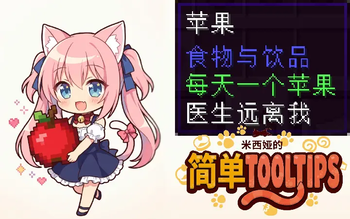
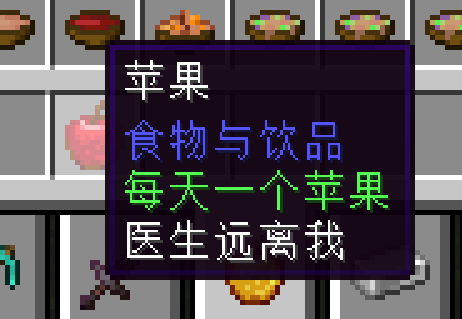
Example using Replace mode + apple:
<modpack root>\simple_tooltips\minecraft\append\apple.json
{
  "apple": "§aAn apple a day\nkeeps the doctor away"
}
Available Versions
How to Install Misia's Simple ToolTips on Your Server
Order Server
Order a Minecraft Java server with at least 3 GB RAM (4 GB recommended).
Set neoforge Loader
In the panel under "Egg", select the neoforge loader and matching Minecraft version (1.21.11).
Install Mod
Open the mod browser in the dashboard and search for "Misia's Simple ToolTips". Click "Install" – done! Alternatively, upload the .jar via SFTP to the /mods folder.
Compatibility
Mod Loaders
Minecraft Versions
1.21.11, 1.21.10, 1.21.9 (+9 more)
Server-side
✗ UnsupportedRecommended RAM
4 GB(min. 3 GB)Frequently Asked Questions
Misia's Simple ToolTips server crashes on startup – what to do?
Most common cause: wrong neoforge version or insufficient RAM. Check the server log (latest.log) for "OutOfMemoryError" or "Mixin" errors. With Mado Hosting: ensure at least 3 GB RAM is allocated and the loader matches the mod version (1.21.11). You can switch loaders with one click in the panel.
Is Misia's Simple ToolTips compatible with neoforge?
Misia's Simple ToolTips officially supports neoforge for Minecraft 1.21.11, 1.21.10, 1.21.9. The Mado dashboard automatically detects incompatible loader combinations.
Server lagging with Misia's Simple ToolTips – how to optimize performance?
Recommended RAM: 4 GB (per 8 players). Use /spark profiler to check if Misia's Simple ToolTips consumes the most tick time. Common fixes: reduce server view-distance to 8-10, install "performant" or "starlight" as supplementary mods on Forge. With Mado Hosting, your server runs on NVMe SSDs with dedicated CPU cores for minimal latency.
Similar Mods




![[ETF] Entity Texture Features](https://cdn.modrinth.com/data/BVzZfTc1/af683d206d50b05258d865b0d6e4aa2f2cee12f2_96.webp)
![[EMF] Entity Model Features](https://cdn.modrinth.com/data/4I1XuqiY/6e5bbd0d06b1741bfdab6c0cfab6de8fdaf0064c_96.webp)
Rent Modded Server
Install Misia's Simple ToolTips with just one click on your server.