
Mixtape
A fabric mod that adds loads more configuration to the music in Minecraft.
Screenshots
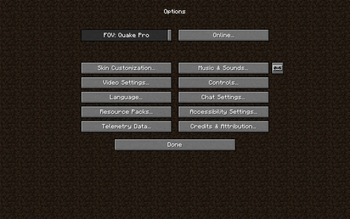
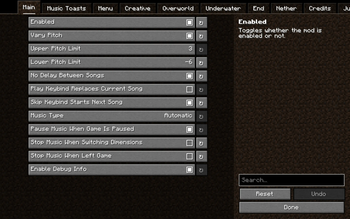
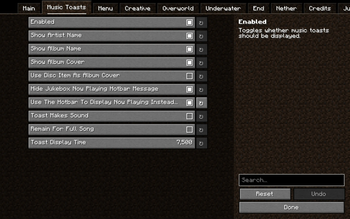
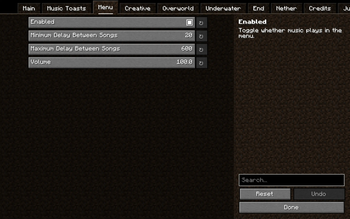
About this Mod
Mixtape
Mixtape is a client sided mod that adds lots of configuration for the music, Letting you control how often music happens, what music plays, and much more! I will backport the mod to older versions on request.
Social
Discord: https://discord.gg/WyrTsYFweK!!!
Features
The current features include
A skip keybind
- Setting that lets you choose if the skip keybind starts a new song if the delay is bigger than 0
A start new song keybind
- Setting that lets you choose if the play keybind replaces the current song
A pause/resume keybind (currently only sets the delay between songs to infinite, not finished)
A setting to change the music from based on your location, to the music from a specific location, nether, end, underwater, etc
A setting to set the delay between songs in all areas 0
Settings to stop the music from pausing when you pause the game, travel dimensions, and leave a world
A setting that you can enable to make the pitch of the music varied, so each time you hear it it's slightly different
- You can change the minimum and maximum the pitch can change to, giving you control over the variation
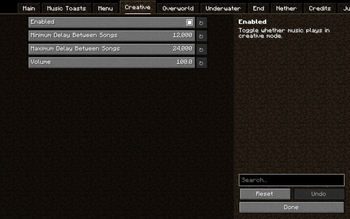
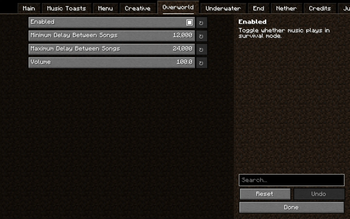
Settings for each music type (menu, creative, game, underwater, end, nether, credits, and jukebox)
- Whether or not music of this type can play
- The maximum delay that can happen before more music plays (apart from the credits and jukebox music)
- The maximum delay that can happen before more music plays (apart from the credits and jukebox music)
- The volume at which the songs play
Special settings for jukebox songs
- A setting that when enabled turns down regular music when a disc song is playing
- A setting to change the jukebox songs to play in mono, so they don't switch ear when you turn around
- A setting to replace the song 11 with the song eleven
- A setting to replace the song cat with the song dog
- A setting to replace the song ward with the song Droopy Likes Your Face
Useful info in the debug screen
Music Toasts
- Music toasts are like regular recipe and advancements toasts. They can show the album cover, the song artist & name, and the song album name.
- Music toasts have lots of customization for each part of them. (duration, whether or not they make a sound, what information they display. etc)
- Music toasts are compatible with music added by resourcepacks!
Create a
music_list.jsonfile inresourcepack/assets/mixtapeto add a Title, Artist, and Album.
{
  "calm1": {
    "name": "Minecraft",
    "artist": "C418",
    "album": "Minecraft - Volume Alpha"
  },
  "calm2": {
    "name": "Clark",
    "artist": "C418",
    "album": "Minecraft - Volume Alpha"
  }
}
- Create an
album_list.jsonfile inresourcepack/assets/mixtapeto point an album name towards a 300x300 tile inresourcepack/assets/mixtape/textures/gui/album_covers.png
{
  "Minecraft - Volume Alpha": {
    "x": 0,
    "y": 0
  },
  "Minecraft - Volume Beta": {
    "x": 1,
    "y": 0
  }
}
Mixtape also comes with 6 built-in resourcepacks!
These are to control what music plays, and some add music written by c418 for minecraft but not used in the game.
- Unused music
- Adds the unused music written by c418 for minecraft
- 0x10c in the end
- Makes the songs from the 0x10c soundtrack play in the end
- Only c418
- Stops the overworld (and menu) music not written by c418 from playing
- Only c418 plus unused music
- Stops the overworld (and menu) music not written by c418 from playing and adds the unused music
- No nether update
- Stops the songs from the nether update soundtrack from playing
- No nether update plus unused music
- Stops the songs from the nether update soundtrack from playing and adds the unused music
- No Biome based
- Makes all overworld music play in the overworld, without biome specific triggers
- No Biome based plus unused music
- Makes all overworld music play in the overworld, without biome specific triggers and adds the unused music
Songs added by the unused music resourcepack include:
- Intro
- Kyoto
- Équinoxe
- Ki
- Chris
- Flake
- Excuse
- Door
- Beginning
- Moog City
- Droopy Likes Richochet
All music added by this mod was composed by c418.
Installation
- Download and run the Fabric installer.
- Click the "vanilla" button, leave the other settings as they are,
and click "download installer". - Note: this step may vary if you aren't using the vanilla launcher
or an old version of Minecraft.
- Click the "vanilla" button, leave the other settings as they are,
- Download the Fabric API and Cloth Config
and move them to the mods folder (.minecraft/mods). - Download mixtape from the releases page
and move it to the mods folder (.minecraft/mods).
Available Versions
How to Install Mixtape on Your Server
Order Server
Order a Minecraft Java server with at least 3 GB RAM (4 GB recommended).
Set fabric Loader
In the panel under "Egg", select the fabric loader and matching Minecraft version (1.20.4).
Install Mod
Open the mod browser in the dashboard and search for "Mixtape". Click "Install" – done! Alternatively, upload the .jar via SFTP to the /mods folder.
Compatibility
Mod Loaders
Minecraft Versions
1.20.4, 1.20.3, 1.20.2 (+7 more)
Server-side
✗ UnsupportedRecommended RAM
4 GB(min. 3 GB)Frequently Asked Questions
Mixtape server crashes on startup – what to do?
Most common cause: wrong fabric version or insufficient RAM. Check the server log (latest.log) for "OutOfMemoryError" or "Mixin" errors. With Mado Hosting: ensure at least 3 GB RAM is allocated and the loader matches the mod version (1.20.4). You can switch loaders with one click in the panel.
Is Mixtape compatible with fabric and quilt?
Mixtape officially supports fabric, quilt for Minecraft 1.20.4, 1.20.3, 1.20.2. The Mado dashboard automatically detects incompatible loader combinations.
Server lagging with Mixtape – how to optimize performance?
Recommended RAM: 4 GB (per 8 players). Use /spark profiler to check if Mixtape consumes the most tick time. Common fixes: reduce server view-distance to 8-10, install "performant" or "starlight" as supplementary mods on Forge. With Mado Hosting, your server runs on NVMe SSDs with dedicated CPU cores for minimal latency.
Similar Mods




![[ETF] Entity Texture Features](https://cdn.modrinth.com/data/BVzZfTc1/af683d206d50b05258d865b0d6e4aa2f2cee12f2_96.webp)
![[EMF] Entity Model Features](https://cdn.modrinth.com/data/4I1XuqiY/6e5bbd0d06b1741bfdab6c0cfab6de8fdaf0064c_96.webp)
Rent Modded Server
Install Mixtape with just one click on your server.