
Moai Statue Paintings
adds Moai Statue paintings to Minecraft. You can choose 5 sizes: Normal, Medium, Big, Huge, and Gigantic.
Screenshots
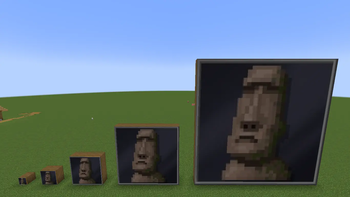
About this Mod
This mod adds a set of new, aesthetic paintings to your Minecraft world, featuring iconic Moai statues from Easter Island. Whether you're decorating a temple, a modern art gallery, or simply adding a unique touch to your home, these paintings will give your builds a new level of character.
The mod includes 5 distinct paintings, each available in different sizes to fit any space:
1x1
2x2
4x4
8x8
16x16 (A huge, high-resolution painting!)
Why you should download this project:
Unique Aesthetic: Move beyond the default paintings with a unique set of art that provides a striking visual for any build.
Perfect for Builders: The variety of sizes allows for seamless integration into large-scale projects or small, detailed rooms. The massive 16x16 size offers a dramatic, centerpiece-worthy piece of art.
Simple & Lightweight: This is a small, focused mod that won't disrupt your core gameplay, but adds significant creative potential.
Critical Information before you download:
Potential Performance Warning: The mod's largest paintings, especially the 16x16 version, use high-resolution textures. While they look great, they can cause performance issues or crashes on some systems, especially in combination with other major performance mods. If you experience crashes on startup, try removing the painting file or scaling it down to a smaller size.
Available Versions
How to Install Moai Statue Paintings on Your Server
Order Server
Order a Minecraft Java server with at least 3 GB RAM (4 GB recommended).
Set neoforge Loader
In the panel under "Egg", select the neoforge loader and matching Minecraft version (1.21.1).
Install Mod
Open the mod browser in the dashboard and search for "Moai Statue Paintings". Click "Install" – done! Alternatively, upload the .jar via SFTP to the /mods folder.
Compatibility
Mod Loaders
Minecraft Versions
1.21.1
Server-side
✓ RequiredRecommended RAM
4 GB(min. 3 GB)Frequently Asked Questions
Moai Statue Paintings server crashes on startup – what to do?
Most common cause: wrong neoforge version or insufficient RAM. Check the server log (latest.log) for "OutOfMemoryError" or "Mixin" errors. With Mado Hosting: ensure at least 3 GB RAM is allocated and the loader matches the mod version (1.21.1). You can switch loaders with one click in the panel.
Is Moai Statue Paintings compatible with neoforge?
Moai Statue Paintings officially supports neoforge for Minecraft 1.21.1. The Mado dashboard automatically detects incompatible loader combinations.
Server lagging with Moai Statue Paintings – how to optimize performance?
Recommended RAM: 4 GB (per 8 players). Use /spark profiler to check if Moai Statue Paintings consumes the most tick time. Common fixes: reduce server view-distance to 8-10, install "performant" or "starlight" as supplementary mods on Forge. With Mado Hosting, your server runs on NVMe SSDs with dedicated CPU cores for minimal latency.
Similar Mods

![[ETF] Entity Texture Features](https://cdn.modrinth.com/data/BVzZfTc1/af683d206d50b05258d865b0d6e4aa2f2cee12f2_96.webp)
![[EMF] Entity Model Features](https://cdn.modrinth.com/data/4I1XuqiY/6e5bbd0d06b1741bfdab6c0cfab6de8fdaf0064c_96.webp)



Rent Modded Server
Install Moai Statue Paintings with just one click on your server.