
Mob Effects Modifier
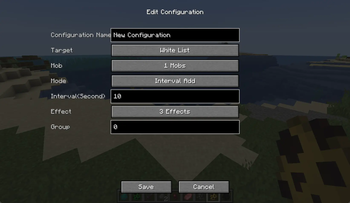
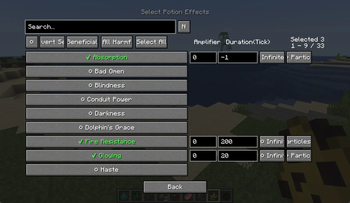
A GUI-configurable mob effect system that lets you filter specific mobs, assign effects on spawn, or schedule timed effect updates.
Screenshots
About this Mod
Mob Effects Modifier

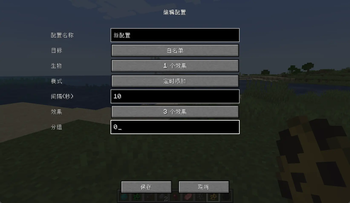
一个 Minecraft Forge 模组,允许你自定义生物的药水效果。可以让生物生成时自带效果,或者定时添加/移除效果,所有配置通过游戏内 GUI 完成,无需编辑配置文件。
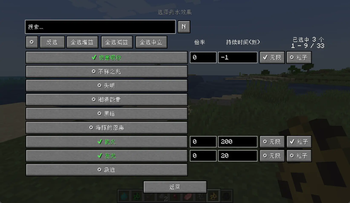
A Minecraft Forge mod that lets you customize mob potion effects. Give mobs effects on spawn or add/remove effects on a timer — all configured through an in-game GUI, no file editing required.
✨ 功能 | Features
- 个性化配置生物的效果 — 使用
/effectmenu开启生物效果配置菜单(需要管理员权限) - 生成自带效果 — 生物生成时自动获得你指定的药水效果
- 定时添加/移除 — 按自定义间隔给生物添加或移除效果
- 灵活目标选择 — 支持全部生物、白名单、黑名单三种模式
- 分组管理 — 配置项支持分组,使用
/effectmenu group <int> <bool>可以统一开启或者关闭某一组配置 - 游戏内 GUI 配置 — 搜索、选择、编辑全部在游戏内完成
- 每个配置独立文件 — 保存在
config/mob_effects_modifier/下,方便分享和版本管理 - 服务端权威 — 所有配置存储在服务端,多人游戏统一生效
- 热重载 —
/effectmenu reload重新加载配置,无需重启
- Custom Mob Effects — Open the config menu with
/effectmenu(requires admin permission) - Effects on Spawn — Mobs automatically gain your specified potion effects when they spawn
- Timed Add/Remove — Add or remove effects from mobs at custom intervals
- Flexible Targeting — Supports ALL mobs, WHITELIST, and BLACKLIST modes
- Group Management — Organize configs into groups; use
/effectmenu group <int> <bool>to enable/disable an entire group at once - In-Game GUI — Search, select, and edit everything without leaving the game
- Per-Config Files — Stored under
config/mob_effects_modifier/, easy to share and version-control - Server-Authoritative — All configs live on the server; everyone on a multiplayer server uses the same settings
- Hot Reload —
/effectmenu reloadreloads configs without restarting
📷 截图
📄 许可证
MIT © 2026
Available Versions
How to Install Mob Effects Modifier on Your Server
Order Server
Order a Minecraft Java server with at least 3 GB RAM (4 GB recommended).
Set forge Loader
In the panel under "Egg", select the forge loader and matching Minecraft version (1.20.1).
Install Mod
Open the mod browser in the dashboard and search for "Mob Effects Modifier". Click "Install" – done! Alternatively, upload the .jar via SFTP to the /mods folder.
Compatibility
Mod Loaders
Minecraft Versions
1.20.1
Server-side
✓ RequiredRecommended RAM
4 GB(min. 3 GB)Frequently Asked Questions
Mob Effects Modifier server crashes on startup – what to do?
Most common cause: wrong forge version or insufficient RAM. Check the server log (latest.log) for "OutOfMemoryError" or "Mixin" errors. With Mado Hosting: ensure at least 3 GB RAM is allocated and the loader matches the mod version (1.20.1). You can switch loaders with one click in the panel.
Is Mob Effects Modifier compatible with forge?
Mob Effects Modifier officially supports forge for Minecraft 1.20.1. The Mado dashboard automatically detects incompatible loader combinations.
Server lagging with Mob Effects Modifier – how to optimize performance?
Recommended RAM: 4 GB (per 8 players). Use /spark profiler to check if Mob Effects Modifier consumes the most tick time. Common fixes: reduce server view-distance to 8-10, install "performant" or "starlight" as supplementary mods on Forge. With Mado Hosting, your server runs on NVMe SSDs with dedicated CPU cores for minimal latency.
Similar Mods
![[EMF] Entity Model Features](https://cdn.modrinth.com/data/4I1XuqiY/6e5bbd0d06b1741bfdab6c0cfab6de8fdaf0064c_96.webp)


Rent Modded Server
Install Mob Effects Modifier with just one click on your server.