
Mob Evolution
The world is learning, mobs are evolving, survive or perish.
Screenshots

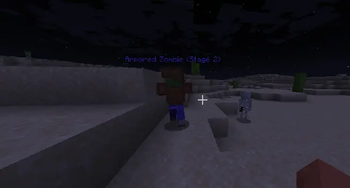
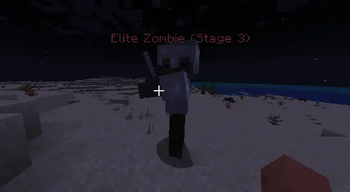
About this Mod
Mob Evolution: Adaptive Nightmare System





Mob Evolution: Adaptive Nightmare System is a progressive difficulty mod for Minecraft Fabric 1.20.1 that transforms your survival experience. The world becomes increasingly dangerous as time passes and as players die. Zombies don't just get stronger—they evolve, gain new abilities, and eventually summon nightmares.
Are you ready to face the evolution?
🌑 Features
🧬 Dynamic Evolution System
Zombies evolve through 6 distinct stages based on the world age and the total number of player deaths. Each death accelerates the evolution!
- Stage 0 (The Beginning): Vanilla zombies. Enjoy the peace while it lasts.
- Stage 1 (Swift Variant): Zombies gain speed and wear leather helmets. They are faster than you think.
- Stage 2 (Armored Threat): Zombies become tougher, wearing iron armor and wielding iron swords.
- Stage 3 (Elite Hunters): Highly dangerous Elite Zombies with diamond gear, increased health, and relentless tracking.
- Stage 4 (Mini-Bosses): The horde grows stronger. Elite variants become common.
- Stage 5 (The Nightmare): The Nightmare Commander arrives. A boss-tier entity that can summon reinforcements and crush unprepared players.
🩸 Blood Moon Event
Every night carries a risk. The Blood Moon may rise, drastically increasing mob spawn rates and aggression. Survive the night if you can.
🧠 Adaptive AI
- Higher-tier zombies are smarter and can track players from further away.
- Reinforcement System: Bosses can call for help when cornered.
🛠️ Commands (Cheats Enabled)
Control the evolution and test your defenses with built-in commands:
/mobevolution status- Check the current evolution stage, death count, and world stats./mobevolution set_deaths <amount>- Manually set the death counter to speed up or reverse evolution./mobevolution set_stage <0-5>- Force the world into a specific evolution stage (Use-1to reset to dynamic mode)./mobevolution trigger_blood_moon- Force a Blood Moon event to start immediately.
📥 Installation
- Download and install Fabric Loader for Minecraft 1.20.1.
- Download the Fabric API mod and place it in your
modsfolder. - Download Mob Evolution from Modrinth or GitHub Releases and place the
.jarfile in yourmodsfolder. - Launch the game and prepare to die.
⚙️ Configuration
The mod includes a configuration file (config/mobevolution.json) where you can tweak:
- Days required per stage.
- Blood Moon chance.
- Difficulty multipliers.
- Whether evolution is enabled.
🔗 Links
- GitHub Source: https://github.com/Saba-Developer12/MobEvolution/MobEvolution
- Modrinth Page: https://modrinth.com/project/mob-evolution
- Issue Tracker: https://github.com/Saba-Developer12/MobEvolution/issues
🤝 Credits
Developed by S-Dev Game Studio.
Based on the Fabric Modding API.
Found a bug? Have a suggestion? Feel free to open an issue on our tracker!
Available Versions
How to Install Mob Evolution on Your Server
Order Server
Order a Minecraft Java server with at least 3 GB RAM (4 GB recommended).
Set fabric Loader
In the panel under "Egg", select the fabric loader and matching Minecraft version (1.20.1).
Install Mod
Open the mod browser in the dashboard and search for "Mob Evolution". Click "Install" – done! Alternatively, upload the .jar via SFTP to the /mods folder.
Compatibility
Mod Loaders
Minecraft Versions
1.20.1
Server-side
✓ RequiredRecommended RAM
4 GB(min. 3 GB)Frequently Asked Questions
Mob Evolution server crashes on startup – what to do?
Most common cause: wrong fabric version or insufficient RAM. Check the server log (latest.log) for "OutOfMemoryError" or "Mixin" errors. With Mado Hosting: ensure at least 3 GB RAM is allocated and the loader matches the mod version (1.20.1). You can switch loaders with one click in the panel.
Is Mob Evolution compatible with fabric?
Mob Evolution officially supports fabric for Minecraft 1.20.1. The Mado dashboard automatically detects incompatible loader combinations.
Server lagging with Mob Evolution – how to optimize performance?
Recommended RAM: 4 GB (per 8 players). Use /spark profiler to check if Mob Evolution consumes the most tick time. Common fixes: reduce server view-distance to 8-10, install "performant" or "starlight" as supplementary mods on Forge. With Mado Hosting, your server runs on NVMe SSDs with dedicated CPU cores for minimal latency.
Similar Mods




Rent Modded Server
Install Mob Evolution with just one click on your server.