
Mob Friendly Fire
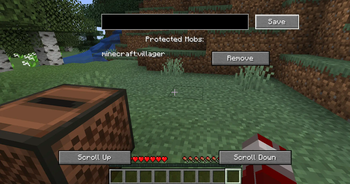
Adds a button to disable the ability to attack configurable mobs. No more accidentally attacking your pets or villagers!
Screenshots

About this Mod
IMPORTANT DISCLAIMER: This mod in its alpha stages, and will have bugs. Use with caution.
Mob Friendly Fire - Overview
Hit your poor dog again? Yeah, we've all been there. Gotten bad deals and an unwelcome visit by an Iron Golem? Relatable. Being chased through the unpleasentness of The Nether by an endless hoarde of Zombified Piglins? That could have been avoided.
It's a common problem, so here's my take on a solution.
How to Use

Click the button in the survival inventory, add a mob's id to the list- it's that simple. Alternatively, you can add mob ids to the config. To be able to attack the mob again, simply hit the 'remove' button. The current limitation is that it will be valid for all mobs of that type, like in this example, all villagers will be immune to player damage. Note: it has not been tested in multiplayer.
Compatibility
It should be compatible with most mods out of the box, but it is entirely possible for exceptions to occur based on how the mod's damage detection code is structured. MCA is a known issue, where it prevents physical damage, but the mod's villagers will still be angered.
Modpacks?
If you're publishing it, it needs to be on either Modrinth or CurseForge.
Interested in reading sci-fi / fantasy? Check out my books!
Seven Systems - Google Play Books There are links to more platforms and formats on my discord.
In the stars above, an ancient evil stirs.
An artifact of vast power will shake the foundations of the seven star systems inhabited by all living beings. In the coming storm, only those who have lived in its shadow can stand against evil. A group tied together by the threads of fate and prophesy embark on a quest through the vast worlds of The Seven Systems, and fight those who would succumb to the temptation of darkness. The prince. His brother. The twin guards. The thief. The one who changed, and will change. Will they stand together long enough to do what is necessary... or pay the price? Will the worlds see their next sunrise, the dawn of a new age, or will all fall to the forces of evil? As the scales of power tip and swing, the worlds will never be the same.
With the new day, The Seven Systems are cast into the flames...
Available Versions
How to Install Mob Friendly Fire on Your Server
Order Server
Order a Minecraft Java server with at least 3 GB RAM (4 GB recommended).
Set forge Loader
In the panel under "Egg", select the forge loader and matching Minecraft version (1.20.1).
Install Mod
Open the mod browser in the dashboard and search for "Mob Friendly Fire". Click "Install" – done! Alternatively, upload the .jar via SFTP to the /mods folder.
Compatibility
Mod Loaders
Minecraft Versions
1.20.1
Server-side
✓ RequiredRecommended RAM
4 GB(min. 3 GB)Frequently Asked Questions
Mob Friendly Fire server crashes on startup – what to do?
Most common cause: wrong forge version or insufficient RAM. Check the server log (latest.log) for "OutOfMemoryError" or "Mixin" errors. With Mado Hosting: ensure at least 3 GB RAM is allocated and the loader matches the mod version (1.20.1). You can switch loaders with one click in the panel.
Is Mob Friendly Fire compatible with forge?
Mob Friendly Fire officially supports forge for Minecraft 1.20.1. The Mado dashboard automatically detects incompatible loader combinations.
Server lagging with Mob Friendly Fire – how to optimize performance?
Recommended RAM: 4 GB (per 8 players). Use /spark profiler to check if Mob Friendly Fire consumes the most tick time. Common fixes: reduce server view-distance to 8-10, install "performant" or "starlight" as supplementary mods on Forge. With Mado Hosting, your server runs on NVMe SSDs with dedicated CPU cores for minimal latency.
Similar Mods




Rent Modded Server
Install Mob Friendly Fire with just one click on your server.
Details
- License
- Creative Commons Attribution Non Commercial Share Alike 4.0 International
- Server-side
- Required