
Mob HP Display
Mob HP Display is a lightweight client-side mod for 1.21.1 that shows mob health above their heads. My first-ever mod-simple and useful. No keybinds, no config.
Screenshots
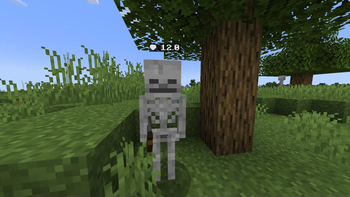

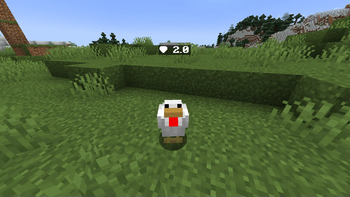
About this Mod
🧠 About
Mob HP Display is a small, client-side Fabric mod that shows the health of mobs floating above their heads. It's designed to be clean, useful, and performance-friendly — perfect for survival, PvE, or farming setups.
⚠️ Note: This is my very first Minecraft mod.
I had no idea how to code when I started this — so while it works great, there may still be some wankiness. Feedback is super welcome!
✨ Features
- 🔍 Health shown when mobs are nearby (up to 6 chunks away)
- 🧱 Positioned not so cleanly above the head
- 🧠 Minimalist design, easy to read without cluttering your screen
- ⚙️ No config needed, just install and play
- 🛡️ Client-side only — doesn’t affect servers or other players
- ⚡ Lightweight — optimized for FPS, with no noticeable performance hit
🛠️ Why I Made This
It started as an experiment, and I ended up learning a lot about Minecraft modding, mixins, rendering, and gradle.build.
💬 FAQ
❓ Will other players see the HP?
Nope. It’s client-side only, so just you.
❓ Does it work with modded mobs?
Yes! As long as the mob is aLivingEntity, the mod will display its health.
❓ Is it configurable?
Not yet! It’s super basic for now — but maybe I’ll add a config later if people are interested.
❤️ Support / Feedback
If you find bugs or have ideas, I’d love to hear them!
This project is mostly me learning as I go — but I want to keep improving it.
Available Versions
How to Install Mob HP Display on Your Server
Order Server
Order a Minecraft Java server with at least 3 GB RAM (4 GB recommended).
Set fabric Loader
In the panel under "Egg", select the fabric loader and matching Minecraft version (1.21.1).
Install Mod
Open the mod browser in the dashboard and search for "Mob HP Display". Click "Install" – done! Alternatively, upload the .jar via SFTP to the /mods folder.
Compatibility
Mod Loaders
Minecraft Versions
1.21.1
Server-side
✗ UnsupportedRecommended RAM
4 GB(min. 3 GB)Frequently Asked Questions
Mob HP Display server crashes on startup – what to do?
Most common cause: wrong fabric version or insufficient RAM. Check the server log (latest.log) for "OutOfMemoryError" or "Mixin" errors. With Mado Hosting: ensure at least 3 GB RAM is allocated and the loader matches the mod version (1.21.1). You can switch loaders with one click in the panel.
Is Mob HP Display compatible with fabric?
Mob HP Display officially supports fabric for Minecraft 1.21.1. The Mado dashboard automatically detects incompatible loader combinations.
Server lagging with Mob HP Display – how to optimize performance?
Recommended RAM: 4 GB (per 8 players). Use /spark profiler to check if Mob HP Display consumes the most tick time. Common fixes: reduce server view-distance to 8-10, install "performant" or "starlight" as supplementary mods on Forge. With Mado Hosting, your server runs on NVMe SSDs with dedicated CPU cores for minimal latency.
Similar Mods




Rent Modded Server
Install Mob HP Display with just one click on your server.