
Mob Locator
This mod ports the locator bar mechanic to the mobs.
About this Mod
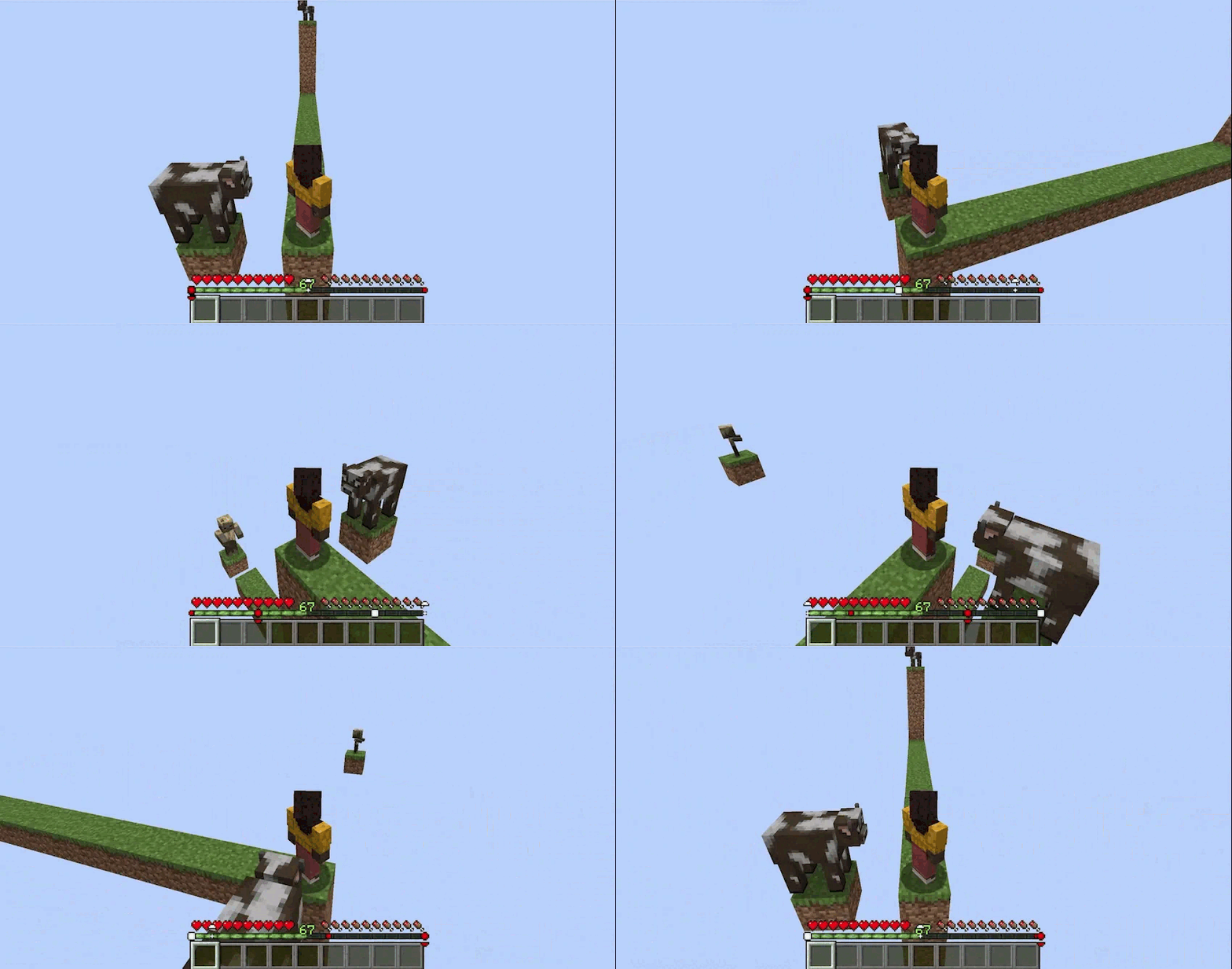
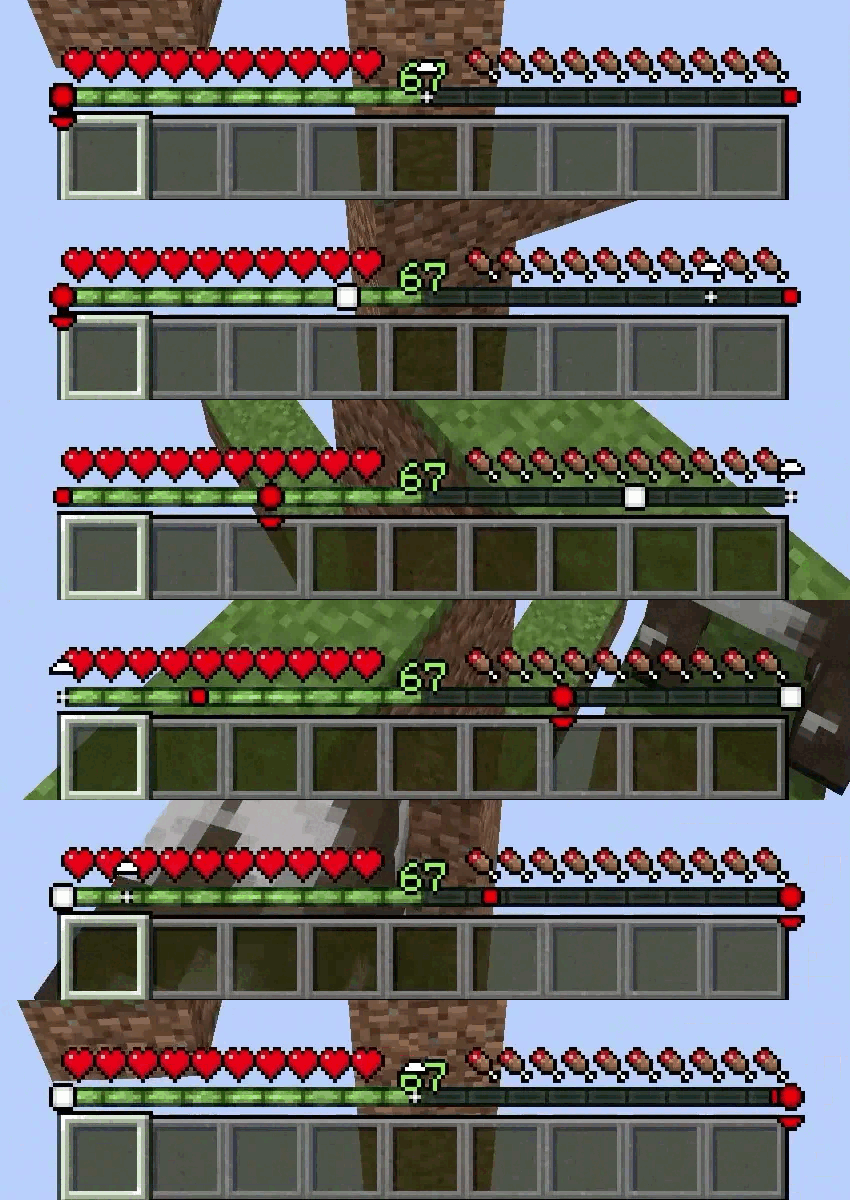
Ever felt like something was lurking just out of sight? Mob Locator gives you a tactical advantage by visualizing "heard" entities directly on your HUD. It uses a sleek, non-intrusive radar system centered on your experience bar to show you exactly where mobs are located relative to your position.
| FEATURES |
| Dynamic Radar | Mobs appear as icons on your XP bar. Their position shifts as you turn, providing a 180° field of view | |
| Distance Scaling | Icons change shape based on proximity. A tiny dot represents a distant sound, while a large square indicates a mob is right on top of you | |
| Elevation Indicators | Small arrows appear above or below icons if a mob is more than 3 blocks above or below your current Y-level | |
| Smart Classification | Hostile | Rendered in Red (includes active threats like Creepers, Zombies, and even angry Neutral mobs like Endermen or Iron Golems) |
| Passive | Rendered in White (Cows, Sheep, etc.) | |
| Invisible | Optionally rendered in Gray so you aren't surprised by Potions of Invisibility or Spiders | |
| Variable Hearing Range | Unlike simple radars, this mod uses "hearing" logic. Common mobs appear within 16 blocks, while massive entities like the Ender Dragon (192 blocks) or Wardens (48 blocks) can be detected from much further away | |
| HOW TO USE |
Simply install the mod and play! The radar is automatically active and sits right above your XP bar.
| Center of the bar | The mob is directly in front of you |
| Left/Right edges | The mob is to your far left or right |
| Up/Down Arrows | The mob is in a cave below you or on a ledge above you |
| CONFIGURATION |
If you have Mod Menu installed, you can customize your experience:
| Show Invisible Mobs | Toggle whether the radar picks up invisible entities |
| Custom Colors | Change the Hex colors for Hostile, Passive, and Invisible indicators |
| Mob Blacklist | Exclude specific mobs from the radar by name |
| REQUIREMENTS |
- Fabric Loader
- Fabric API
- Cloth Config API (1.21.x)
- YetAnotherConfigLib (26.x)
- Mod Menu (recommended for easy in-game configuration)
| CLIENT-SIDE ONLY |
All functionality is done client-side and is compatible with vanilla servers.
| FREE & OPEN SOURCE |
This is a completely free project. I'm not asking for donations or "buy me a coffee" contributions. If you enjoy the mod, the best way to support it is by:
- Leaving a rating/review
- Sharing it with friends
- Reporting any bugs you find
Available Versions
How to Install Mob Locator on Your Server
Order Server
Order a Minecraft Java server with at least 3 GB RAM (4 GB recommended).
Set fabric Loader
In the panel under "Egg", select the fabric loader and matching Minecraft version (26.1.2).
Install Mod
Open the mod browser in the dashboard and search for "Mob Locator". Click "Install" – done! Alternatively, upload the .jar via SFTP to the /mods folder.
Compatibility
Mod Loaders
Minecraft Versions
26.1.2, 26.1.1, 26.1 (+12 more)
Server-side
✗ UnsupportedRecommended RAM
4 GB(min. 3 GB)Frequently Asked Questions
Mob Locator server crashes on startup – what to do?
Most common cause: wrong fabric version or insufficient RAM. Check the server log (latest.log) for "OutOfMemoryError" or "Mixin" errors. With Mado Hosting: ensure at least 3 GB RAM is allocated and the loader matches the mod version (26.1.2). You can switch loaders with one click in the panel.
Is Mob Locator compatible with fabric?
Mob Locator officially supports fabric for Minecraft 26.1.2, 26.1.1, 26.1. The Mado dashboard automatically detects incompatible loader combinations.
Server lagging with Mob Locator – how to optimize performance?
Recommended RAM: 4 GB (per 8 players). Use /spark profiler to check if Mob Locator consumes the most tick time. Common fixes: reduce server view-distance to 8-10, install "performant" or "starlight" as supplementary mods on Forge. With Mado Hosting, your server runs on NVMe SSDs with dedicated CPU cores for minimal latency.
Similar Mods




Rent Modded Server
Install Mob Locator with just one click on your server.