
Mob Protect
This is a customisable mod designed to protect the mobs in your world.
Screenshots
About this Mod
Mob Protect
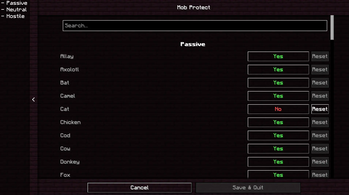
Mob protect is the saviour of your dogs, cats and villagers!

Simply enable or disable each mob within the configuration menu and voila!
Any disabled mobs will be immune from your attacks, allowing you to play Minecraft without the fear of accidentally hitting your precious dogs or cats.
Or you can disable villagers and not have to worry about hitting your villagers and making them mad at you, or just game ending them in one hit with that netherite axe.

This mod behaves differently in different environments:
Local Single Player
- Blocks direct attacks
- Blocks sweeping edge damage
- TNT
- Lava
- Fire
- Cactus
- Arrows
- Any any other environmental damage.
Dedicated Fabric Servers with the mod
Blocks direct attacks
Blocks sweeping edge damage
TNT ignited by the player
Arrows fired by the player
Snowballs fired by the player
Mobs are protected from all damage (Like Local Single Player) if they are protected on the server config file but are only protected from Player Caused damage if they are only protected by a player.
- An example would be if a player lights some TNT and it blows up a mob they have protected, it will take no damage.
- But if lightning struck some TNT which then lit and blew up a mob they have protected, it will take damage since it has no connection to the player who wants it protected.
- If that mob was protected in the server config, it would not take damage in either scenario.
Vanilla Servers
- Blocks direct attacks
- Blocks sweeping edge attacks entirely if they will harm a protected mob.
Pets also have protections!
- If you take the scenario shown in the Dedicated Server section but applied it to a player's tamed wolf, it would behave differently.
- The wolf would not take damage from the lightning TNT since it knows the wolf is tamed to a person.
The list will be shortened with future updates.
Will I port to X version?
Maybe, no promises.
Will I make a forge version?
No
Available Versions
How to Install Mob Protect on Your Server
Order Server
Order a Minecraft Java server with at least 3 GB RAM (4 GB recommended).
Set fabric Loader
In the panel under "Egg", select the fabric loader and matching Minecraft version (1.20.1).
Install Mod
Open the mod browser in the dashboard and search for "Mob Protect". Click "Install" – done! Alternatively, upload the .jar via SFTP to the /mods folder.
Compatibility
Mod Loaders
Minecraft Versions
1.20.1, 1.19.4
Server-side
~ OptionalRecommended RAM
4 GB(min. 3 GB)Frequently Asked Questions
Mob Protect server crashes on startup – what to do?
Most common cause: wrong fabric version or insufficient RAM. Check the server log (latest.log) for "OutOfMemoryError" or "Mixin" errors. With Mado Hosting: ensure at least 3 GB RAM is allocated and the loader matches the mod version (1.20.1). You can switch loaders with one click in the panel.
Is Mob Protect compatible with fabric?
Mob Protect officially supports fabric for Minecraft 1.20.1, 1.19.4. The Mado dashboard automatically detects incompatible loader combinations.
Server lagging with Mob Protect – how to optimize performance?
Recommended RAM: 4 GB (per 8 players). Use /spark profiler to check if Mob Protect consumes the most tick time. Common fixes: reduce server view-distance to 8-10, install "performant" or "starlight" as supplementary mods on Forge. With Mado Hosting, your server runs on NVMe SSDs with dedicated CPU cores for minimal latency.
Similar Mods




![[ETF] Entity Texture Features](https://cdn.modrinth.com/data/BVzZfTc1/af683d206d50b05258d865b0d6e4aa2f2cee12f2_96.webp)
![[EMF] Entity Model Features](https://cdn.modrinth.com/data/4I1XuqiY/6e5bbd0d06b1741bfdab6c0cfab6de8fdaf0064c_96.webp)
Rent Modded Server
Install Mob Protect with just one click on your server.