
Mob Tracing
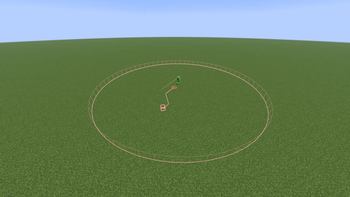
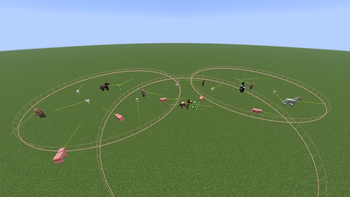
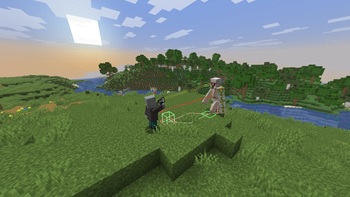
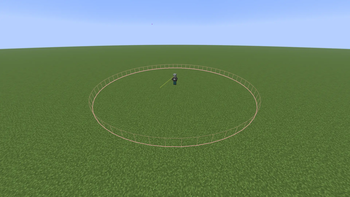
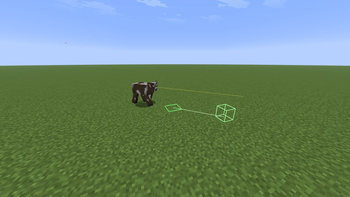
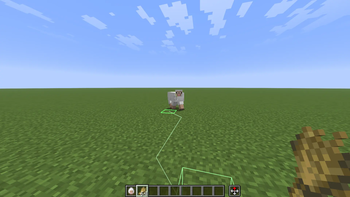
Real-time entity AI preview. you can directly see the mob paths, aggro zones, attack target, and look direction in the world.
Screenshots
About this Mod
Mob Tracing
Always wondered what's going through the mind of a mob? Mob Tracing displays exactly that in real time. Where they are going, what they're reacting to, how far their senses can extend.
Extremely useful for mod creators testing their mob behavior, but it's also quite fun in vanilla as well. Track a zombies path towards you, see how close you need to be for a skeleton to spot you.
Shows
- Complete pathfinding trace (how the mob found the current route it's traveling along from start to finish)
- Start/end points for the traced route
- Aggro radius as a visual bubble surrounding the mob (works for hostiles, also for pacified mobs too, like when an animal is trailing you after you show them food)
Toggle with F7 (Adjustable). All settings accessible with Mod Menu.
Dependencies
- Fabric API
- Mod Menu (Optional)
Note: This mod reads and displays client-side AI data. Some servers may flag it as a cheat client or unfair advantage. Use at your own risk — I take no responsibility for any bans or punishments resulting from its use.
Available Versions
How to Install Mob Tracing on Your Server
Order Server
Order a Minecraft Java server with at least 3 GB RAM (4 GB recommended).
Set fabric Loader
In the panel under "Egg", select the fabric loader and matching Minecraft version (26.1.2).
Install Mod
Open the mod browser in the dashboard and search for "Mob Tracing". Click "Install" – done! Alternatively, upload the .jar via SFTP to the /mods folder.
Compatibility
Mod Loaders
Minecraft Versions
26.1.2, 1.21.11
Server-side
✗ UnsupportedRecommended RAM
4 GB(min. 3 GB)Frequently Asked Questions
Mob Tracing server crashes on startup – what to do?
Most common cause: wrong fabric version or insufficient RAM. Check the server log (latest.log) for "OutOfMemoryError" or "Mixin" errors. With Mado Hosting: ensure at least 3 GB RAM is allocated and the loader matches the mod version (26.1.2). You can switch loaders with one click in the panel.
Is Mob Tracing compatible with fabric?
Mob Tracing officially supports fabric for Minecraft 26.1.2, 1.21.11. The Mado dashboard automatically detects incompatible loader combinations.
Server lagging with Mob Tracing – how to optimize performance?
Recommended RAM: 4 GB (per 8 players). Use /spark profiler to check if Mob Tracing consumes the most tick time. Common fixes: reduce server view-distance to 8-10, install "performant" or "starlight" as supplementary mods on Forge. With Mado Hosting, your server runs on NVMe SSDs with dedicated CPU cores for minimal latency.
Similar Mods
![[EMF] Entity Model Features](https://cdn.modrinth.com/data/4I1XuqiY/6e5bbd0d06b1741bfdab6c0cfab6de8fdaf0064c_96.webp)


Rent Modded Server
Install Mob Tracing with just one click on your server.